Freelance Time Management Tips That Actually Work
You just checked the clock and two hours vanished into email, Slack messages, and "quick" admin tasks. Sound familiar? Poor time management is the single biggest reason freelancers miss deadlines, burn out, and earn less than they should. The good news: a handful of practical freelance time management tips can turn a chaotic workday into a focused, profitable one.
Below you'll find proven strategies that freelancers actually use every day, not vague advice you've read a hundred times. Each tip includes a concrete action you can take this week. Whether you are juggling three clients or thirteen, these time management techniques scale with your workload.
Map Your Energy, Not Just Your Hours
Most productivity advice tells you to wake up earlier. That misses the point. What matters is when your energy peaks, not when your alarm rings.
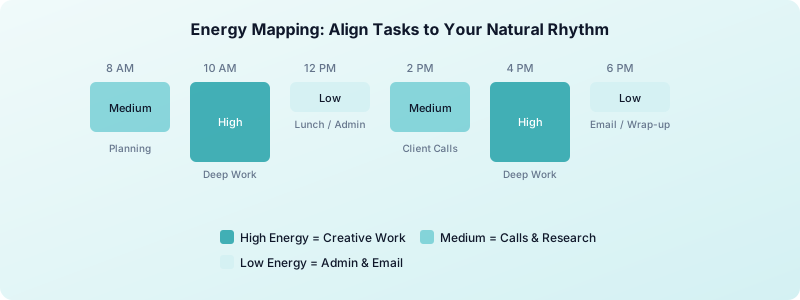
Try this for one week: rate your energy on a 1-to-5 scale every two hours. After seven days you'll have a clear map of your personal high, medium, and low energy windows.
- High energy blocks go to deep creative work: writing, designing, coding.
- Medium energy blocks go to client calls, research, and planning.
- Low energy blocks go to email, invoicing, and admin.
When you align tasks to energy instead of forcing everything into a 9-to-5, you produce better work in less time. Freelancers who schedule around energy report finishing projects 20-30% faster because they stop fighting their own biology.
Time Block Your Week in Advance
Time blocking means assigning every hour of your workday to a specific task or category before the week starts. It eliminates the "what should I work on next?" decision fatigue that eats into your productive hours.
Here is a simple framework:
- Sunday evening: list every deliverable due in the coming week.
- Assign each deliverable to a day based on its deadline and your energy map.
- Block 2-3 hour chunks for deep work. No meetings, no email during these blocks.
- Reserve one block per day for admin: invoicing, emails, marketing.
- Leave 20% of your week unscheduled as a buffer for revisions and unexpected requests.
If a client asks for a last-minute change, you move things around within the buffer instead of blowing up your entire week. This single habit prevents the cascading missed deadlines that plague disorganized freelancers.
Time blocking also makes tracking your billable hours almost automatic. When each block is labeled, you know exactly where your time went at the end of the day.
Use the Two-Minute Rule for Small Tasks
Small tasks pile up fast when you freelance. A quick reply here, a file rename there, and suddenly your to-do list has 40 items that each take under two minutes.
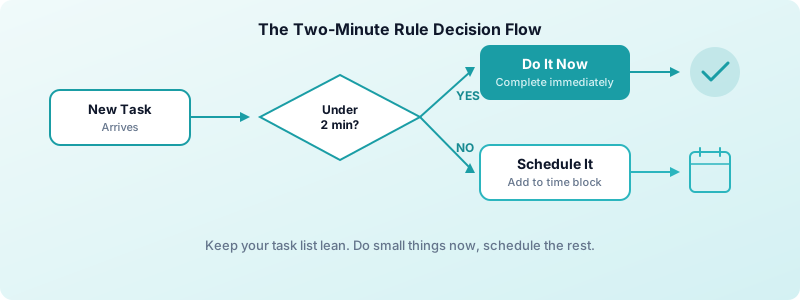
The rule is simple: if a task takes less than two minutes, do it immediately. If it takes longer, schedule it in a time block.
This keeps your task list lean and your mental overhead low. You stop carrying dozens of micro-tasks in your head, which frees cognitive space for the work that actually earns you money.
Common two-minute tasks include: replying to a scheduling email, renaming a file, saving a reference link, or updating a project status. None of these deserve a spot on your to-do list. Handle them the moment they appear and move on.
Batch Similar Tasks Together
Context switching is expensive. Research shows that it takes an average of 23 minutes to fully refocus after switching between different types of tasks. If you jump from coding to email to a client call to design work, you lose hours of productive time every day.
Batching solves this. Group similar tasks and do them in one sitting:
- Communication batch: answer all emails, Slack messages, and client check-ins in one 30-minute window.
- Creative batch: do all writing, design, or development in a single uninterrupted block.
- Admin batch: invoicing, bookkeeping, file organization, and proposals in one session.
- Marketing batch: social media posts, portfolio updates, and outreach in a single weekly session.
Most freelancers find that two communication batches per day (mid-morning and late afternoon) are enough. Clients rarely need an instant reply, and the ones who do will call.
Here is a practical way to start: pick one day this week and log every time you switch between task types. Count the switches. Most freelancers discover they switch 15-20 times per day. Even cutting that number in half saves you over an hour of lost focus time daily. If you want a structured way to stay focused within each batch, try the Pomodoro technique for freelancers. It pairs perfectly with batching. For more strategies on protecting your attention, especially if you work from home, check out this guide on staying focused as a freelancer working from home.
Batching is worth doing deliberately rather than by feel. How to batch tasks as a freelancer shows which work groups well and which does not.
Set Boundaries That Protect Your Schedule
Without boundaries, client work expands to fill every waking hour. You answer emails at 10 PM, take calls during lunch, and wonder why you feel burned out by Thursday.
Set these three boundaries this week:
- Working hours: pick a start and end time and communicate it to every client. Add it to your email signature.
- Response time: tell clients you respond within 4-8 business hours, not instantly.
- Scope limits: when a project grows beyond the original agreement, flag it immediately. Understanding the difference between billable and non-billable hours helps you spot scope creep before it drains your schedule.
Boundaries feel uncomfortable at first. But clients respect freelancers who protect their time because it signals professionalism and reliability. You deliver better work when you are not stretched across 14-hour days.
The fastest way to enforce boundaries is to put them in writing. Add your working hours to your contract, your email signature, and your onboarding document. When a boundary is documented, you do not have to defend it in the moment. You just point to the agreement.
Track Where Your Time Actually Goes
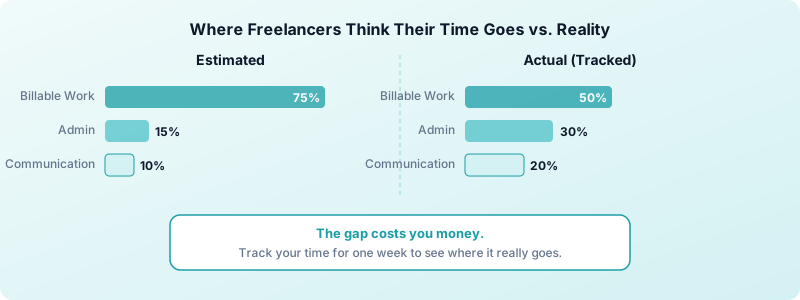
You cannot manage what you do not measure. Most freelancers overestimate how much time they spend on billable work and underestimate how much time goes to admin, marketing, and context switching.
Start tracking every task for one full week. You will likely discover that 30-40% of your work hours go to non-billable activities. That insight alone changes how you price projects, schedule your days, and decide which clients to keep.
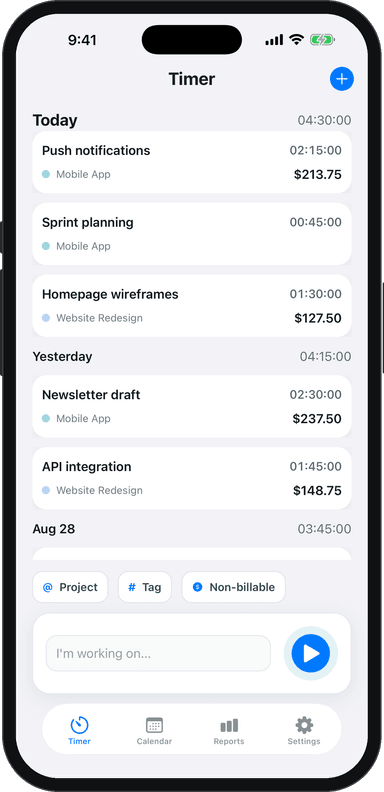
Toggle Time Tracker makes this easy. Tap to start a timer, tag the task by project, and review your weekly breakdown. No spreadsheets, no complicated setup, and your data stays on your device.
Toggle Time Tracker works offline and requires no account, so you can start tracking in under a minute. The weekly reports show your billable ratio at a glance, which is the single most useful metric for improving your time management over time.
Once you have a week of real data, you can answer questions like:
- How many billable hours do I actually work per week?
- Which client takes the most non-billable communication time?
- Where am I losing time to context switching?
This connects directly to why every freelancer needs a time tracker. Without data, you are guessing. With data, you are making decisions.
Build a Shutdown Ritual
Open loops keep your brain working even after you close your laptop. A shutdown ritual gives your brain permission to stop for the day.
A simple version takes five minutes:
- Review tomorrow's time blocks.
- Write down any loose threads that need attention.
- Close all browser tabs and apps.
- Say (out loud or in your head): "The workday is done."
This sounds trivial, but it works. Freelancers who use a shutdown ritual report better sleep, less anxiety, and sharper focus the next morning. When your brain knows there is a clear boundary between work and rest, it actually rests.
You can also use your shutdown ritual as a mini-review. Glance at your time tracking data for the day and note one thing that went well and one thing to improve tomorrow. Over weeks, these small observations compound into major productivity gains.
Put These Freelance Time Management Tips Into Practice
Reading about time management does not improve your schedule. Action does. Pick one tip from this list and implement it tomorrow. Once it becomes a habit, add another.
Start with energy mapping and time blocking. Those two changes create the foundation for everything else. If you want a complete template for structuring your workday, check out our guide to building a freelance daily routine. For a broader overview covering scheduling, focus, client management, and tools together, see the complete freelance productivity guide. Need help choosing the right apps to support your workflow? See our roundup of the best freelance productivity tools. Add time tracking to see where your hours really go, and you will have the data to keep improving week after week. Within a month, you will wonder how you ever worked without a system.
Download Toggle Time Tracker and start tracking your freelance hours today. You will be surprised how much clarity a single week of data brings to your schedule.