Best Freelance Productivity Tools for 2026
The difference between a freelancer who earns $40 per hour and one who earns $80 often comes down to systems, not talent. The right freelance productivity tools eliminate the busywork that quietly eats your billable hours: hunting for files, chasing invoice payments, switching between five apps to find one deadline. A 2025 study by Payoneer found that freelancers spend an average of 15 hours per week on non-billable administrative tasks. The right tools can cut that number in half, giving you more time to do the work that actually pays.
But picking tools is not the same as picking wisely. With hundreds of productivity apps for freelancers on the market, it is easy to end up with a bloated stack that creates more admin than it eliminates. This guide breaks down the categories that matter, the best tools for freelancers in each one, and how to build a lean stack that works without becoming a productivity problem itself.
Why Freelancers Need the Right Productivity Tools
Employees get tools handed to them by their IT department. Freelancers are the IT department. You are also the project manager, accountant, scheduler, and marketing team. Every tool you add should solve a specific, recurring pain point.
The five tool categories that matter most for freelancers are:
- Time tracking — Know where your hours go and bill accurately
- Project management — Keep deadlines, deliverables, and client requests organized
- Communication — Manage client conversations without letting them take over your day
- Scheduling — Eliminate the back-and-forth of booking calls and meetings
- Invoicing and finance — Get paid faster with less manual effort
Choosing one solid tool per category gives you a complete system. Choosing three per category gives you chaos. The goal is a lean tool stack that supports your time management strategies, not one that creates more admin work.
Time Tracking Tools That Pay for Themselves
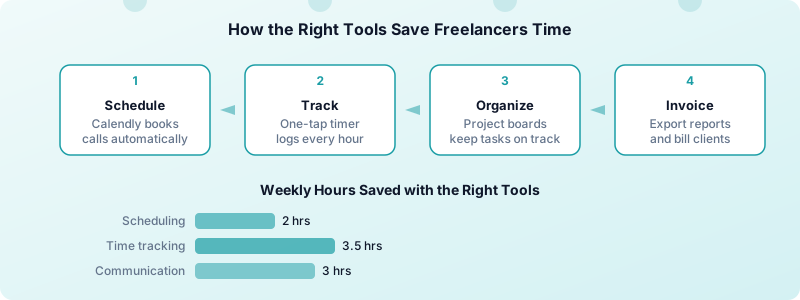
Time tracking is the single highest-ROI tool category for freelancers. Without it, you are guessing how long projects take, underpricing your work, and losing billable minutes every day.
What to look for:
- One-tap start and stop (if it takes more than two seconds, you will not use it)
- Project and client organization
- Reporting and export features for invoicing
- Offline support for working on the go
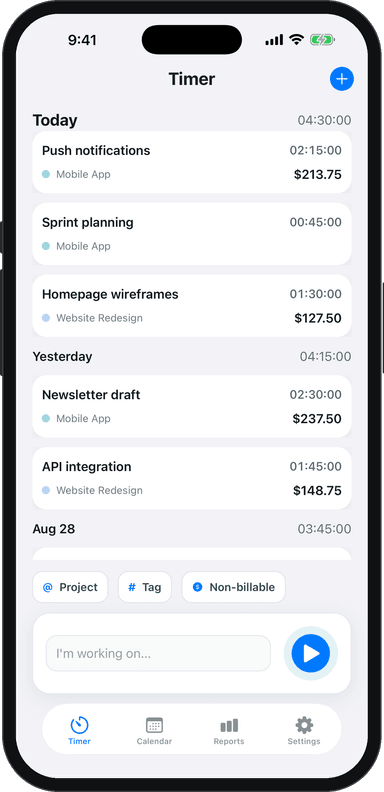
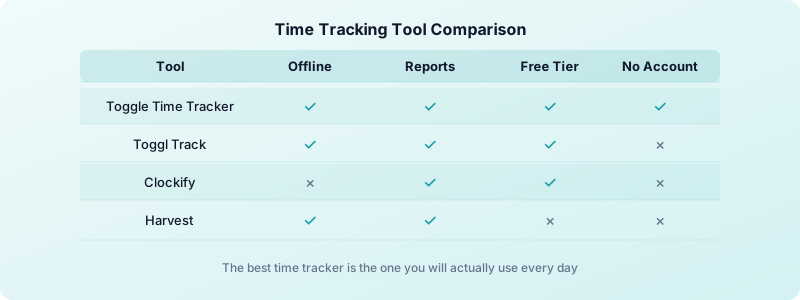
Toggle Time Tracker gives you all of this in a clean, no-account-required iPhone app. You tap to start, assign hours to a project, and export professional PDF or Excel reports when it is time to invoice. Your data stays on your device, and it works offline, which means no excuses for skipping tracking on busy days.
Other popular options include Toggl Track (strong integrations with project management tools), Clockify (free tier with unlimited tracking), and Harvest (combines time tracking with built-in invoicing). Each has strengths, but the best tool is the one you will actually use every day.
A freelancer billing $60 per hour who recovers just 30 minutes of previously untracked time per day gains $7,800 per year. Time tracking is not overhead. It is revenue recovery.
Project Management Tools to Stay Organized
When you are juggling three clients with overlapping deadlines, a project management tool prevents things from falling through the cracks. The right tool depends on how complex your projects are.
For simple task management:
- Notion — Combines notes, databases, and task boards in one workspace. Great if you want a single place for project notes, client briefs, and to-do lists. The learning curve is steeper, but the flexibility is worth it.
- Trello — Visual boards with drag-and-drop cards. Perfect for freelancers who think in lists and stages like "To Do," "In Progress," and "Done."
For complex projects with dependencies:
- Asana — Timeline views, task dependencies, and detailed project tracking. Best for freelancers managing longer engagements with multiple deliverables.
- ClickUp — Feature-rich with docs, goals, and time tracking built in. Can replace multiple tools if you commit to learning it.
The freelancer-specific tip: Do not over-engineer your system. If you are a solo freelancer with 2-4 clients, a simple Trello board or Notion page is plenty. Save the complex project management software for when your workload genuinely demands it.
Pair your project management tool with focus techniques like the Pomodoro method to make sure the tasks you organize actually get done.
Tools only help on top of a working process. Freelance project management tips covers the process the tools are meant to support.
Communication and Scheduling Tools for Client Work
Client communication is a necessary part of freelancing, but it can easily consume your most productive hours. The right tools create structure around conversations and meetings.
Communication:
- Slack — Best for ongoing client relationships, especially with startups and remote teams. Create one channel per client to keep conversations organized.
- Loom — Record quick screen walkthroughs instead of scheduling a call. A 3-minute Loom video often replaces a 30-minute meeting.
- Zoom — Still essential for live client calls. Features like AI meeting summaries save time on follow-up notes.
Scheduling:
- Calendly — Share a link, let clients pick a time. It handles time zones, sends reminders, and syncs with your calendar. Eliminates 5-10 emails per meeting.
- SavvyCal — An alternative to Calendly that lets recipients overlay their own calendar to find mutual availability.
The boundary rule: Set specific hours for communication. Checking Slack and email constantly fragments your focus. Batch your responses into two or three windows per day. If you struggle with staying focused while working from home, dedicated communication windows make a measurable difference.
How to Build a Freelance Tool Stack Without Overload
The biggest productivity mistake freelancers make with tools is using too many of them. Every app you add introduces another login, another notification, another context switch. Research on task switching shows that it takes an average of 23 minutes to regain deep focus after an interruption.
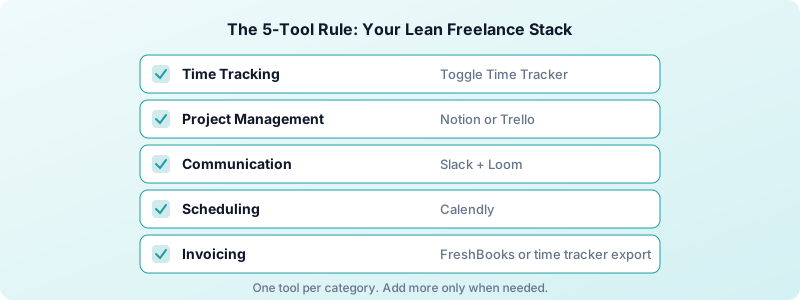
The 5-tool rule: Start with one tool per category. Do not add a second until the first has proven insufficient for at least 30 days.
Here is a lean starter stack for 2026:
- Time tracking: Toggle Time Tracker (free, works offline, no account needed)
- Project management: Notion or Trello (pick based on your complexity needs)
- Communication: Slack + Loom (async-first approach saves hours)
- Scheduling: Calendly (free tier covers most freelancers)
- Invoicing: FreshBooks or your time tracker's built-in export
Before adding any new tool, ask three questions:
- What specific problem does this solve?
- Can an existing tool in my stack handle this instead?
- Will I actually use this daily, or is it shiny-object syndrome?
The best freelance productivity tools are the ones that disappear into your workflow. You should spend more time doing client work than managing the tools that are supposed to help you do client work.
Track everything in one place, review your time data weekly, and cut any tool that creates more work than it saves. That is the difference between a productivity system and a productivity trap. If you want a broader look at the habits, schedules, and systems that underpin great freelance productivity, that guide covers the full picture beyond just tools.
Download Toggle Time Tracker and start building your productivity stack with the tool that pays for itself first — accurate, effortless time tracking.