How to Manage Multiple Freelance Clients
You landed your third freelance client last week, and the excitement lasted about two days. Now you are staring at three sets of deadlines, two overlapping revision requests, and an inbox full of messages from people who all believe their project is your top priority. Learning how to manage multiple freelance clients is the skill that separates freelancers who scale from freelancers who burn out. The good news: it comes down to systems, not superhuman effort.
Why Managing Multiple Clients Gets Overwhelming
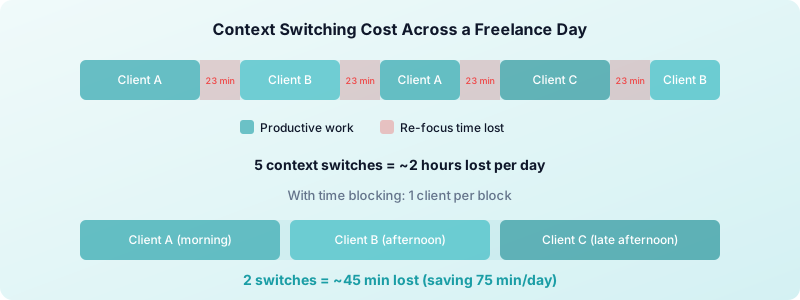
The challenge is not the volume of work. It is the volume of context switching. Every time you shift from Client A's branding project to Client B's content calendar, your brain needs roughly 23 minutes to fully re-engage with the new task. Multiply that across five or six switches per day, and you can lose two to three hours of productive time without realizing it.
Three things make freelance client management harder than managing a single workload at a traditional job:
Every client has different expectations. One wants daily Slack updates. Another prefers a weekly email summary. A third sends voice memos at 10 PM and expects a reply by morning. Without a system, you spend more energy remembering each client's preferences than doing the actual work.
Deadlines overlap unpredictably. When you have one client, your schedule is linear. With three or four, deadlines stack. A quiet Tuesday can become a crisis Wednesday when two clients move their review dates forward simultaneously.
Your attention becomes the bottleneck. Unlike an employee who can escalate to a manager, you are the manager, the worker, and the quality control department. Every decision runs through you, and decision fatigue is real.
Set Up a Client Management System That Scales
Before you can manage multiple clients effectively, you need a single place where all client information lives. Trying to keep track of deadlines, deliverables, and communication preferences across email threads, sticky notes, and memory is a guaranteed path to missed deadlines.
Build your system around three components:
1. A client dashboard. Create a simple spreadsheet or board with one row per client. Include: project name, current deliverable, next deadline, communication preference, and billing status. Update it every Monday morning. This five-minute habit eliminates the mental overhead of constantly wondering what is due when.
2. A task list organized by deadline, not by client. When you sort tasks by client, you tend to finish one client's work before starting another. That feels satisfying but creates bottlenecks. Sort by deadline instead, and you naturally distribute your attention across all active projects.
3. A communication log. Track when you last contacted each client and what you discussed. This prevents the awkward moment when you realize you have not updated a client in ten days because you were buried in another project.
The system does not need to be complicated. A notebook works. A free tool works. What matters is that you use one system consistently instead of five systems sporadically.
How to Prioritize When Every Client Feels Urgent
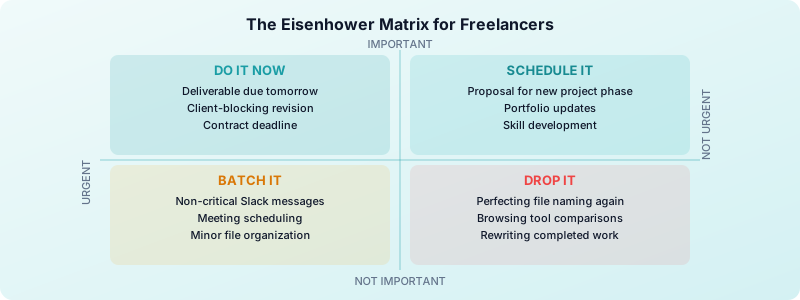
When three clients all need something "as soon as possible," you need a framework that cuts through the noise. The Eisenhower Matrix is the most practical tool for freelance workload management.
Sort every task into four categories:
- Urgent and important: Do it now. A deliverable due tomorrow that directly impacts the client relationship.
- Important but not urgent: Schedule it. A proposal for a new phase of work due next week.
- Urgent but not important: Delegate or batch it. Responding to a non-critical Slack message that feels pressing but can wait until your communication block.
- Neither urgent nor important: Drop it. Reorganizing your file naming system for the third time this month.
Most freelancers spend their days reacting to whatever feels urgent, which means important-but-not-urgent work keeps getting pushed back. That is how scope creep, missed opportunities, and late invoices happen.
A better approach: start each morning with your single most important task before opening email or Slack. Protect that first 90 minutes for deep work on your highest-priority deliverable. Your time management strategies should put proactive work before reactive work every single day.
Time Blocking Across Multiple Projects
Time blocking is not just a productivity technique. For freelancers juggling multiple projects, it is a survival strategy. Without dedicated blocks, your day becomes a series of interruptions where no client gets your best work.
Here is a time blocking framework that works for three to five active clients:
Morning deep work block (2-3 hours). Reserve this for your most demanding creative or technical work. No meetings, no email, no Slack. Pick one client per morning block and give them your full focus.
Midday communication block (1 hour). Batch all client communication into a single window. Reply to emails, send updates, join quick calls. Clients do not need instant responses. They need consistent, reliable responses.
Afternoon project block (2-3 hours). Switch to a different client. Use this block for work that requires focus but is less creatively demanding: revisions, research, planning.
End-of-day admin block (30 minutes). Update your client dashboard, log your hours, review tomorrow's priorities. This daily reset prevents the Sunday-night dread of not knowing what Monday looks like.
The key rule: one client per block. Context switching within a block destroys the efficiency that blocking creates. If Client A's revision comes in while you are working on Client B's deliverable, it goes on the list for Client A's next block.
If you are new to time blocking, pair it with techniques like the Pomodoro method to maintain focus within each block.
Communication Habits That Keep Clients Happy
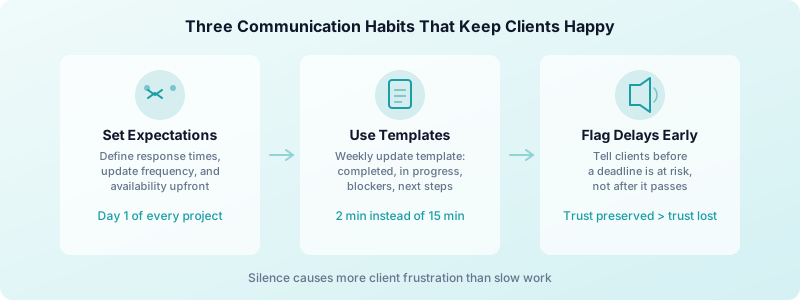
Most client frustration does not come from slow work. It comes from silence. A client who hears from you every three days with a progress update is happier than a client who gets perfect work delivered with no communication in between.
Build these habits into your weekly routine:
Set communication expectations during onboarding. Before starting any project, tell the client: "I send progress updates every Tuesday and Thursday. I respond to messages within 24 hours on weekdays. I do not work weekends." A solid client onboarding process makes this automatic. Clients rarely push back on clear expectations set early.
Use templates for recurring updates. Create a simple weekly update template: what you completed, what is in progress, any blockers or decisions needed. Copy, customize, send. A template that takes two minutes to fill out saves you 15 minutes of composing a message from scratch every time.
Communicate proactively about delays. If a deadline is at risk, tell the client before the day it is due. "I am running about two days behind on the homepage copy because the client feedback from Tuesday required more revision than expected. New estimated delivery is Friday." That one message preserves more trust than delivering late without warning.
Limit real-time communication channels. Every Slack workspace, WhatsApp group, and iMessage thread you add is another source of interruptions. Standardize on one async channel per client whenever possible.
Use Time Tracking to Stay Profitable Across Clients
Managing multiple clients is not just about getting the work done. It is about making sure every client is worth your time. Without tracking, you cannot answer the most important question in freelance client management: which clients are actually profitable?
Here is what happens when you track your billable hours across all your clients:
- You spot underpriced clients. When you see that Client A takes 25 hours per week at $50/hour while Client B takes 10 hours at $100/hour, the math becomes obvious. Client B generates more hourly value with less overhead.
- You catch scope creep early. If your tracked hours on a fixed-price project exceed your estimate by 20%, you know to have the scope conversation before it reaches 50%.
- You prove your value at renewal time. When a client asks what they are getting for their retainer, you can show them exactly how you spent every hour. Data builds trust.
- You learn your true capacity. After a month of tracking, you will know whether you can sustainably handle three clients or five. Guessing leads to overcommitting. Data leads to smart decisions.
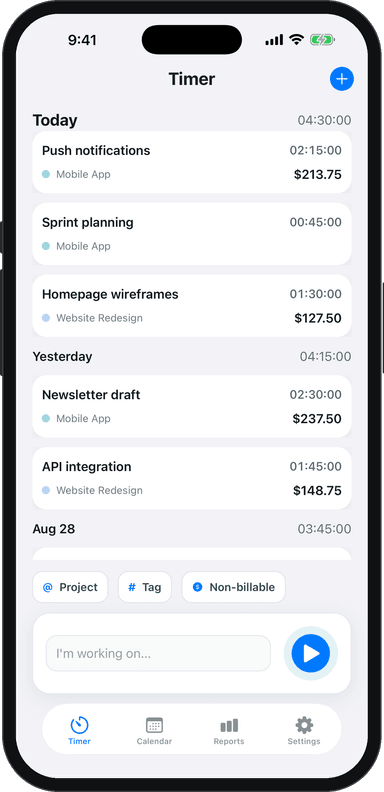
Toggle Time Tracker makes multi-client tracking simple. Tag each entry with the client's project, and your weekly report shows exactly where your time went. Because it works offline and stores everything locally on your device, you can track a quick phone call with one client immediately after hanging up without needing Wi-Fi or an account.
The freelancers who juggle multiple clients successfully are not the ones with the most energy. They are the ones with the best systems. Know your capacity, protect your focus time, communicate consistently, and let your time data guide your decisions about which clients to keep, which to grow, and which to let go. When you have a healthy multi-client system in place, you also build a natural defense against the freelance feast or famine cycle — multiple active clients means income rarely drops to zero all at once.
If you are feeling the strain of too many clients and not enough structure, it is worth reading about avoiding burnout as a freelancer. The strategies overlap more than you might expect.
Download Toggle Time Tracker and start seeing exactly where your time goes across every client and project.