How to Track Billable Hours as a Freelancer
If you're a freelancer billing by the hour, every untracked minute is money left on the table. Studies suggest that professionals who don't track billable hours in real time lose 10-15% of their working time to forgotten tasks. That adds up fast — for a freelancer earning $75/hour, that's over $500 a month gone.
The good news? Learning to track billable hours doesn't have to be complicated. With the right workflow, you can capture every minute, build client trust, and finally get paid what you're worth.
What Counts as Billable Time
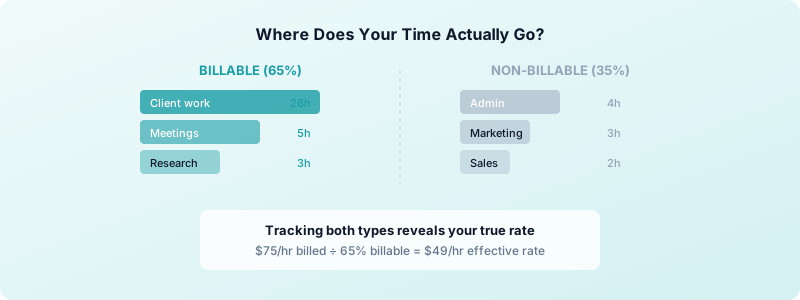
Before you start tracking, you need a clear definition of what's billable. This sounds obvious, but many freelancers lose money because the line between billable and non-billable work is fuzzy.
Typically billable:
- Active project work (design, coding, writing, consulting)
- Client calls and meetings
- Research directly tied to a deliverable
- Revisions and feedback rounds
- Project-specific communication (emails about deliverables)
Typically non-billable:
- General admin (invoicing, bookkeeping)
- Marketing and self-promotion
- Learning and professional development
- Prospecting and sales calls
- Internal project management
The key is to define this upfront in your contract. When both you and your client agree on what counts, there's no room for disputes later.
Step-by-Step: Your Billable Hours Workflow
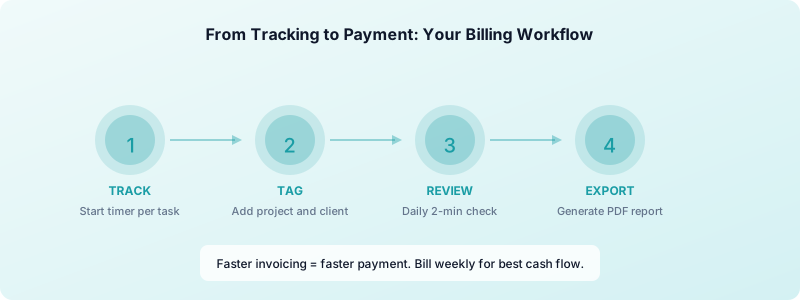
Here's a practical workflow you can start using today:
1. Start the timer when you begin work. Don't wait. Don't say "I'll log it later." Tap the timer the moment you open a client's project. Even a quick 10-minute email response is billable if it's project-related.
2. Tag each entry with a project and client. Organizing by project lets you see exactly where your time goes. When it's time to invoice, you can pull a report per client instead of scrolling through a messy list.
3. Add brief descriptions. Write a short note for each entry: "Homepage wireframe revisions" is better than "design work." Detailed descriptions build trust and make your invoices impossible to dispute.
4. Stop the timer during breaks. This seems small, but it keeps your data honest. If you take a 15-minute coffee break mid-project, pause the timer. Your tracked hours should reflect actual focused work.
5. Review your entries daily. Spend 2 minutes at the end of each day checking your time log. Did you forget to track that client call? Was the 3-hour block really 3 hours, or did you get distracted? Catching errors the same day is easy. Catching them next week is guesswork.
Real-Time Tracking vs End-of-Day Logging
This is the single biggest decision that affects your billing accuracy.
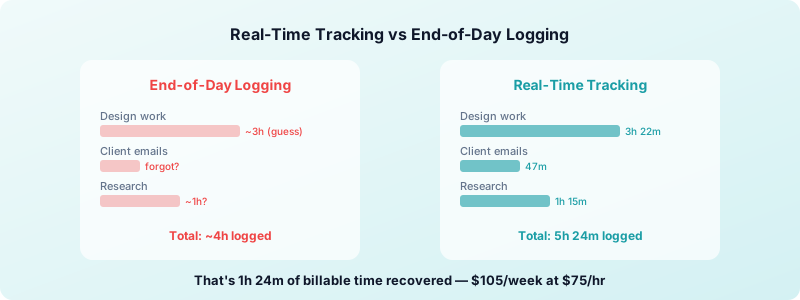
End-of-day logging is what most freelancers default to. You sit down at 5pm and try to remember what you did all day. The problem? Memory is unreliable. You'll consistently underestimate short tasks and overestimate long ones.
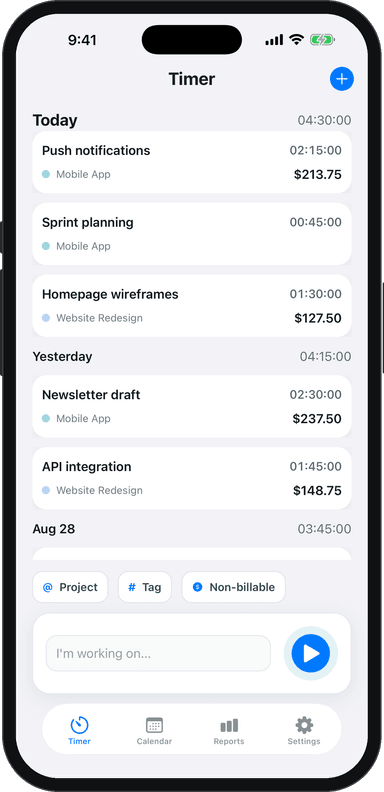
Real-time tracking means starting a timer when you begin each task. It's more accurate, captures small tasks you'd otherwise forget, and removes the mental burden of reconstructing your day.
The data backs this up. Freelancers who track in real time report billing 15-20% more hours than those who log at the end of the day — not because they work more, but because they capture everything.
If you've been avoiding real-time tracking because it feels disruptive, try it for one week. With a simple time tracking app, it takes one tap to start and stop. After a few days, it becomes second nature.
How to Present Billable Hours to Clients
Tracking is only half the equation. How you present your hours determines whether clients pay promptly or push back.
Be transparent. Share itemized time reports with your invoices. When a client sees "March 15 — Homepage redesign — 2h 15m" instead of just "Design work — 8 hours," they understand exactly what they're paying for.
Use professional reports. Export your time data as a PDF or spreadsheet and attach it to your invoice. Toggle Time Tracker lets you generate clean reports in PDF and Excel format — no manual formatting needed.
Set expectations early. In your initial contract, specify how you'll track time, what's billable, and how often you'll invoice. Weekly or bi-weekly invoices with time reports keep projects transparent and cash flow steady.
Round consistently. Decide on a rounding policy and stick with it. Rounding to the nearest 15 minutes is standard. Some freelancers round up, some round to the nearest increment. Whatever you choose, be consistent and transparent about it.
Turning Tracked Hours Into Professional Invoices
The final step is converting your tracked time into an invoice. This is where many freelancers waste time manually copying data from their tracker into an invoice template. If you need a full walkthrough on building a repeatable billing process, check out our guide on how to invoice as a freelancer.
A better workflow:
- Filter your time entries by client and date range
- Export the report as PDF or Excel
- Attach the report to your invoice as backup
- Send immediately — don't let invoices sit
The faster you invoice after completing work, the faster you get paid. Clients are more likely to pay promptly when the work is fresh in their minds and the time report is detailed.
Start Tracking Today
The best time to start tracking billable hours was when you started freelancing. The second best time is today. You don't need a complex system — just a reliable timer, a habit of starting it when you work, and a quick daily review.
Download Toggle Time Tracker and start capturing every billable minute from your iPhone. It's free to start, works offline, and your data stays private on your device.