Freelance Client Communication: 8 Templates and the Rules Behind Them
Client communication is where most freelance projects succeed or fail. It's also where freelancers spend more time than they realize — drafting, redrafting, and second-guessing messages that follow the same patterns every time. Templating your most common client communications saves hours per week and makes your professionalism consistent across every client relationship.
These eight templates cover the core situations freelancers face repeatedly. Adapt the language to your voice; the structure and content are battle-tested.
1. Project Kickoff Email
Send within 24 hours of signing a contract or receiving a deposit. This anchors expectations from day one.
Subject: [Project name] — kicking off, next steps
Hi [Name],
Excited to get started on [project name]. Here's a quick summary of what we've aligned on:
Scope: [Brief 1–2 sentence summary] Deadline: [Milestone or final delivery date] My first ask: [What you need from them to begin — access, assets, answers]
I'll be in touch by [date] with [first deliverable or update]. In the meantime, [contact method] is the best way to reach me for anything urgent.
Looking forward to it.
This message does three things: confirms scope, sets timing, and tells them what action is needed from their side. It also establishes your communication rhythm immediately.
2. Weekly Status Update
Send once per week on a consistent day (Friday afternoon is common) for active projects. Clients who receive regular updates ask fewer questions mid-week.
Subject: [Project name] — week of [date] update
Hi [Name],
Quick update on [project name]:
Done this week: [Bullet list of completed items] In progress: [What you're working on now] Next week: [What you'll deliver or complete] Open items: [Anything pending from client — approvals, assets, decisions]
No action needed from you unless noted above. Let me know if anything has shifted on your end.
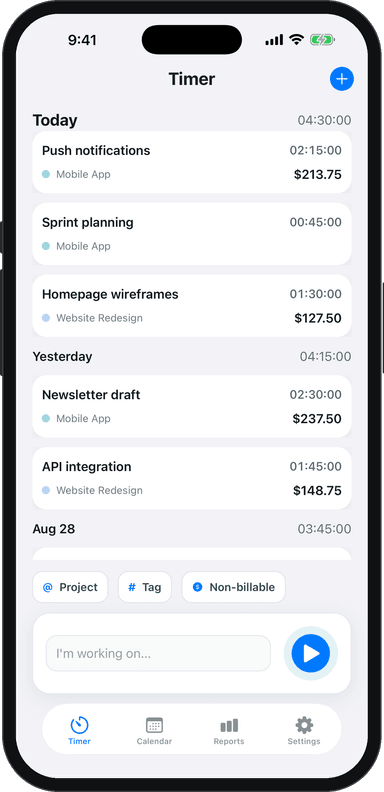
Short, predictable, and easy to skim. Track the time you spend on these in Toggle Time Tracker — clients rarely see this overhead, but it's billable time on retainer projects.
3. Scope Change Request
When a client asks for something outside the original scope, respond immediately — don't wait, don't complete the work, and don't just say yes.
Subject: Re: [their request]
Hi [Name],
Happy to add [requested item]. I want to flag that this falls outside our original scope for [project name], so it would be a separate line item.
My estimate for this work: [X hours / $X amount]. I can have it done by [date] if you'd like to move forward.
If you'd prefer to defer it or handle it separately, that works too — just let me know how you'd like to proceed.
This keeps the relationship warm while drawing a clear line. The key is to frame it as information, not confrontation. For a deeper guide on preventing this situation, see how to handle scope creep as a freelancer.
4. Revision Request Clarification
When a client sends vague feedback ("make it pop more", "something feels off"), don't guess. Ask once, specifically.
Subject: Re: [project name] revisions
Hi [Name],
Thanks for the feedback — I want to make sure I nail the revisions. A couple of clarifying questions:
- [Specific question about unclear feedback]
- [Second question if needed]
Once I hear back, I'll turn these around by [date].
Asking for clarification isn't a sign of weakness — it's professionalism. One targeted question beats three rounds of wrong-direction revisions.
5. Project Completion and Invoice Delivery
Send when you deliver the final work.
Subject: [Project name] — final delivery + invoice
Hi [Name],
[Project name] is complete and attached. Here's a summary of what's included:
[Brief bullet list of deliverables]
I've attached invoice #[number] for [amount], due [date]. Payment details are in the invoice.
It's been great working on this with you. If you have any questions about the deliverables in the next [X days], just reach out.
Pairing delivery with the invoice is standard practice — it ensures the invoice doesn't get forgotten in a separate email thread. For well-structured invoices, see how to write freelance invoice payment terms.
6. Payment Reminder (Friendly)
Send 2–3 days after the due date, before going to a firmer tone.
Subject: Invoice #[number] — gentle reminder
Hi [Name],
Just a quick follow-up on invoice #[number] for [amount], which was due on [date]. Happy to resend if it got buried.
You can pay via [method]. Let me know if you have any questions.
No accusation, no passive aggression. Invoices get missed for dozens of benign reasons — a friendly reminder resolves most of them.
7. Project Pause or Hold Notice
When a client goes quiet, misses approvals, or the project stalls due to their delays.
Subject: [Project name] — checking in on status
Hi [Name],
I wanted to check in on [project name]. We're currently waiting on [specific item] before I can move forward with [next step].
If the timeline has shifted on your end, no problem — just let me know what's realistic so I can plan accordingly. If I don't hear back by [date], I'll assume [project] is on hold and plan my schedule around other work.
Happy to jump on a quick call if that's easier.
Setting a deadline for response signals that your time is managed, not unlimited. The "plan my schedule around other work" line gently introduces opportunity cost without sounding passive-aggressive.
8. Offboarding and Future Work
After project completion, a short follow-up builds long-term client relationships.
Subject: Great working with you on [project]
Hi [Name],
Really glad [project name] is live/complete. [One genuine observation about what went well or what the outcome was].
A few things for your records: [link to deliverables, login credentials, handoff notes if applicable].
If you need [type of work] in the future, I'd love to continue working together. I typically book [X] weeks out, so reaching out early is helpful.
Thanks again.
This message is the simplest way to generate repeat business. Most freelancers skip it and lose the opportunity.
Set Communication Expectations Before the Project Starts
The best time to prevent misunderstandings is before any work begins. In your kickoff or onboarding conversation, agree on how often you'll send updates, which channel you'll use (email, Slack, a project management tool), and what turnaround time clients can expect when they message you.
Put it in writing. A short paragraph in your contract or welcome email is enough. Clients who know what to expect are far less likely to send anxious check-in messages mid-project — and far more likely to trust your process.
Think about what you want to cover: response hours, preferred contact method, how you handle revision requests, and what falls outside the original scope. Even two or three clear bullet points in your welcome message can eliminate a surprising number of friction points later.
This upfront clarity is the foundation of your client onboarding process. Get it right at the start, and the rest of the project runs smoother.
How to Handle Difficult Client Conversations
Scope creep, missed deadlines, and client feedback you disagree with are all part of freelancing. How you handle those conversations determines whether a difficult moment damages the relationship or strengthens it.
When something goes wrong, say so early and directly. A short, honest message — "I've hit a snag with X and wanted to flag it now rather than later" — lands far better than silence followed by a late delivery. Clients can handle problems. What they struggle with is being left in the dark while you quietly hope things sort themselves out.
If a client is pushing back on your work, listen before you defend. Ask clarifying questions and summarize what you've heard back to them before you respond. Most disputes dissolve when a client feels genuinely understood rather than argued with.
When scope creep is the issue, don't let it build up silently. Address it the first time it happens with a calm, factual message: here's what was agreed, here's what's been requested, and here's how you'd like to handle the difference. That conversation is far easier to have early than after several rounds of unacknowledged additions.
Common Client Communication Mistakes Freelancers Make
Small communication habits can quietly damage client relationships over time. Watch out for these:
Waiting to be asked for updates. Reactive communication signals that the client isn't a priority, even if that's not your intention.
Vague timelines. "Soon" and "almost done" create anxiety. Give specific dates whenever you can — even a rough estimate is better than nothing.
Ignoring concerns. If a client raises a worry and you brush past it, they'll remember. Acknowledge it, even if you disagree.
Over-promising. Optimistic timelines feel good in the moment but erode trust when you can't deliver. Build in buffer time and be honest about it.
Radio silence. Disappearing for days with no acknowledgment is one of the fastest ways to lose a client permanently — and damage your reputation through the referrals that never come.
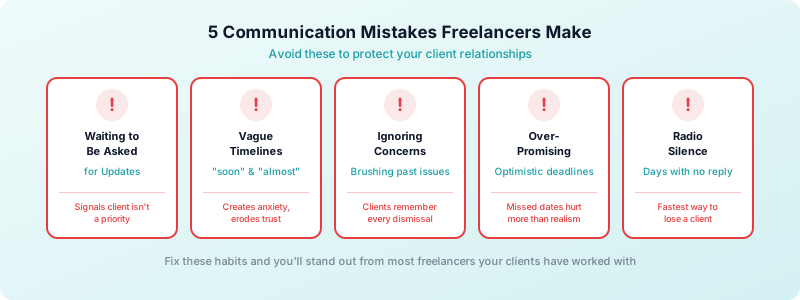
These mistakes are fixable. A few consistent habits — responding within 24 hours, sending weekly updates, flagging problems early — will set you apart from most freelancers clients have worked with. The bar for good client communication is genuinely not that high, which means doing it well is a meaningful competitive advantage.
Use Time Data to Communicate Your Value
One underused communication tool is your time data. When a client can see exactly how many hours went into their project and what those hours covered, the conversation about your rate becomes much easier.
Toggle Time Tracker lets you log time by project and task, then pull a report you can share directly with clients. Instead of sending an invoice with a single number, you send a clear breakdown: three hours on research, two on drafts, one on revisions. That level of transparency builds confidence and heads off the "why does this cost so much?" conversation before it starts.
Sharing time reports also shifts the focus from your hourly rate to your actual output. Clients stop thinking about what you charge per hour and start seeing the full scope of what you did. That reframe is one of the most effective ways to justify a rate increase when the time comes.
When you're managing multiple freelance clients, time reports help you spot which relationships are eating into your margins so you can address it before it becomes a problem. A client who generates constant back-and-forth will show up clearly in your logged hours.
Setting boundaries around your availability is another place where time data earns its keep. If a client keeps requesting out-of-scope work, your logged hours give you a concrete, inarguable basis for that conversation — no guesswork, no awkwardness.
Organize Templates in a System You'll Actually Use
The best template system is the one you use consistently. A shared folder in your notes app, a simple Google Doc, or snippets in your email client all work. What matters is that templates are accessible in under 30 seconds so you actually reach for them.
For managing client communication effectively across multiple clients, see how to manage multiple freelance clients and freelance client communication tips.
Track the time you spend on client communication in Toggle Time Tracker to see what it actually costs you per project. On non-retainer projects, this is often unbilled time — tracking it lets you build communication overhead into future project estimates.
Download Toggle Time Tracker and start tracking your full work picture, including the communication time that doesn't show up in your deliverables.