How to Write and Negotiate Freelance Payment Terms
Your freelance invoice payment terms are one of the most important pieces of text you'll write — and most freelancers give them almost no thought. Vague or missing payment terms are the single biggest contributor to late payments, disputed invoices, and awkward client conversations.
Clear, specific payment terms protect you, set professional expectations, and significantly reduce the time between invoice and payment.
What Payment Terms Actually Are
Payment terms are the conditions under which you expect to be paid. They appear on every invoice you send and should also be in your project contract. They specify:
- When payment is due (the deadline)
- How payment can be made (accepted methods)
- What happens if payment is late (penalties or fees)
- Any early-payment incentives you offer (optional discounts)
Without these terms spelled out, clients can — and do — apply their own defaults, which might be Net 60 or "whenever is convenient."
The Core Term: Net Days
The most common payment timeline format is "Net X" — meaning payment is due X days from the invoice date.
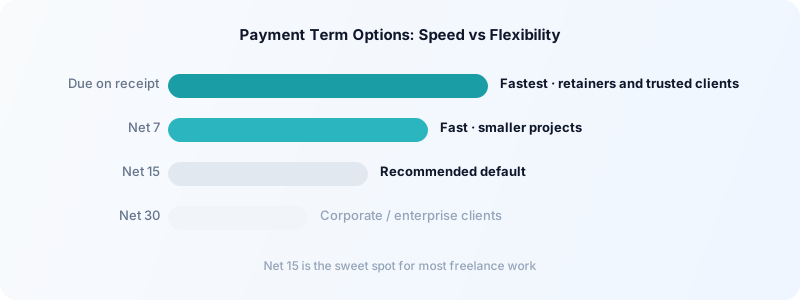
Net 7: Payment due within 7 days. Aggressive but workable for smaller projects or trusted clients. Communicates urgency.
Net 15: Payment due within 15 days. A solid default for most freelancers. Professional, reasonably urgent.
Net 30: Payment due within 30 days. Common in corporate settings where clients have AP cycles. Expect to wait the full 30 days.
Due on receipt: Payment expected immediately or within a few days. Works for retainer clients and ongoing work.
For most freelancers, Net 15 strikes the right balance between giving clients enough time to process invoices and not waiting over two weeks for money you've already earned. For more on the pros and cons of different terms, see freelance payment terms: Net 30 explained.
Exact Wording to Use
Here's clear, professional language you can use directly on your invoices:
Basic Net 15:
Payment due within 15 days of invoice date. Accepted payment methods: bank transfer, PayPal, [your preferred method].
With a late fee:
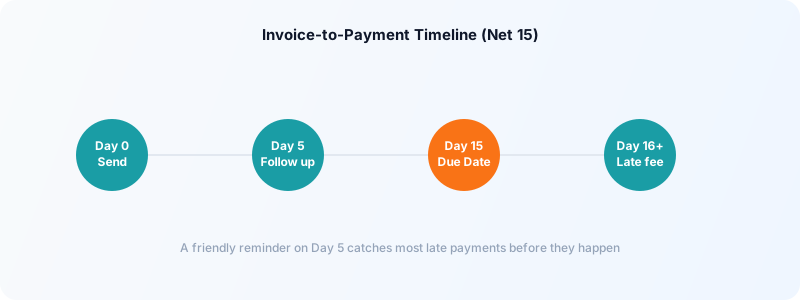
Payment due within 15 days of invoice date. Invoices unpaid after 15 days are subject to a 1.5% monthly late fee on the outstanding balance. Accepted payment methods: bank transfer, PayPal.
With an early-payment discount:
Payment due within 15 days. 2% discount if paid within 5 days. Accepted payment methods: bank transfer, PayPal.
Retainer/recurring:
Monthly retainer invoice. Payment due by the 5th of each month. Recurring charge authorized per our agreement dated [date].
Keep the language plain and specific. Avoid legal jargon — simple is both clearer and more likely to be read.
How to Add a Late Fee That's Actually Enforceable
A late fee clause has two purposes: it incentivizes on-time payment, and it compensates you for the cost of chasing overdue invoices. But you can only charge it if it's stated upfront on your invoice and/or in your contract.
Standard rates:
- 1.5% per month on the outstanding balance is the most common
- Flat-fee late charges ($25-$50) work for smaller invoices
- Some freelancers charge a tiered fee: $25 at 15 days, then 2% per month after 30 days
Important: check your jurisdiction — some regions cap late fee percentages. In the US, 1.5-2% monthly is generally acceptable. In the EU, regulations vary by country.
Include the fee in your contract AND repeat it on every invoice. A client who agreed to terms in a contract is far more likely to pay without dispute than one seeing a late fee for the first time on an overdue notice.
For a complete approach to late payments, see what to do when a freelance invoice is overdue.
Connect Payment Terms to Your Time Tracking
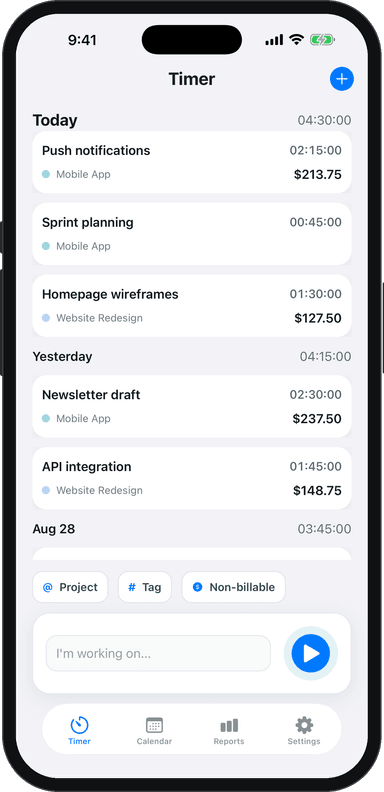
The fastest way to reduce invoice disputes is to attach a time log to your invoice. When you track time by project in Toggle Time Tracker and export your time log with the invoice, clients see exactly what they're paying for — eliminating the "I didn't know it would be that many hours" conversations.
This is especially important when you bill hourly. A time-backed invoice is harder to dispute than one that just lists a total. Toggle Time Tracker lets you log time with one tap and export it as a report that you can attach to any invoice.
Put Terms in Both the Contract and the Invoice
One of the most common mistakes: having payment terms in your contract but not on the invoice (or vice versa). Include your core terms in both places:
In the contract: Full payment terms section covering Net X period, late fees, accepted methods, and dispute resolution
On every invoice: Abbreviated version — due date, accepted methods, late fee reminder
Repeating the key terms on the invoice means clients are reminded of them at exactly the right moment — when they're looking at what they owe you.
Why Negotiating Payment Terms Is Normal
Large companies negotiate payment terms with all their vendors. Law firms, agencies, and consultants routinely push back on Net 60 or request deposits. The difference with freelancers is that many feel like asking for better terms is asking for a favor.
It isn't. You're running a business. Cash flow is a real operational concern. Your payment terms are a business decision, not a personal request.
The key is framing: you're not asking for special treatment, you're communicating your standard business terms. Most clients — especially professional ones — respond well to this approach.
The Best Time to Discuss Terms
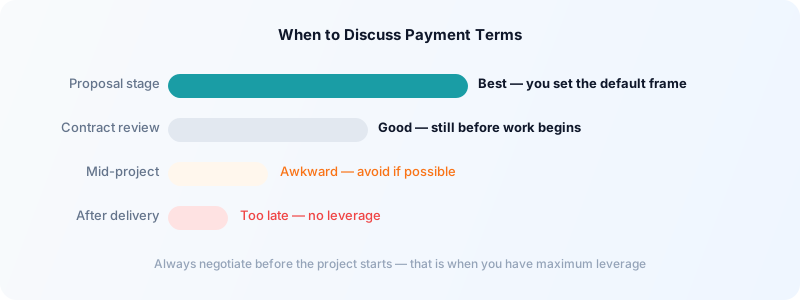
Before you start work. Payment terms should be agreed on before the project kicks off — ideally in the proposal or SOW (statement of work). Once work is underway, you lose most of your leverage.
During the proposal stage. When you send a proposal, include your payment terms explicitly. Don't wait for the client to propose terms — establish yours first. This sets the default and forces any negotiation to happen from your starting point, not theirs.
If a client comes to you with a contract that includes Net 60 or unfavorable terms, that's still early enough to negotiate. You haven't started work. You have leverage.
The worst time is mid-project, after you've already delivered work. Never negotiate payment terms retroactively — it creates conflict and looks unprofessional.
Scripts for Common Payment Term Negotiations
If a client proposes Net 60 and you want Net 30:
"My standard terms are Net 30. I see your default is Net 60 — is there flexibility to use Net 30 for this engagement? I find it keeps the billing relationship simpler for both sides."
This is matter-of-fact and gives them a reason that benefits them too.
If you want a deposit on a new client:
"For new client relationships, I typically require a 25-50% deposit before beginning work, with the balance due on project completion. This is my standard practice for all new engagements. Does that work for you?"
Don't apologize for it. It's standard practice — and it is.
If a client says their AP only does Net 45 or Net 60:
"I understand you have fixed AP cycles. For larger projects with extended payment terms, I do add a small premium to offset the cash flow impact — typically 5-8%. Alternatively, I can do milestone invoicing so that the first 50% of the project is billed and paid before the second half begins. Which would you prefer?"
You're giving them a choice between two options, both of which work for you.
If a client balks at a deposit:
"I appreciate the relationship and want to make this easy. The deposit protects both of us — it reserves my time for your project and commits us both to the engagement. I can reduce it to 25% if that's easier on your end."
What to Do When a Client Refuses to Negotiate
Some clients won't move on terms. Large enterprise clients may have fixed procurement policies that genuinely can't be changed. In those cases, your choices are:
-
Accept the terms and price them in. If Net 60 is their hard requirement, add 8-10% to your rate to account for the delayed cash and the additional risk. Present it as your "extended terms rate."
-
Propose milestone invoicing instead. Even with Net 60 terms, you can invoice 50% at the project start and 50% on completion. That first invoice being paid 60 days later doesn't leave you in the cold — you've already been paid half.
-
Decline the project. If the terms are genuinely unsustainable for you, it's better to decline than to resent the work while doing it. That resentment shows up in quality and communication.
Build Standard Terms Into Your Proposal Template
The most effective way to ensure good payment terms is to include your standard terms in every proposal before the client has a chance to suggest otherwise. When your proposal arrives with "Payment: 30% deposit on project start, 70% on delivery. Net 15." already written in, you've set the frame.
Clients who agree to your proposal have agreed to your terms. You're not asking for them later — they were part of the agreement from the start.
For templates on what to include in your invoices, see how to create a freelance invoice from scratch.
Make It Easy to Pay
The single best thing you can do to get paid faster is eliminate friction. The more payment methods you accept, the faster you get paid.
At minimum, offer:
- Bank transfer (ACH in the US, SEPA in Europe)
- One digital option (PayPal, Stripe, Wise)
If you work with US-based clients, a Zelle option for smaller invoices is appreciated. For international clients, Wise (formerly TransferWise) significantly reduces transfer fees compared to traditional bank wires.
Include your payment details on the invoice — bank account or payment link — so the client never has to ask. The easier you make it, the fewer "I'll get to it" delays you'll experience.
Download Toggle Time Tracker and attach your tracked time logs to every invoice — clear records are the foundation of payment terms that clients respect.