Deep Work Techniques for Freelancers: How to Do Your Best Work
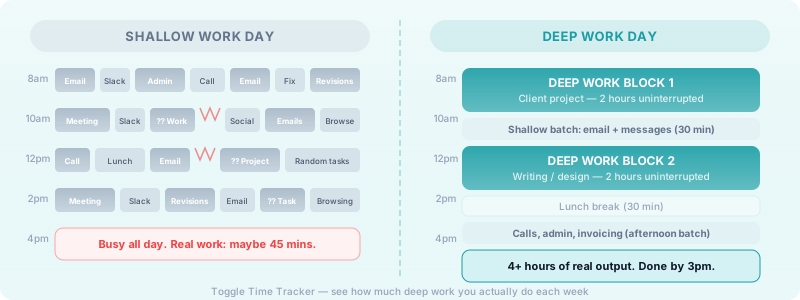
Shallow tasks expand to fill your day if you let them. Email threads, Slack pings, quick admin fixes — they feel productive, but by 5pm you look back and realize you never touched the work that actually moves your business forward.
That is where deep work comes in. Author Cal Newport coined the term to describe cognitively demanding work performed in a state of distraction-free concentration. For freelancers, deep work is not a luxury — it is the difference between delivering average output and doing the kind of work clients pay a premium for.
Why Freelancers Need Deep Work More Than Anyone
Employees have meetings, managers, and team structures to fill their calendars. You do not. Every hour of your day is a choice, which sounds like freedom until you realize how easy it is to fill that freedom with noise instead of output.
Deep work matters for freelancers because:
- Your income is tied to your output quality. Clients hire you for expertise and results. Distracted, fragmented work produces mediocre results — and mediocre results do not justify premium rates.
- You have no buffer. One lost afternoon of focus is one afternoon of billable work gone. There is no team to pick up the slack.
- Context-switching is expensive. Research suggests it takes more than 20 minutes to fully re-enter a state of deep focus after an interruption. If you are checking your phone every 30 minutes, you are never really doing deep work at all.
The good news: because you control your schedule, you have more power than most people to protect focused time. You just need a system.
Create the Conditions for Deep Work
Deep work does not happen by accident. You have to engineer the environment and the schedule that makes it possible.
Control Your Environment
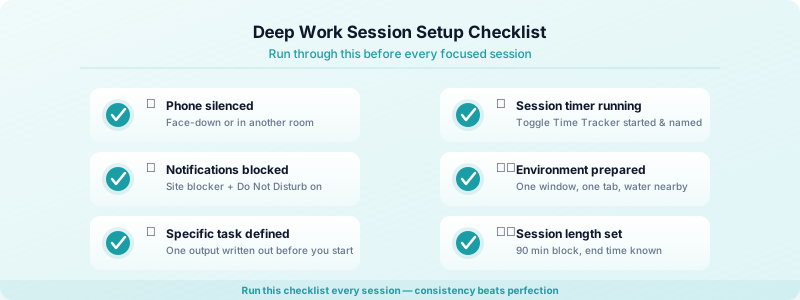
Your physical and digital environment either supports focus or undermines it. Before you sit down for a deep work session:
- Put your phone in another room or switch it to airplane mode.
- Close every browser tab not directly related to the task.
- Use a site blocker (Freedom, Cold Turkey, or your browser's built-in focus mode) during sessions.
- If you work from home, signal to others — and to yourself — that you are unavailable. Headphones, a closed door, a do-not-disturb sign.
Check out our guide on staying focused when working from home as a freelancer for more strategies on turning your home setup into a focus-friendly workspace.
Schedule Deep Work in Advance
Deep work sessions should appear on your calendar before the week begins — not whenever you happen to find a gap. Most freelancers do their best cognitive work in the morning. If that is you, protect those hours ruthlessly.
A practical approach: block two to four hours each morning for deep work before you open email or check messages. Treat those blocks as client appointments. You would not cancel a client call to answer a non-urgent email, so do not cancel your deep work block for one either.
Time blocking for freelancers is the scheduling method that pairs best with deep work. The idea is to assign every hour of your day a specific task category rather than working from a loose to-do list.
Deep Work Techniques That Actually Work
Batch Your Shallow Work
Shallow work — email, invoicing, social media, administrative tasks — is necessary but should never bleed into your deep work time. The fix is batching: designate specific time slots for shallow work and keep them separate from your focus blocks.
For example:
- 7:00–9:00am: Deep work block (client project, writing, design)
- 9:00–9:30am: Email and messages
- 9:30am–12:00pm: Second deep work block
- 12:30–1:00pm: Admin, invoicing, social
- Afternoon: Client calls, lighter tasks
When you know you have a dedicated window for shallow tasks, you stop feeling the urge to check your inbox every 20 minutes.
Protect Your Peak Hours
Not all hours are equal. Most people have a two-to-four hour window each day when they are at their cognitive best. Identify yours — track your energy levels for a week and you will notice a pattern — and protect those hours for your hardest, most valuable work.
If you tend to feel sharp in the early morning, do not waste those hours on emails. If your peak hits mid-morning, schedule your deep work block accordingly and push admin to the afternoon.
Use Timed Sessions to Build Momentum
Open-ended work blocks are psychologically harder to start. A timed session with a clear end point makes it easier to commit. The Pomodoro technique for freelancers — working in focused 25-minute intervals with short breaks — is one popular structure, though many freelancers doing deep work prefer longer sessions of 90 minutes to two hours. If you are unsure which approach fits your work, read our breakdown of focus sprints vs long work sessions.
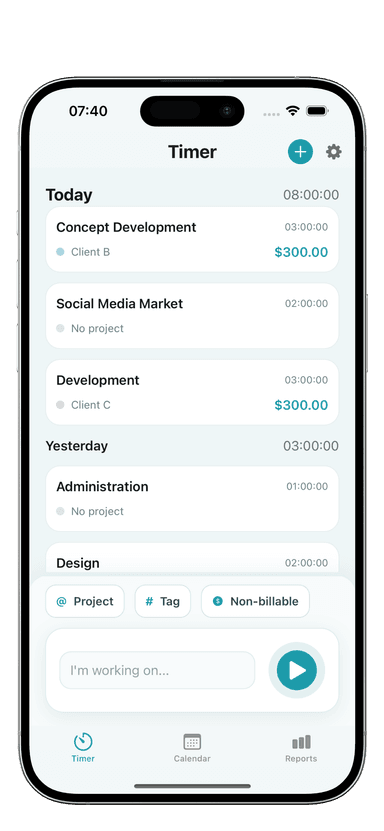
Toggle Time Tracker is useful here. Start a session when your deep work block begins, name it with the specific task you are working on, and stop it when the block ends. Over a week, you will see exactly how many hours of genuine deep work you are actually logging — most freelancers are surprised to find it is far less than they thought.
Practice Digital Minimalism During Sessions
During a deep work session, less is more. Aim for a single task, a single window, and zero notifications. Some freelancers find it helpful to write out the one specific output they want to produce before starting — a finished section of a report, a completed design component, a reviewed client brief — so there is no ambiguity about what success looks like for that session. Keep a distraction list nearby to park any thoughts that surface mid-session so they do not break your flow.
Building a Consistent Deep Work Habit
Doing deep work once is easy. Doing it every day, week after week, is the habit that separates high-performing freelancers from those who always feel behind.
A few things that help:
Start with less than you think you need. Trying to do four hours of deep work from day one is a recipe for burning out and quitting. Start with a single 90-minute block each morning for two weeks. Once that feels normal, add a second.
Track your deep work hours weekly. Toggle Time Tracker lets you categorize sessions, so you can tag focused work blocks and see your weekly total at a glance. Aim for a minimum number of deep work hours per week — say, eight to ten — and treat it as a non-negotiable metric for your business.
Protect the habit before optimizing it. The most important thing is consistency, not perfection. A 90-minute session where you hit a wall and only produce 60 good minutes is still infinitely better than no session at all. Show up to the block even on days it feels hard.
Review and adjust weekly. Every Friday, look back at your tracked sessions. Where did deep work get interrupted or skipped? What caused it? Use that to adjust your next week's schedule.
The Bottom Line
Deep work is the highest-leverage thing most freelancers are not doing consistently. The techniques are not complicated: schedule focused blocks, batch your shallow tasks, eliminate distractions, protect your peak hours, and track what you actually produce.
The hard part is treating deep work as a non-negotiable business practice rather than something you do when you happen to find the time. When you make that shift, the quality of your work — and the rates you can charge for it — will follow.
Start this week: block one 90-minute deep work session into tomorrow morning, open Toggle Time Tracker when it begins, and see what you can produce when you give a real task your full attention.