The Distraction List: A Freelancer's Secret Focus Tool
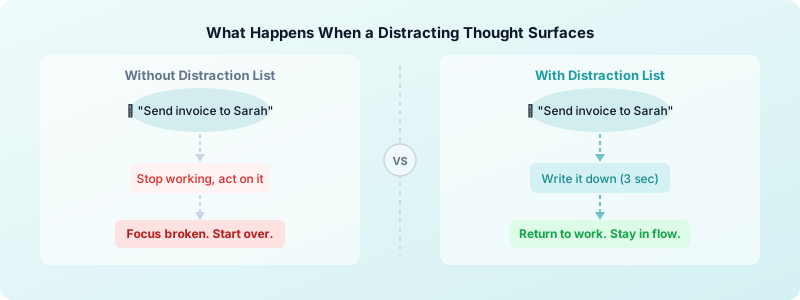
You sit down to work. Within ten minutes a random thought lands in your head — an email you forgot to send, a billing question, a grocery item you need to pick up. You either act on it (and lose your focus block) or fight it (and spend mental energy you should be spending on work). Neither option is good.
The freelance distraction list technique solves this. It is one of the simplest focus tools available, and most freelancers have never heard of it. Here is how it works — and why it makes every other focus strategy you already use work better.
Why Your Brain Fights Focus (And Why Willpower Doesn't Fix It)
Intrusive thoughts during work are not a character flaw. They are your brain doing exactly what it evolved to do: monitor for open loops and unfinished tasks.
Psychologists call this the Zeigarnik effect — the brain holds on to unfinished tasks and replays them until they are resolved or offloaded. With a dozen open mental loops cycling in the background, attention keeps fragmenting away from the task you are actually trying to do.
Willpower does not fix this. The more you push a thought away, the more it resurfaces. What you need is a way to tell your brain: "I recorded it. You can stop reminding me now." That is exactly what the distraction list does.
What the Distraction List Technique Is
A distraction list is a dedicated place — a notepad beside your keyboard, a sticky note, a note on your phone — where you write down any thought that surfaces during a focus session that is not related to the task at hand.
The idea is simple: when a distracting thought appears, you spend three seconds writing it down, and then immediately return to your work. You do not act on it. You do not think it through. You park it and come back to it later. Some people call this the thought parking technique — the name describes exactly what it does.
The technique was popularized alongside the Pomodoro technique for freelancers, where a physical distraction sheet is part of the standard setup. But it works with any focus method — deep work blocks, time boxing, or just a regular focused hour.
How to Use a Distraction List During Focus Sessions
The mechanics are straightforward. Here is the exact workflow:
Before your session starts:
- Open a fresh note, notepad page, or physical paper labelled "Distraction List."
- Write today's date at the top.
- Set it beside your workspace where you can reach it without switching windows or apps.
During your focus session:
- When a thought surfaces ("I need to follow up with Clara," "Did I turn on the out-of-office?"), write it down in one short phrase.
- Do not expand on it. Do not plan it. Just record it.
- Return to your work immediately.
After your session ends:
- Review the list. Most items will feel less urgent than they did in the moment.
- Sort them: some get added to tomorrow's to-do list, some can be done in two minutes during your shallow work window, some can be deleted entirely.
- Clear the list before your next session so it starts fresh.
That is the whole system. The power is in how quickly it defuses the urgency of a distracting thought. Once your brain learns that writing something down means it will not be forgotten, the thought stops competing for your attention.
Pairing the Distraction List with Your Existing System
The distraction list is not a standalone productivity system. Think of it as a layer that sits on top of whatever structure you already use — and makes it more resilient.
With Pomodoro: During a 25-minute Pomodoro sprint, your distraction list catches anything that surfaces during the session. Review and process the list during your five-minute break, not before it. This keeps the break short and purposeful.
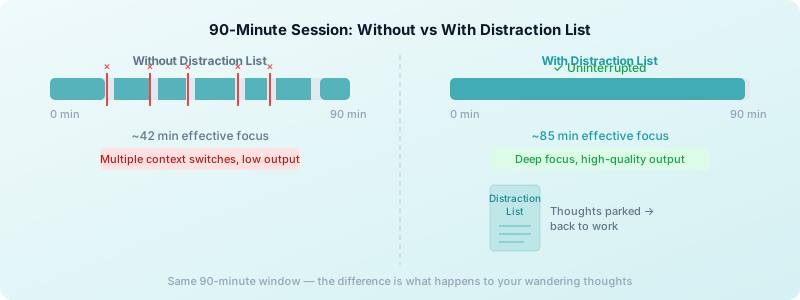
With deep work blocks: Deep work techniques for freelancers require long uninterrupted stretches of 90 minutes or more. Without a distraction list, mental interruptions accumulate and eventually break the session. With one, you hold focus for the full block because you know nothing is slipping through the cracks.
With digital distraction blocking: Site blockers handle external distractions (websites, apps). The distraction list handles the internal ones — the thoughts those tools cannot touch.
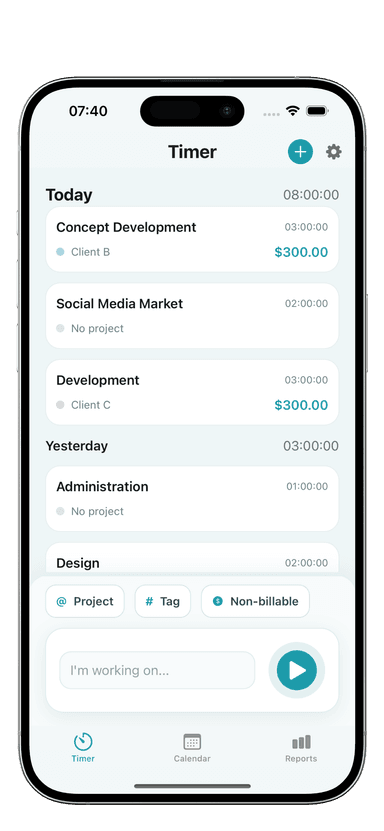
With time tracking: Start Toggle Time Tracker when your session begins. When a thought lands, add it to your list without stopping the timer. Your tracked time reflects actual focused work, not a derailed rabbit hole.
Making It a Daily Habit
Process the list only at session boundaries — during a Pomodoro break, at the end of a deep work block, or at the end of the day. The list is a parking lot, not a live inbox. At the end of each day, anything on it either gets added to tomorrow's task list or deleted. A clean list at day's end is part of a good shutdown ritual for freelancers.
The habit takes about a week to become automatic. The habit forms when you start to feel the difference: the days you use the list produce noticeably more focused work than the days you do not.
A few things that help it stick:
Keep the format dead simple. A physical notepad is often better than a digital note because it stays out of your task management system. You do not want to be adding things to Notion or Todoist mid-session — the app switch breaks focus as much as the thought itself.
Set a clearing ritual. Make it a rule: before every focus session, your distraction list is empty. Starting with a clean sheet signals to your brain that you are beginning fresh.
Track your focus session lengths. Toggle Time Tracker helps here. When you see weeks where your session lengths consistently hit 90 minutes versus weeks where they average 45 minutes, you will know the distraction list is doing its job — or you have slipped out of the habit.
Among focus tips for freelancers, the distraction list stands out because it addresses the internal environment — not just external distractions. For freelancers who struggle to stay focused when working from home, this is the part most tools miss.
The Bigger Picture
Most freelancers focus on external distractions — notifications, social media, noisy environments. These are real problems, but they are the easier half of the battle. The harder half is the mental noise your own brain generates during a session.
The distraction list is the tool for that harder half. It does not require an app, a subscription, or a complicated setup. It just requires a notepad and the discipline to write things down instead of acting on them.
Start this week: before your next focus session, grab a blank piece of paper, label it "Distraction List," and set it next to your keyboard. See what surfaces. After the session, review what you wrote. Most of it will be small, none of it will have been worth interrupting your work for.
Download Toggle Time Tracker and pair it with your distraction list — start the timer when your session begins, park your thoughts on paper, and finish the session with clean tracked hours and a cleared list.