Time Blocking for Freelancers: How to Own Your Schedule
If you've ever reached the end of a workday and wondered where the time went, time blocking for freelancers is the answer. Unlike a vague to-do list, time blocking gives every hour a job — so you stop reacting to your day and start designing it. It's one of the simplest shifts you can make to reclaim your focus and actually finish what matters.
What Time Blocking Actually Is (and Why Freelancers Need It)
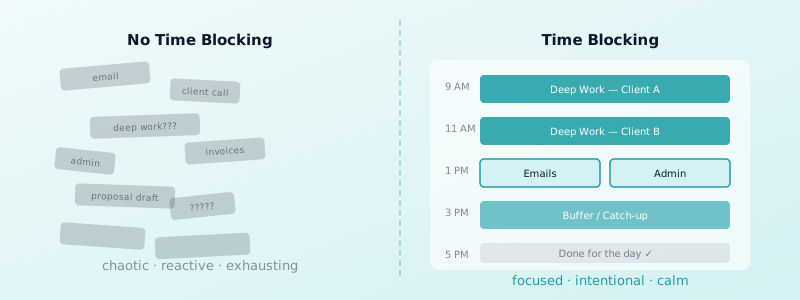
Time blocking means assigning specific tasks to specific chunks of time on your calendar. Instead of working from a list and picking whatever feels doable, you decide in advance: this hour is for client work, this one is for admin, this one is protected for deep focus.
Freelancers need this more than most. Without a boss setting your schedule, you're constantly making micro-decisions about what to work on next — and that decision fatigue drains you before noon. Research shows that employees get interrupted every 3 minutes and need over 23 minutes to refocus. Freelancers face the same trap when they leave their day unstructured.
There's also Parkinson's Law at play: work expands to fill the time available for it. If you allocate a vague "morning" to a task, it will eat the whole morning. Time blocking counters this by creating a defined container — the task ends when the block ends.
Time blocking solves both problems by removing the question. You open your calendar, and the answer is already there.
How to Set Up Your First Time Blocking Schedule
Start with a blank weekly calendar — digital or paper, whichever you actually use. Don't try to build the perfect schedule on day one. Instead, list every type of work you do: client deliverables, admin, email, business development, and breaks.
Now group similar tasks together and assign them a recurring block. Deep work — writing, designing, coding — deserves your sharpest hours, which for most people are in the morning. Schedule shallow tasks like email and invoicing in lower-energy slots, typically early afternoon.
A few practical rules to follow from the start:
- Block in 90-minute chunks. This matches your brain's natural focus cycle better than arbitrary hour slots.
- Leave buffer blocks. Put 30-minute buffers between major blocks to handle overruns without breaking your whole day.
- Name your blocks specifically. "Client A — draft article" beats "work time" every time.
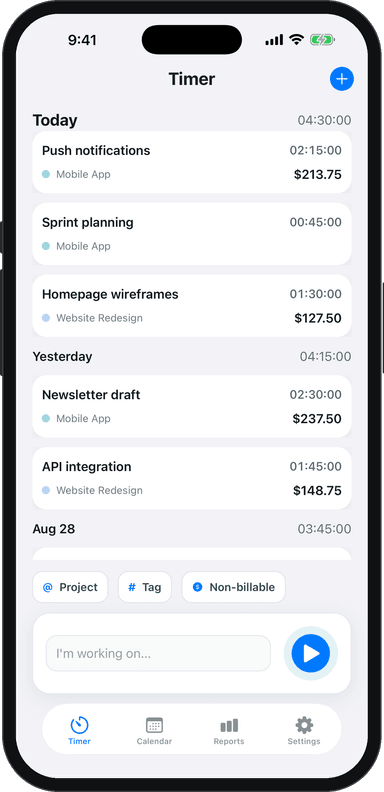
Use Toggle Time Tracker to log how long each block actually takes. Over a few weeks, you'll see exactly where your estimates are off and adjust accordingly.
Time Blocking Your Week as a Freelancer
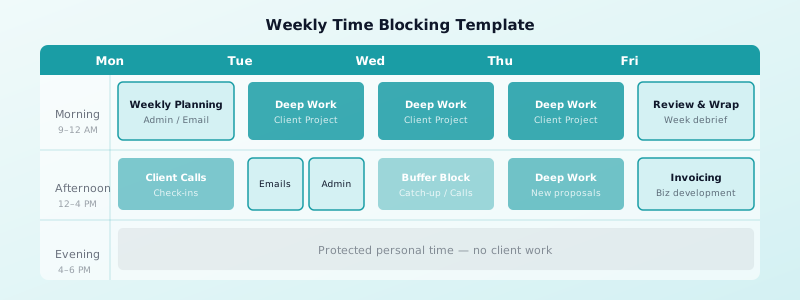
A good freelance week has a shape. Mondays are often best for planning, admin, and lighter tasks — your brain is warming up and jumping straight into deep client work often leads to slower output. Tuesday through Thursday are your prime production days. Fridays work well for reviews, invoicing, and wrapping loose ends.
Here's a simple weekly pattern that works for many freelancers:
- Monday: Weekly planning, email, admin, one light task
- Tuesday–Thursday: Deep work blocks (2–3 hours each), client calls in early afternoon
- Friday: Project reviews, invoices, business development
The key is batch-processing similar tasks. Answering every email as it arrives is one of the biggest time-killers for freelancers — two dedicated email blocks per day covers everything without constant context switching. The same applies to client calls: group them into a single afternoon rather than scattering them across every morning.
For solid advice on the bigger picture, check out these freelance time management tips that complement a time blocking system well.
One thing freelancers often miss: block personal time too. Exercise, lunch, and end-of-day cutoffs aren't luxuries — they're what makes the rest of the schedule sustainable. When your calendar shows work ending at 5 PM, you're far more likely to actually stop at 5 PM.
Handling Interruptions Without Losing Your Day
Interruptions will happen. A client sends an urgent message. Your internet drops. An estimate runs long. The goal isn't to eliminate disruption — it's to absorb it without losing your whole day.
The best defense is a dedicated "open" block each day: a 30–60 minute slot you set aside for the unexpected. When something urgent comes up during a deep work block, write it down and park it in that buffer. You protect your focus now and address it later.
Another practical move: communicate your schedule to clients upfront. A simple "I check messages at 9 AM and 2 PM" sets expectations and dramatically reduces the pressure to respond instantly. Most clients are fine with this — they just need to know when to expect you.
For longer work sessions, pairing time blocking with the Pomodoro technique adds another layer of structure — 25-minute sprints with short breaks make it easier to push through resistance and track exactly what got done.
If you work from home, environment plays a huge role. Distractions kill time blocks faster than anything else. These tips on staying focused while working from home as a freelancer pair directly with a time blocking practice.
Common Time Blocking Mistakes to Avoid
Overpacking your blocks. If every hour is scheduled, there's no room for reality. Leave 20% of your day unblocked. Things always take longer than expected.
Ignoring your energy levels. Scheduling a 3-hour writing block at 3 PM when you're naturally sluggish sets you up to fail. Map your tasks to your energy, not just the clock.
Skipping the review. Time blocking only improves if you look back at the end of the week. Did your blocks hold? Where did time slip? Five minutes of reflection prevents weeks of repeating the same mistakes.
Treating blocks as suggestions. A block isn't a hope — it's a commitment. When you reschedule without a real reason, you're training yourself to ignore the system. Protect your blocks the way you'd protect a client meeting.
Not tracking actual time. Estimating how long work takes is notoriously hard. Without real data, your blocks will stay misaligned for months. Logging your time — even roughly — closes that gap fast.
Time blocking isn't about being rigid. It's about being intentional. When you decide in advance what each hour is for, you spend less mental energy deciding in the moment and more of it actually working.
Start small: block just your three most important tasks tomorrow and see how it changes your day. Then build from there.
Ready to see where your time actually goes? Download Toggle Time Tracker and start logging your blocks. Within a week, you'll have real data to build a schedule that actually works.