How to Get Clients to Pay on Time as a Freelancer
Late payments are one of the most stressful parts of freelancing. You deliver the work, send the invoice, and then wait — sometimes for weeks past the due date. Research shows that 85% of freelancers experience late payments at least some of the time, and over 20% deal with it on more than half their invoices.
The good news: most late payments aren't malicious. They're the result of unclear expectations, disorganized clients, or invoices that get lost in the shuffle. If you want to get clients to pay on time as a freelancer, you need a system that prevents delays before they happen and handles them quickly when they do.
Why Late Payments Happen (And Why They're Your Problem to Solve)
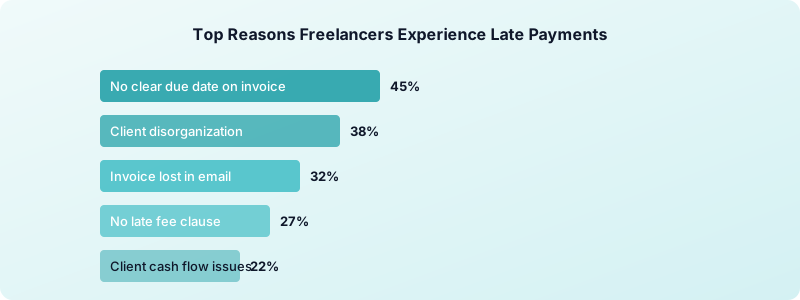
Clients pay late for predictable reasons. Their accounts payable team batches payments monthly. Your invoice didn't include a clear due date. They forgot. They're waiting on their own clients to pay them first.
Whatever the reason, you can't control their internal processes. But you can control how you set up the relationship and how you respond when payments slip.
Freelancers who get paid consistently do three things differently. They set expectations before the project starts. They make it easy for clients to pay. And they follow up without hesitation when a payment is late.
Treating your invoicing process as a professional system — not an afterthought — is the single biggest shift you can make.
Set Clear Payment Terms Before Work Begins
The best time to discuss payment terms is during the project proposal or discovery call — not after you've delivered the work. Put your terms in writing and get them agreed upon before the first task begins.
Your payment terms should include:
- Payment window — Net 15 or Net 30, with an exact calendar due date on every invoice
- Accepted payment methods — Bank transfer, PayPal, credit card, or whatever you prefer
- Late fee clause — A flat fee ($25-$50) or percentage (1.5% monthly) that applies after the due date
- Deposit requirement — 30% to 50% upfront for new clients or projects over $1,000
Shorter payment windows get better results. Freelancers using Net 15 instead of Net 30 often see payments arrive 10 to 15 days sooner. If you're working with a client for the first time, start with tighter terms and loosen them after they prove reliable.
Understanding payment terms like Net 30 helps you pick the right structure for each client relationship. Not every client needs the same terms.
Send Professional Invoices That Get Paid Faster
A sloppy invoice invites a slow payment. A clean, detailed invoice signals that you run a real business and expect to be treated like one.
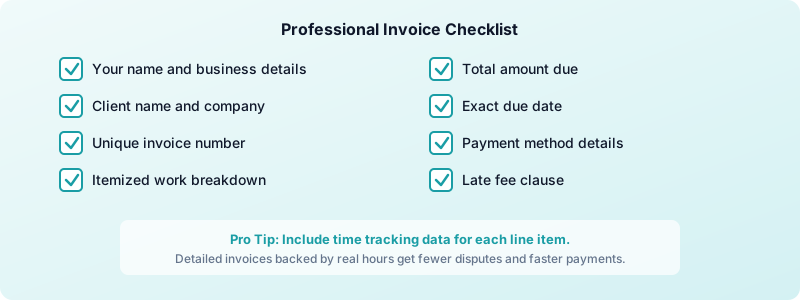
Every invoice you send should include:
- Your name and business details
- The client's name and company
- A unique invoice number
- An itemized breakdown of work completed
- The total amount due
- The exact due date (not just "Net 30")
- Your payment method details
If you need a walkthrough, our guide on creating a freelance invoice from scratch covers each element in detail. Invoices backed by accurate time data get fewer disputes. When clients see a clear breakdown of hours spent on each task, they're less likely to question the total or delay payment. Tracking your billable hours gives you that level of detail automatically.
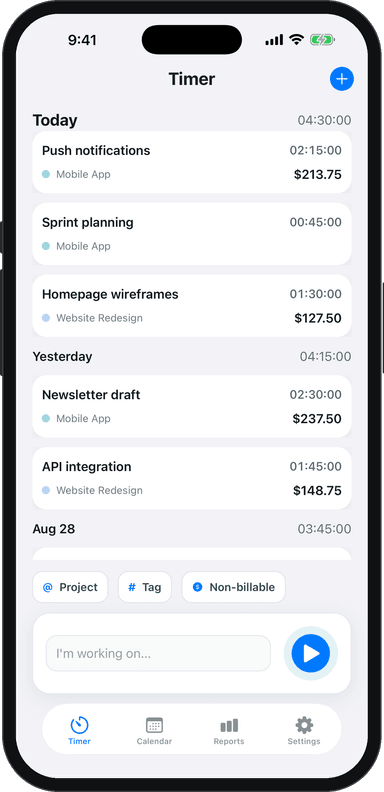
Toggle Time Tracker makes this easy. Log your hours by project and task as you work, then reference your time data when building each invoice. No more guessing how long something took.
Follow Up Without Feeling Awkward
Many freelancers avoid following up on late invoices because it feels uncomfortable. But sending a payment reminder is completely normal and expected in business. You're not being rude — you're being professional.
Use a staged follow-up system:
- 3 days before due date — Send a courtesy reminder: "Just a heads-up, invoice #1042 for $2,400 is due on March 20th."
- On the due date — Confirm receipt: "Invoice #1042 is due today. Please let me know if you have any questions."
- 3 days after due date — Friendly nudge: "Following up on invoice #1042, which was due March 20th. When can I expect payment?"
- 7 days overdue — Get specific: "Invoice #1042 is now 7 days past due. I'd appreciate a confirmed payment date."
- 14+ days overdue — Reference your contract: "Per our agreement, a late fee of $50 applies to invoices overdue by more than 14 days."
Keep every follow-up short, professional, and focused on the invoice details. Never apologize for asking to be paid. You did the work. Payment is expected.
Pre-due reminders alone can reduce late payments by 25% to 40%. Most clients aren't intentionally stalling — they just need a nudge.
Protect Yourself with Deposits and Milestones
The best defense against late payments is getting paid before or during the work — not just after. Two strategies make this practical.
Upfront deposits protect you from clients who disappear after delivery. Requesting 30% to 50% before starting work is standard practice. Professional clients expect it. Clients who refuse to pay any deposit are a red flag worth paying attention to.
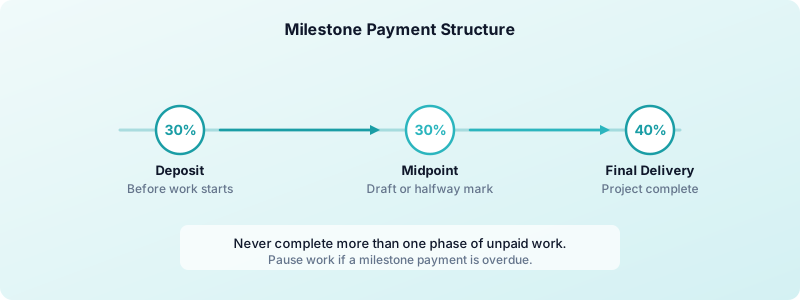
Milestone payments work for larger projects. Break the project into phases and invoice at each milestone. A common structure:
- 30% deposit before work begins
- 30% at the midpoint deliverable
- 40% on final delivery
This way, you never complete more than one phase of unpaid work. If a client stalls on a milestone payment, you pause until they pay. It protects both your time and your cash flow.
For smaller or recurring projects, "Due on Receipt" terms work well. The client pays when they receive the invoice — no waiting period.
For longer engagements, splitting the fee across milestones beats one invoice at the end. Freelance milestone payments covers how to structure and word them.
Build a Payment System You Can Trust
Getting clients to pay on time isn't about chasing money. It's about building a system where late payments rarely happen in the first place. Set clear terms upfront, send professional invoices backed by real data, and follow up consistently when payments slip.
Track your average days-to-payment for each client using Toggle Time Tracker. Over time, you'll know exactly which clients pay fast and which ones need tighter terms. That data lets you adjust your approach and protect your income.
Download Toggle Time Tracker and start pairing accurate time tracking with professional invoicing to get paid on time, every time.