Freelance Scope of Work Template: What to Include
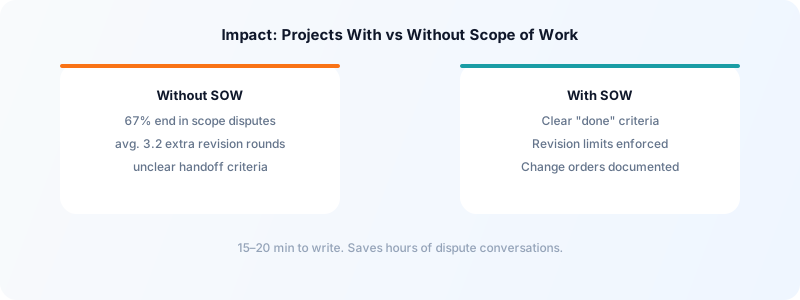
A scope of work document is one of the most practical things a freelancer can create. It lives between a client proposal and a full contract — more detailed than an email agreement, faster to produce than a legal contract. When built into your workflow, it prevents the majority of scope creep disputes, payment disagreements, and project miscommunications before they start.
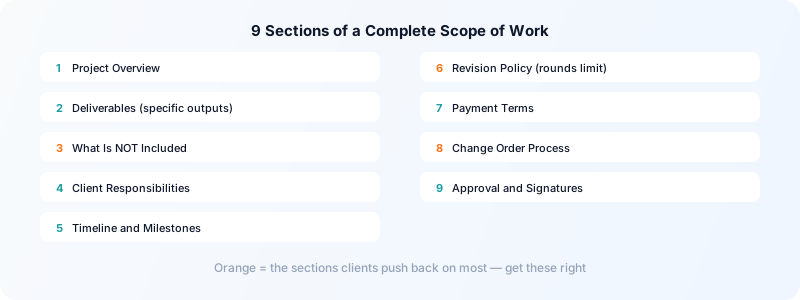
This is what a freelance scope of work template should include, and why each section earns its place.
What a Scope of Work Does
A scope of work (SOW) defines what you will deliver, by when, under what conditions. It answers the question "what are we agreeing to?" before work begins.
Unlike a full service agreement, an SOW is project-specific and operationally focused. You can produce one in 15–20 minutes for any new project. Many freelancers attach an SOW to their contract rather than embedding everything in the legal document — this keeps the contract stable across clients while the scope document changes per project.
Section 1: Project Overview
One or two sentences describing the project in plain language.
Project: Redesign of [Client Company] website homepage and services page Client: [Name, company, contact email] Freelancer: [Your name, business name] Date: [SOW creation date]
This section creates a shared reference point. When a client later asks "wasn't that included?", you can point to this description as the baseline.
Section 2: Deliverables
The most important section. List every specific output you will provide — not categories, but actual files, documents, pages, or items.
Weak: "Website pages" Strong:
- Homepage (desktop + mobile responsive)
- Services page (desktop + mobile responsive)
- Contact page (desktop + mobile responsive, with form)
Each deliverable should be specific enough that both parties can recognize when it's done. If you're writing copy, specify word counts. If you're designing, specify file formats. If you're building, specify which features are included.
Anything not on this list is not in scope. This is the foundation of every scope creep conversation you'll have.
Section 3: What Is Not Included
Explicitly list exclusions. This sounds counterintuitive but is critical.
Not included in this scope:
- SEO optimization or copywriting
- Integration with third-party tools (except those listed above)
- Post-launch bug fixes beyond a [14]-day warranty period
- Illustration or photography (client to provide all visual assets)
An "out of scope" list is especially useful when the client already has a history of scope expansion, or when the project type commonly attracts add-on requests. For more on managing scope after the SOW is signed, see how to handle scope creep as a freelancer.
Section 4: Client Responsibilities
What you need from the client to complete the work.
- Provide brand assets (logo, fonts, color guide) by [date]
- Provide all written copy for each page by [date]
- Review and approve wireframes within [5] business days of delivery
- Designate one point of contact for approvals
Documenting client responsibilities does two things: it sets expectations about their role, and it gives you a legitimate reason to adjust timelines if they miss their obligations. If the client delays supplying content and the project slips, the SOW shows whose deadline was missed.
Section 5: Timeline and Milestones
Break the project into phases with specific dates.
| Milestone | Deliverable | Due Date | |---|---|---| | Phase 1 | Wireframes | [Date] | | Phase 2 | Design mockups (2 rounds of revisions) | [Date] | | Phase 3 | Final files / build | [Date] | | Phase 4 | Launch / handoff | [Date] |
Include how many revision rounds are included in each phase. "2 rounds of revisions" is a statement with meaning — it's what clients push against when they request a fifth revision.
Track your time against each milestone in Toggle Time Tracker. When the next similar project comes up, you'll have real data on how long each phase takes rather than guessing.
Section 6: Revision Policy
Specify revision limits explicitly.
This SOW includes up to 2 rounds of revisions per deliverable. Each revision round means one set of consolidated feedback from the client, addressed once by the freelancer. Additional revision rounds are billed at [hourly rate]/hour.
The word "consolidated" is important here. Clients sometimes send feedback in five separate emails over three days and expect it all to count as "one round." A consolidated round means one document or one call with all feedback combined.
Section 7: Payment Terms
Even if payment is covered in your contract, restate the key figures in the SOW.
- Project total: $[amount]
- Deposit: [50%] due before work begins
- Final payment: [50%] due upon delivery
- Late payment: [1.5%/month] on outstanding balances after [net 30]
For guidance on structuring payment terms that get you paid on time, see how to write freelance invoice payment terms.
Section 8: Change Order Process
Describe how scope changes are handled.
Any changes to the deliverables, timeline, or budget described in this SOW require a written change order signed by both parties before additional work begins. Verbal approvals are not sufficient.
This sentence alone eliminates dozens of uncomfortable conversations. When a client says "I thought we agreed to that on the call," you have a documented process to point to.
Section 9: Approval and Signatures
Both parties sign and date the document. Even a digital signature via email ("confirmed" reply) is better than nothing — it creates a timestamped record of agreement.
For clients working through platforms with built-in contracts, you can include the SOW as an attachment. For direct clients, a simple PDF works fine.
The scope of work sits inside a larger agreement. What to include in a freelance contract covers the clauses around it.
Putting It Together
A complete SOW for a typical freelance project is 1–2 pages. It doesn't need legal language. It needs to be clear, specific, and agreed upon before work starts.
Build a template version of each section with your standard language, then customize the deliverables and dates per project. Once you've done it five times, the whole document takes under 20 minutes.
For managing multiple client projects with clear scopes, see how to manage multiple freelance clients and freelance client prioritization.
Download Toggle Time Tracker to track your time against each SOW milestone — knowing how long each phase actually took makes every future estimate more accurate.