Freelance Client Prioritization: A Framework That Works
When you're managing multiple clients, every day involves a version of the same decision: whose work gets done first? Without a clear freelance client prioritization framework, that decision defaults to whoever emailed most recently or whoever is loudest — which rarely reflects actual business priorities.
A deliberate prioritization system helps you allocate your time where it creates the most value, keeps the right clients happy, and protects your income stability.
The 4 Dimensions of Client Priority
Not all clients are equal. Prioritization should be based on a combination of factors — not just who's paying the most right now.
1. Revenue contribution What percentage of your monthly income does this client represent? Clients who contribute 30%+ of your income deserve higher baseline priority than clients who represent 5%.
2. Growth potential Some clients are small today but represent a clear path to more work — a new contact at a large company, a startup that's growing fast, a client who's referred you to others. Factor in potential, not just current revenue.
3. Deadline urgency Has the client given you a hard deadline tied to a real business event (product launch, investor presentation, public filing)? Urgent deadlines that affect your client's business outcomes warrant elevated priority.
4. Strategic value Some clients elevate your career: they're marquee names for your portfolio, they're in a niche you're building authority in, or the work they give you is genuinely differentiated. These clients can justify higher priority even if they're not your highest-paying ones.
The 2x2 Priority Matrix
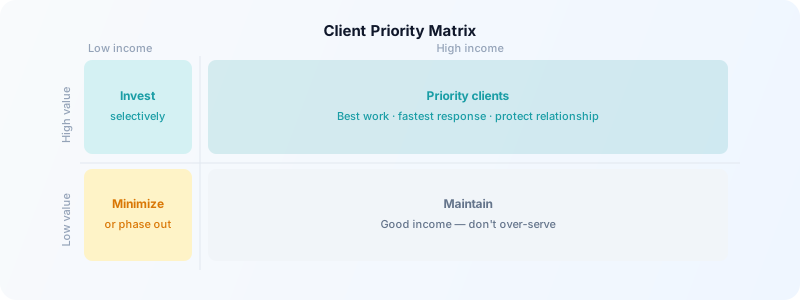
A simple way to visualize this: place each client on a matrix based on two dimensions — income impact (low/high) and strategic value (low/high).
| | Low Income Impact | High Income Impact | |---|---|---| | High Strategic Value | Invest selectively — cap hours | Prioritize actively — protect relationship | | Low Strategic Value | Minimize or phase out | Maintain — good income, don't overinvest |
Clients in the top-right quadrant (high income + high strategic value) are your priority clients. They get your best work hours and fastest response times.
Clients in the bottom-left quadrant (low income + low strategic value) are candidates for phase-out or rate increases. They shouldn't be consuming your best creative hours.
How to Actually Sequence Work Across Clients
Once you've ranked clients, translate that into a daily and weekly schedule:
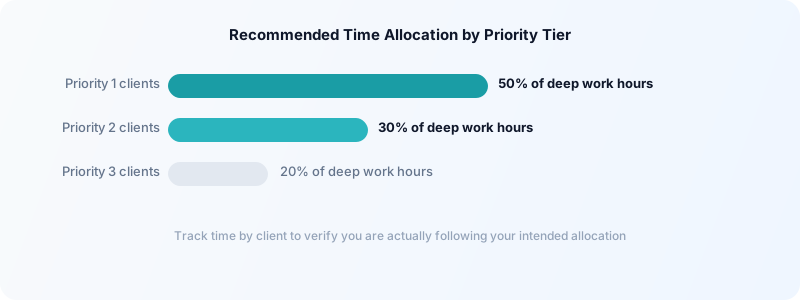
Morning deep work block: Reserved for Priority 1 and 2 client deliverables — work that's complex, creative, or time-sensitive.
Mid-day: Meetings, client communication, and project coordination across all clients.
Afternoon: Priority 3 client work, admin, invoicing, and lower-complexity tasks.
This doesn't mean you ignore lower-priority clients in the morning — it means you don't do their creative, focused work during your peak cognitive hours.
For a full system for structuring your week, see freelance weekly planning template.
Track Time by Client to Make Data-Driven Decisions
The most objective input for client prioritization is time data. How many hours are you actually spending on each client? And how does that compare to what you're billing?
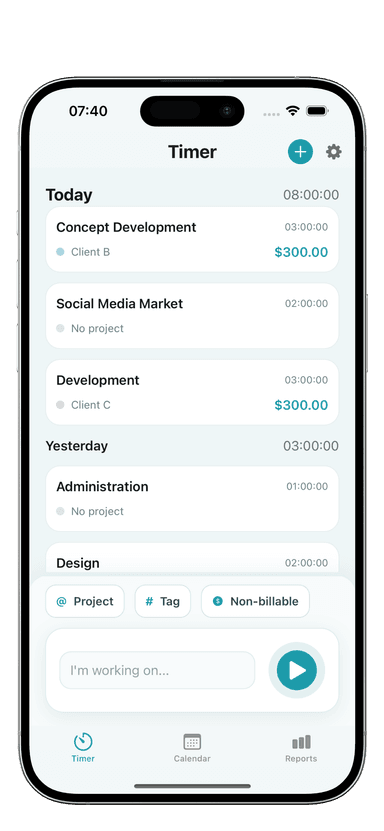
Toggle Time Tracker lets you tag every work session by client and project. After a month of tracking, your time log shows:
- Which clients consume the most hours
- Effective hourly rate by client (total billed ÷ total hours worked, including prep and communication)
- Whether time spent matches the income contribution
Many freelancers are surprised to find that their "big" client is actually lower-margin than they thought once all communication overhead is counted. That data changes how you think about priorities.
For more on reviewing this data, see how to review your freelance time logs.
Communicate Priorities Without Damaging Relationships
Most clients don't know where they sit in your workload. Managing their expectations proactively prevents the "why hasn't this been done yet?" conversations.
For time-sensitive requests from lower-priority clients: "I'm in the middle of a deadline for another client. I can get to this by [specific date/time] — will that work?"
This is honest, professional, and sets expectations without ranking or dismissing them.
For ongoing timeline management: Be specific about turnaround times in your client agreements. "Standard turnaround is 48 hours for small requests, 5 business days for larger deliverables." This lets you manage priorities without making it personal.
When capacity is genuinely full: If you're at capacity and a good client sends an urgent request, say so directly: "My schedule is fully booked through [date]. I can start on this on [date] — does that work? If it's urgent, I have a colleague I could refer you to."
Honesty about capacity is always better than overpromising and underdelivering.
When to Stop Prioritizing and Start Letting Go
A well-functioning prioritization framework eventually reveals a harder truth: some clients shouldn't be in your portfolio at all. If a client consistently lands in the low-income, low-strategic-value quadrant and consumes disproportionate administrative energy, they're costing you more than they're contributing.
Phasing out low-fit clients — gradually, professionally — creates space for better ones. See how to manage multiple freelance clients for a full approach to client portfolio management.
A clear prioritization framework doesn't just help you decide what to work on today — it shapes the kind of freelance practice you're building over the long term. Use it consistently, review it quarterly, and let the data guide you.
Download Toggle Time Tracker and start tracking hours by client — the data will show you clearly which relationships deserve your best time and which ones you've been over-serving.