Why You Should Track Time on Fixed-Price Freelance Projects
There's a common myth among freelancers: once you switch to flat-fee work, you can stop tracking your hours. The client gets a fixed price, the scope is set, so why bother? The truth is that time tracking for fixed-price projects is just as critical — arguably more so — than tracking on hourly work. Without it, you're flying blind on your actual profitability.
Fixed-price work goes by several names — flat rate, flat fee, fixed fee, project rate. They all describe the same deal: one agreed number, however long the work takes. Everything below applies to all of them.
The Real Reason Fixed-Price Projects Go Over Budget
Fixed-price projects feel safe because the number is locked in. But scope creep, unclear boundaries, and optimistic estimates quietly eat into your margin every time. You said yes to a project, gave a number, and now you're 20 hours over what you expected — and the client owes you nothing extra.
The root problem is almost always a bad estimate. And bad estimates come from not knowing how long similar work actually took in the past. Without historical time data, every quote is a guess. You're pricing based on hope, not evidence.
Think about how most freelancers set a flat fee: they estimate hours, multiply by a rate, and add a buffer. But if that hour estimate is built on gut feeling rather than real logs, the buffer never holds. One round of unexpected revisions or a client who changes direction halfway through will wipe it out entirely.
Tracking hours on flat-rate projects gives you a feedback loop. You see where the estimate was right, where it fell apart, and exactly which tasks consumed more time than planned. That data directly improves every future quote you make.
5 Ways Time Tracking Protects You on Fixed-Price Work
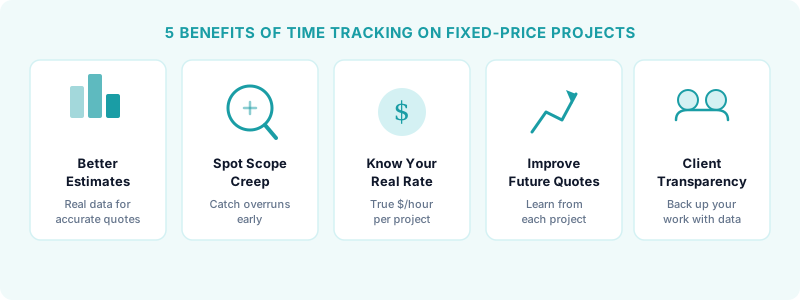
Time data isn't just a number — it's leverage. Here's what it does for you on fixed-rate work:
- Better estimates. When you log hours on every project, you build a library of real data for similar work. Your next quote becomes far more accurate.
- Spot scope creep early. If a project is running over, you want to know on day five, not day fifty. Time logs show you the moment a project starts expanding beyond what was agreed.
- Know your real hourly rate. A $3,000 flat-fee project sounds great — until you realize you worked 80 hours on it. Knowing your true hourly rate means you can catch these situations before they become a pattern.
- Improve future quotes. Time data from past projects is the only reliable input for pricing new ones. You'll stop undercharging once you see the pattern clearly.
- Client transparency. If a client ever questions the value delivered, a time log backs you up. It shows the work, not just the output.
How to Track Time on Fixed-Rate Projects (Without Overcomplicating It)
You don't need a complex system. The goal is consistency, not perfection. Here's a simple approach that works:
Start a timer when you begin a task. Stop it when you stop working. That's the core habit. You're not billing the client by the hour — you're building data for yourself.
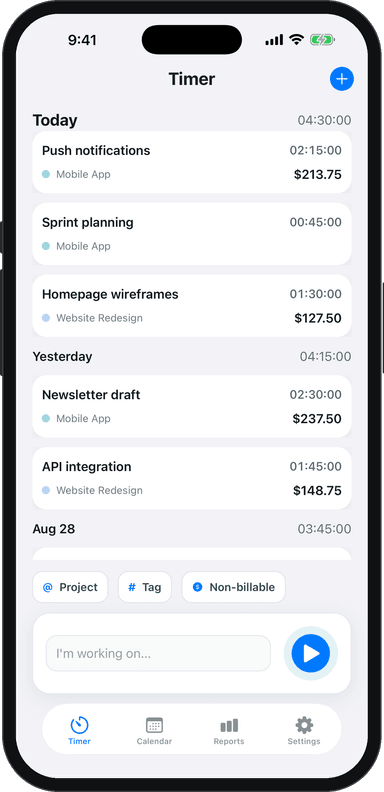
Break your time into task categories that match how you estimate: discovery, design, development, revisions, communication. When you review your hours at the end of a project, these categories tell you exactly where time went and where your estimate was off. Toggle Time Tracker makes this easy — you can log hours across multiple projects and tasks without the overhead of a bloated tool.
One important rule: track every work session, including short ones. A five-minute email thread doesn't feel like much, but client communication can quietly add up to five or ten hours on a longer project. Those hours are real costs that belong in your estimates.
For tracking billable hours effectively, the same principles apply to fixed-fee work. Log everything, even admin time. You need the full picture to price accurately.
This is one use of tracked time among several — freelance time tracking: the complete guide covers the full workflow.
Using Time Data to Improve Your Next Project Estimate
Once you've tracked a few projects, patterns emerge fast. You might find that client onboarding always takes twice as long as you thought, or that revisions eat up 30% of your total hours. That's the kind of insight that changes how you quote.
Before pricing your next fixed-fee project, pull up the time logs from similar past work. Look at total hours, which phases ran over, and where your original estimate was closest to reality. Use that as your baseline, then adjust for the specifics of the new job.
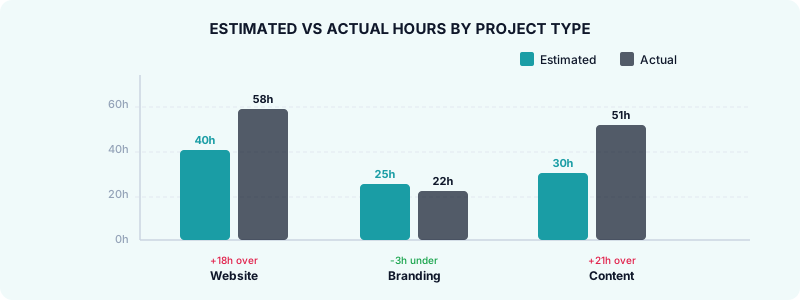
This process compounds over time. After six months of consistent tracking, your estimates will be significantly tighter than they were when you were guessing. You'll also be able to decide whether flat-fee pricing actually works for certain types of projects — or whether hourly makes more sense. That decision is the heart of comparing hourly vs project-based pricing.
When Your Time Data Reveals a Bad Deal
Sometimes the data shows you something uncomfortable: a project you thought was profitable wasn't. A $2,500 fixed-fee job that took 60 hours means you earned around $42 per hour before expenses. If your target rate is $100/hour, that's a significant gap — and one you'd never have noticed without tracking.
Knowing this doesn't mean you made a mistake — it means you have actionable information. You can raise your rate on the next similar project, tighten the scope in your contract, or decide that type of work isn't worth taking at any fixed price.
You can also use this data to have honest conversations with clients. If a project consistently runs over because the scope is vague, you now have documented evidence to support adding a clause for out-of-scope work. That's a conversation you can only have when you have numbers to back it up.
The freelancers who run sustainable businesses aren't necessarily the best at the work. They're the ones who know their numbers. Time tracking on fixed-price projects is how you get those numbers — even when no one is asking you for them.
Stop guessing at your profitability. Download Toggle Time Tracker on iOS and start logging your hours on every project — fixed-fee or not. The data you collect today will make every future quote more accurate and every project more profitable.