Freelance Weekly Planning Template: Structure Your Week
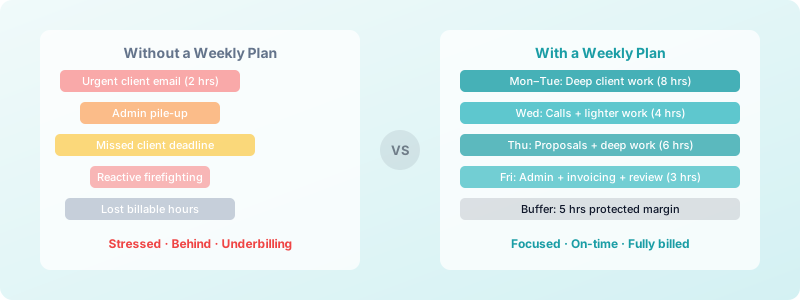
Every Monday morning, millions of freelancers open their laptops and wonder the same thing: where do I even start? Without a freelance weekly planning template to guide you, each week becomes a reactive scramble — urgent client requests push out focused work, admin piles up, and Friday arrives with less done than you planned.
The fix is not to work harder. It is to plan smarter, once, at the start of each week.
Why Freelancers Need a Weekly Plan (Not Just a To-Do List)
A to-do list tells you what to do. A weekly plan tells you when you will do it and how long it will take.
Freelancers who use structured weekly planning report completing 25-30% more of their planned work compared to those who rely on daily task lists alone. The reason is simple: when you assign tasks to specific time blocks, you stop treating every item as equally urgent.
A weekly plan also gives you a realistic look at your capacity. If you have 30 hours of client work and 10 hours of admin this week, you cannot also take on a 15-hour rush project without something giving. Planning makes that tradeoff visible before you say yes.
The other benefit is psychological. A clear weekly structure reduces the constant low-level anxiety of "I hope I'm not forgetting something." When everything is mapped out, you can focus fully on the task in front of you. This is a core principle behind solid freelance time management and sustainable output.
The Freelance Weekly Planning Template (Section by Section)
Here is the template structure. You can recreate this in a notebook, a spreadsheet, or a simple notes app. The tool matters far less than the habit.
Section 1: Weekly Goal (one sentence) Write down the single most important outcome for this week. Not a task list — one sentence. Example: "Deliver the website copy to Client A and submit the Q2 tax estimated payment."
Section 2: Revenue and Hours Target Fill in:
- Target billable hours this week: ___
- Target unbillable hours (admin, marketing, professional development): ___
- Total available working hours: ___
This section forces you to acknowledge that admin time is real time. Most freelancers undercount it and end up short on billable hours.
Section 3: Client Projects This Week List each active client, the specific deliverable due this week, and your estimated hours. Add a buffer of 20% to each estimate — projects almost always expand.
| Client | Deliverable | Est. Hours | |--------|-------------|------------| | Client A | Website copy (3 pages) | 6 hrs | | Client B | Monthly report review | 2 hrs |
Section 4: Admin Block List the admin tasks for the week: invoices to send, proposals to write, emails to follow up on. Estimate total admin hours. Most freelancers need 5-8 hours of admin time per week.
Section 5: One Investment Task This is the task that moves your freelance business forward but never feels urgent — updating your portfolio, pitching a new client, improving your intake process. Block at least 90 minutes for it.
How to Build Your Default Week
A default week is a reusable template you apply every Monday. You fill in specifics, but the structure stays the same. This eliminates the "what should I do first?" decision fatigue. Think of it as your freelance work schedule — set once, adjusted weekly.
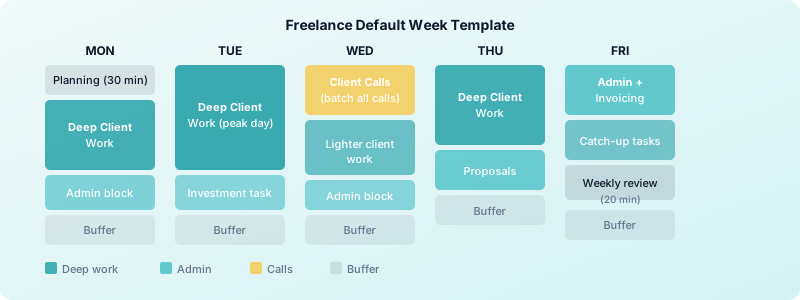
A simple default week for freelancers looks like this:
- Monday: Weekly planning (30 min) + deep client work
- Tuesday: Deep client work (your highest-focus day)
- Wednesday: Client calls + lighter work + one admin block
- Thursday: Deep client work + proposal writing
- Friday: Admin + invoicing + weekly review (20 min)
Theme days work best when you protect them. If you let client calls bleed into your deep work mornings, the whole structure collapses. Communicate your availability clearly so clients know not to expect same-day responses outside your communication windows.
Once you have a default week, adapting to deadlines becomes much easier. Instead of rebuilding your schedule from scratch, you shift blocks within the existing structure.
Time-Blocking Your Billable and Admin Hours
Time blocking is the act of assigning every hour of your work week to a specific activity. It transforms your weekly plan from a wishlist into a schedule.
Here is how to apply it to the freelance weekly planning template:
1. Block your peak hours first. Your sharpest 2-3 hours of the day belong to your highest-value client work. Identify when you think best — for most people, that is mid-morning — and protect those hours from meetings and email. If you are unsure of your peak hours, track your energy for one week using a time tracker like Toggle Time Tracker. You will spot the pattern quickly.
2. Cluster similar tasks. Context switching costs 15-25 minutes of re-focus time per switch. Batch your emails into two 30-minute windows (morning and afternoon) rather than checking constantly. Put all client calls on the same day or two days if possible.
3. Add buffer time between tasks. Leave 15-minute gaps between blocks. Meetings run long, tasks take longer than expected, and your brain needs transition time. Freelancers who block back-to-back with no margins consistently run late and feel frantic.
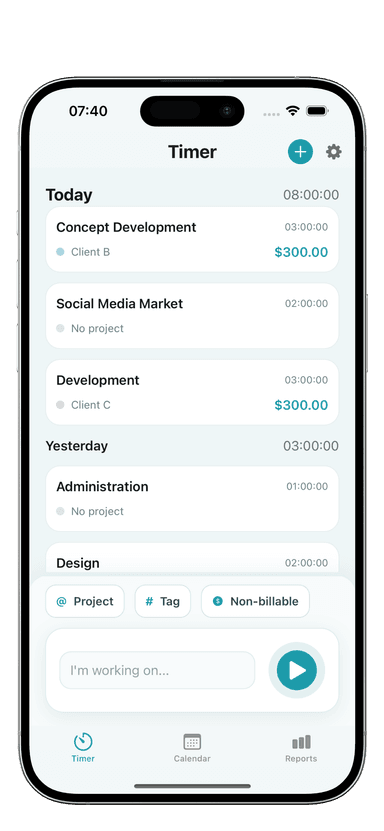
4. Track against your plan. At the end of each day, check whether your actual hours matched your planned hours. Toggle Time Tracker makes this easy — start a timer when you begin a task, stop it when you finish. After a few weeks, your time estimates become significantly more accurate, and your freelance daily routine schedule starts running like clockwork.
Your Weekly Review Ritual: 20 Minutes Every Friday
The weekly review is where planning becomes learning. Without it, you repeat the same mistakes each week. With it, you improve your system every seven days.
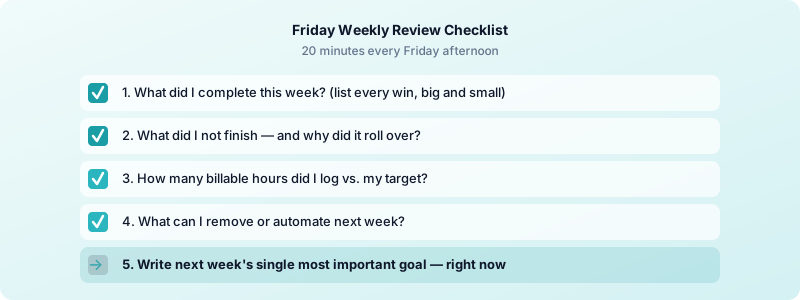
Run through these five questions every Friday afternoon:
- What did I complete? List everything you finished, including small wins. This is motivating and helps with invoicing accuracy.
- What did I not finish? Note what rolled over and why. Was the estimate wrong? Did something urgent come up? Did you lose time to distraction?
- How many billable hours did I log? Compare against your target. If you consistently fall short, your default week may have too many admin tasks — or too many meetings scattered through your best focus hours.
- What can I remove or automate next week? Look for any tasks you did this week that were not a good use of your time.
- What is the one thing that will make next week successful? Write your next week's goal now, while Friday's context is fresh.
This 20-minute ritual creates a feedback loop that makes each week slightly more effective than the last. Over a quarter, the improvement is dramatic. If you need help staying focused while working from home, a consistent review ritual is one of the highest-leverage habits you can build.
Putting It All Together
The freelance weekly planning template is not a rigid system. It is a starting point you adapt to your work style, your clients, and your energy patterns.
Start simple: the next time you sit down to plan your week as a freelancer, spend 30 minutes filling out each section. Block your client work, schedule your admin, pick one investment task. At the end of the week, run the five-question review. Adjust. Repeat.
Within a month, your freelance weekly planning template will become second nature. You will have a clearer picture of your actual capacity, fewer missed deadlines, and more billable hours logged. The freelancers who plan their week with intention consistently out-earn those who wing it — not because they work more, but because they waste less.
Download Toggle Time Tracker and start tracking your billable hours against your weekly plan today.