How to Set Project Minimums as a Freelancer (And Why You Should)
Every freelancer has taken a small project that felt harmless at the time. A quick logo tweak. A short article. A "simple" one-page website. Then the back-and-forth emails start, the revision rounds pile up, and the kickoff call runs long. By the time you invoice, you've spent more time managing the project than doing the work — and the hourly math is ugly.
Project minimums fix this. They're one of the most practical pricing tools available to freelancers, and most people wait far too long to implement them.
What a project minimum is (and why it exists)
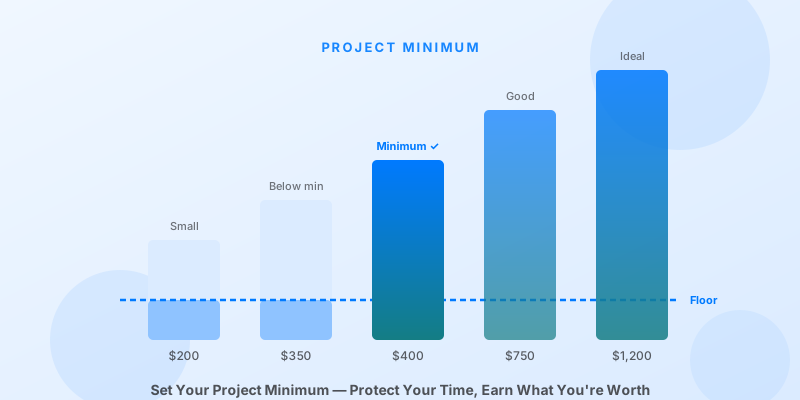
A project minimum is a floor — the lowest amount you'll accept for any single engagement, regardless of scope.
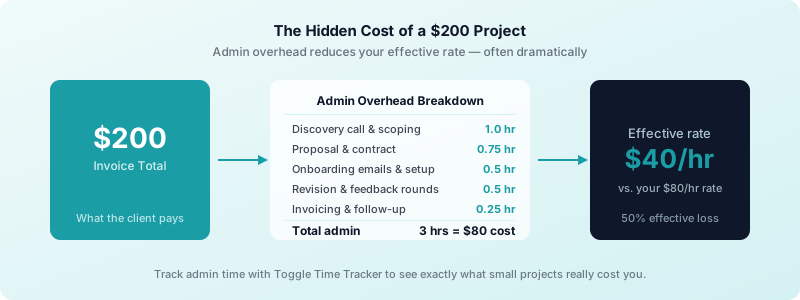
It exists because every project carries a fixed overhead that has nothing to do with the deliverable. You scope the work, sign the contract, onboard the client, answer questions, manage revisions, submit the invoice, and follow up on payment. That process takes roughly the same amount of your time whether the project is worth $200 or $2,000.
When you take a $200 project with $80 in admin overhead, your effective rate on the billable work drops sharply. When you take a $2,000 project with the same $80 in admin overhead, it barely registers. The only rational response is to set a minimum that makes the overhead worth absorbing.
This is not about being difficult or pricing out small clients. It's about running a financially sustainable business.
How to calculate your project minimum
Your minimum is not a number you pick out of thin air. It comes from two inputs: your actual admin overhead per project and your minimum viable profit on that overhead.
Step 1: Track your admin time per project.
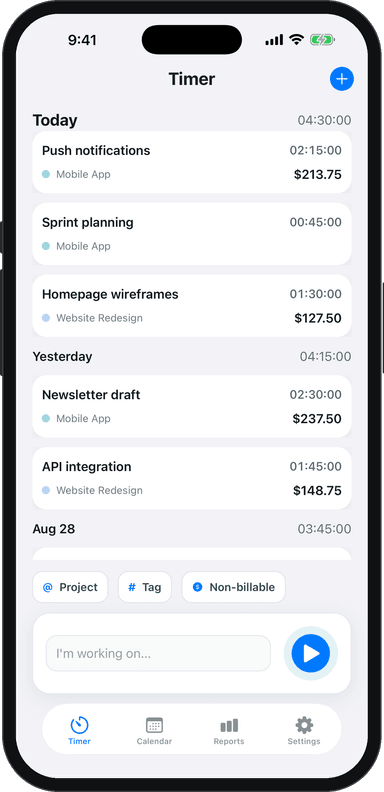
For the next three or four projects, log every minute that isn't billable work. Discovery calls, proposal writing, contract review, onboarding emails, status updates, revision requests, invoicing, and payment follow-up all count. Use Toggle Time Tracker to run a timer for each admin task and tag it separately from your billable hours. Most freelancers are surprised to find this runs 3–6 hours per project.
Step 2: Multiply by your true hourly rate.
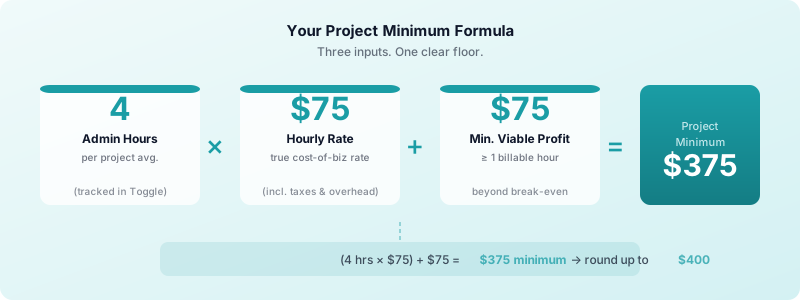
Take your average admin hours and multiply by your real cost-of-business hourly rate — the number that accounts for taxes, software, non-billable time, and target income. If admin averages 4 hours and your true hourly rate is $75, your admin cost per project is $300.
Step 3: Add your minimum viable profit.
You need to earn something beyond breaking even on overhead. A useful benchmark: your minimum project should be worth at least one full billable hour of focused work on top of admin recovery. At $75/hour, that's another $75.
The formula:
(Admin Hours × Hourly Rate) + Minimum Viable Profit = Project Minimum
Using the example above: (4 × $75) + $75 = $375 minimum.
Round to a clean number. In this case, $400 is a natural floor.
If you work with value-based pricing, your minimum may be higher — a flat fee that reflects the outcome delivered, not just the hours involved. The formula still gives you a reliable floor so you know when a proposed project doesn't clear the threshold.
How to communicate your minimum to clients
The way you frame your minimum determines whether clients accept it or push back.
Lead with the engagement, not the number. When a prospect describes a small project, say: "My minimum engagement for new projects is $X. That covers [scope description] and everything needed to get it done properly." You're presenting it as a package, not a restriction.
Be matter-of-fact, not apologetic. "My minimum project fee is $400" is a complete sentence. You don't need to justify it, qualify it, or soften it. Hesitation signals that you're not confident in the number, which invites negotiation.
Include it in your intake process. Add a line to your inquiry form or email auto-response: "Note: my minimum engagement fee is $400." This filters out mismatched prospects before you spend time on a discovery call.
If you offer retainer arrangements, note that retainers typically satisfy any project minimum by design — an ongoing engagement is the opposite of a one-off micro project.
What to say when a client pushes back
Pushback on a project minimum usually takes one of two forms.
"That's too expensive for what I need."
Respond with: "I understand. The minimum reflects the overhead involved in any new engagement regardless of scope. If the budget doesn't fit, I'm happy to suggest a few freelancers who might be a better match." Then actually offer to refer them. This response is generous and firm. Most clients either accept the minimum or self-select out — both are good outcomes.
"Can you make an exception this one time?"
This is the more dangerous ask, because saying yes once sets a precedent. Respond with: "I keep my minimums consistent across all clients — it's how I stay fair and keep my rates predictable. If the current scope doesn't fit, we could look at expanding it to make the engagement worthwhile for both sides." This reframes the conversation toward more scope rather than a lower rate.
Why minimums attract better clients
Project minimums do something counterintuitive: they tend to improve the quality of clients you work with, not reduce the quantity.
Clients who respect your minimum understand that professional work has professional costs. They're investing in a result, not hunting for the lowest price. These are the clients who give clear briefs, respond quickly, and pay on time.
Clients who resist your minimum on a $300 project will resist every invoice, revision limit, and deadline you set. Filtering them out early isn't just good for your income — it's good for your schedule, your stress level, and the quality of the work you do for everyone else.
Your project minimum is a signal about how you run your business. Set it based on real numbers, communicate it with confidence, and adjust it as your rates and overhead evolve. The freelancers who protect their time with clear minimums are the ones who build sustainable, profitable practices — not just busy ones.
Start by tracking your actual admin time on your next project with Toggle Time Tracker. The data will tell you exactly where to set the floor.