Freelance Time Tracking for Flat Rate Projects: Why It Still Matters
Here's a belief that costs freelancers real money: "I charge a flat fee, so I don't need to track my time."
It sounds logical. If your invoice says $3,000 and the client pays $3,000, what does it matter how many hours you worked? A lot, it turns out. The time you spend on a flat-rate project is data — and without that data, you're pricing blind on every future project.
The misconception that hurts your margins
Hourly freelancers track time because they bill by the hour. That much is obvious. But flat-rate and fixed-price work doesn't remove the relationship between time and money — it just hides it.
When you accept a flat-rate project, you're making an implicit bet: "This project will take X hours, so my $3,000 fee means I'll earn at least $Y per hour." If your estimate is wrong, you don't know it unless you track. You finish the project, move on, and make the same underprice mistake next time.
That's the trap. Without tracking, flat-rate projects feel fine on the surface — client paid, project delivered — but your bank account slowly tells a different story.
Four reasons flat-rate freelancers need time data

1. You need to know your effective hourly rate
Your flat fee divided by actual hours worked is your effective rate. If you quoted $3,000 on a project that took 40 hours, your effective rate is $75/hour. If it took 60 hours, it's $50/hour. These are very different outcomes — and only tracking tells you which one is true.
Over time, calculating your effective hourly rate project by project reveals whether your flat-rate pricing is actually working. You might find that certain project types are reliably profitable and others consistently eat your margin.
2. Your estimates improve with real data
Humans are notoriously bad at estimating how long tasks take. The planning fallacy is real. You imagine the best-case version of a project and quote accordingly, then reality shows up with revision rounds, client delays, and unexpected complexity.
The only antidote is historical data. When you've tracked five similar projects, you stop guessing and start knowing. You quote based on what actually happened, not what you hoped would happen. For more detail on applying this to time tracking on fixed-price projects, there's a full breakdown there.
3. You can detect and respond to scope creep
Scope creep is the slow expansion of project requirements beyond what was originally agreed. It's common, it's expensive, and it's very hard to argue against without evidence.
When you're tracking time by task, you'll notice when a project that should have been 25 hours is sitting at 22 hours with half the deliverables still outstanding. That's your signal to pause, review the original brief, and have a conversation about out-of-scope work before you've absorbed the full cost of it.
Without tracking, you only notice scope creep when you're exhausted and the project still isn't done.
4. You have evidence if a dispute arises
Most client disputes come down to: "I don't think this should have taken that long." Without a time log, you're arguing from memory against someone with a financial incentive to push back.
A detailed time log with task-level entries shows exactly where your hours went — research, revisions, calls, delivery. That transparency either resolves the dispute quickly or prevents it from happening in the first place.
How to track time on flat-rate projects without overcomplicating it
The goal isn't to build a bureaucratic time-reporting system. It's to capture useful data with minimal friction.
A simple structure works well: one project in Toggle Time Tracker per client engagement, and a handful of task categories that reflect how you actually work. For a web design project, that might be discovery, design, revisions, and client calls. For a writing project: research, drafting, editing, and feedback rounds.
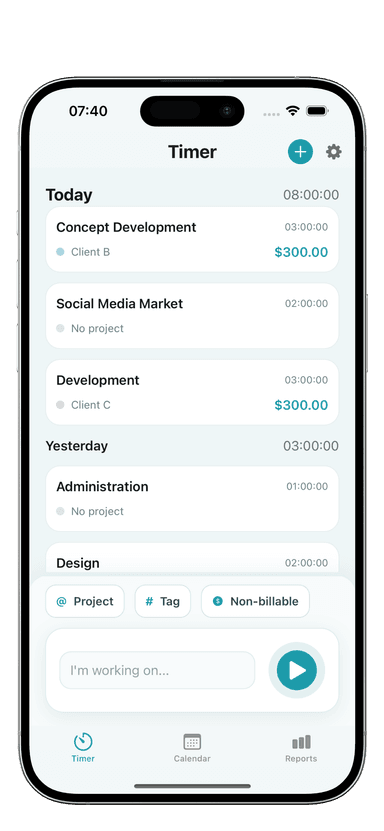
Start the timer when you start working. Stop it when you stop. Toggle Time Tracker's one-tap timer makes this fast enough that there's no excuse to skip it. The whole point is that capturing the data takes almost no time.
Resist the urge to add complexity. You don't need 15 task types. Three to five is enough to give you meaningful breakdowns without creating a tracking chore.
How to use time data after a flat-rate project ends
The data you collect only creates value if you actually look at it. A quick post-project review — ten minutes, no more — pays dividends on every future project you price.
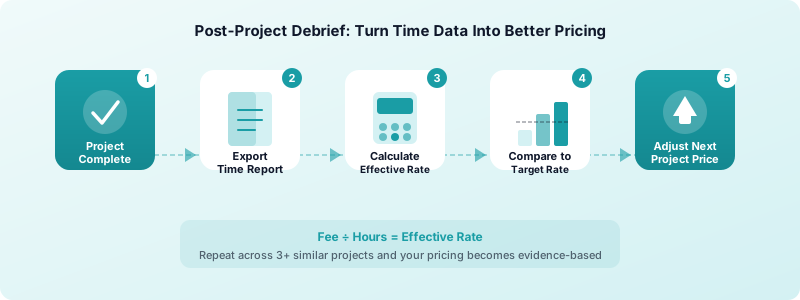
Here's a straightforward workflow:
-
Export your time report from Toggle Time Tracker once the project is complete. You'll see total hours and a breakdown by task or category.
-
Calculate your effective rate. Divide your flat fee by total hours. Compare it to your target hourly rate. Were you above, at, or below your target?
-
Identify the time sinks. Which tasks took longer than expected? Were there more revision rounds than you planned for? Did a specific phase balloon unexpectedly?
-
Adjust your next estimate. If this project type took 35% more time than you quoted, build that buffer into your next quote. Or price the flat rate higher to account for typical complexity.
Once you have two or three data points for a given project type, your pricing becomes genuinely evidence-based. You'll also get faster at the estimate itself — it stops being a guess and starts being a lookup.
Reviewing your logs regularly is part of this habit. Reviewing your time logs at the end of each project keeps patterns visible before they become problems.
Build the habit now, benefit on every project
The freelancers who price flat-rate work most confidently aren't guessing. They've tracked enough projects to know what their time actually costs.
Toggle Time Tracker is designed to make this easy. Organize work by project, track by task, and export clean reports when you need them. The habit takes a week or two to form — but the data it generates has value for years.
If you're not tracking time on flat-rate projects, you're not running your freelance business on real numbers. Start tracking, review the data after each project, and let reality inform your pricing instead of hope.