How to Review Your Freelance Time Logs (And What to Do With the Data)
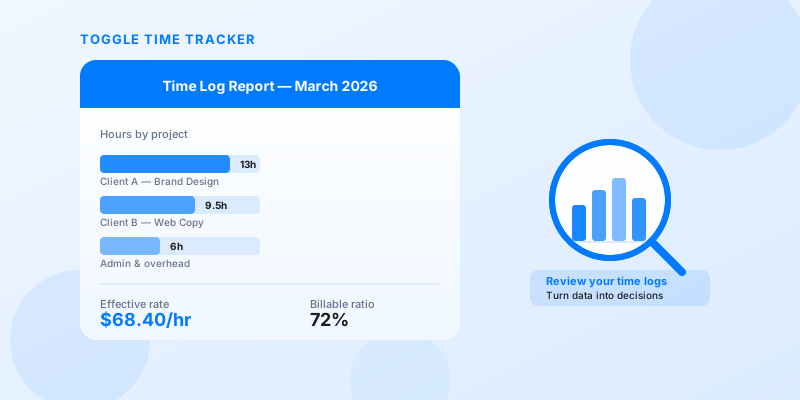
Most freelancers track their time. Far fewer actually review it. You start a timer, stop it, log the hours — and then move on. The data just sits there.
That's a missed opportunity. Your time logs aren't just a billing record. They're a business report. Reviewing them regularly is how you find out whether your pricing makes sense, which clients are costing you more than they're paying, and where your working hours are actually going.
This guide walks you through how to do a weekly review, a monthly review, and — most importantly — what decisions to make with what you find. If you want to understand why tracking time matters in the first place, that's a good starting point. But this article is about what comes next.
Tracking vs. reviewing: why most freelancers only do half the job
There's a difference between logging time and reviewing it. Logging is passive — you record what happened. Reviewing is active — you look for what the data is telling you.
Think of it like keeping a food diary but never reading it back. The habit exists, but the insight doesn't.
Most freelancers treat time tracking as a tool for invoicing. It tells clients how many hours you worked. But the same data also tells you:
- Whether your quoted rate matches what you're actually earning
- How much of your working week is billable versus overhead
- Which clients or project types eat more time than they're worth
- Whether your estimates are accurate or consistently off
None of that shows up unless you actually look.
How to do a weekly time review
A weekly review doesn't need to take long. Fifteen minutes on a Friday afternoon is enough. The goal is to catch problems while they're small and keep your estimates calibrated.
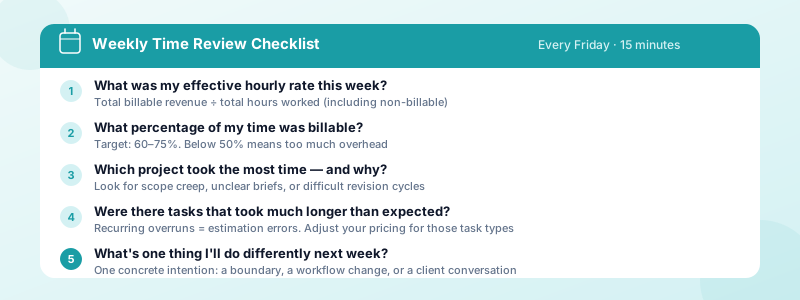
Here are the five questions to answer every week:
1. What was my effective hourly rate this week? Take your total billable revenue for the week and divide it by total hours worked (including non-billable time). If you billed $600 and worked 20 hours, your effective rate was $30/hour — even if your stated rate is $75. This gap is where pricing problems hide.
2. What percentage of my time was billable? A healthy billable ratio for most freelancers is 60-75%. If you're consistently below 50%, too much of your week is going to admin, pitching, or overhead. If you're above 80%, you may be underinvesting in business development.
3. Which project took the most time — and why? Look at your hours by project. If one project consumed a disproportionate share of your week, ask why. Was it scope creep? Unclear briefs? A difficult revision cycle? Identifying the cause helps you address it before it repeats.
4. Were there any tasks that took much longer than expected? These are your estimation errors. Over time, tracking these helps you build more accurate quotes. One slow week doesn't mean much — but if the same type of task consistently runs long, your pricing for that task is probably wrong.
5. What's one thing I'd do differently next week? This could be a workflow change, a boundary you need to set, or a conversation you need to have with a client. End every review with one concrete intention.
Toggle Time Tracker makes this easy. You can view your hours by project or tag, and export a PDF or Excel report at the end of each week. Instead of doing mental math, you're looking at a clear breakdown of where your time went.
If you're still working on making time tracking a consistent habit before reviewing it, building the tracking habit first is the right foundation.
How to do a monthly time review
Monthly reviews go deeper. You're looking for patterns that don't show up in a single week — and making bigger strategic decisions based on what you find.
Set aside 30-45 minutes at the end of each month. Grab your time log export and work through the following:
Total billable hours and effective rate for the month Calculate your monthly effective rate the same way you do it weekly — total revenue divided by total hours worked. Then compare it to the previous month, and the same month last year if you have the data. Is your effective rate trending up, down, or flat?
Billable hours per client Which clients accounted for the most hours? Which accounted for the least revenue relative to hours? This comparison reveals your highest and lowest effective rate clients — which often isn't the same as your highest and lowest paying clients.
Time by task category If you tag your time entries (by task type, phase of work, or deliverable), your monthly report can show what percentage of your work time goes to each category. For many freelancers, this reveals that certain types of work — like revisions, client communication, or administrative tasks tied to specific clients — take far more time than the project budget accounts for.
Patterns across weeks Were there consistent slow periods? Rush weeks? Recurring types of overrun? Patterns repeat. If your last three Mondays were consumed by a particular client's urgent requests, that's not a coincidence — it's a workflow issue to address.
What to do with what you find
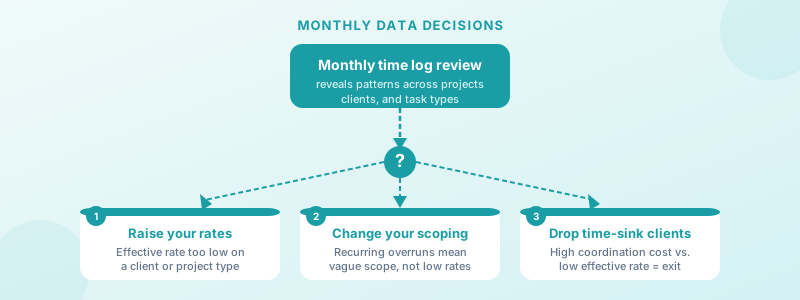
Data is only useful if it drives decisions. Here are the three most common decisions that come out of reviewing your time logs:
Raise your rates on underpriced clients If a client is consistently producing a lower effective rate than others, their work is underpriced. Before raising rates, make sure it's a pricing problem and not a scope creep problem (those require different fixes). But if the work genuinely takes more time than the budget allows for, a rate conversation is justified. Knowing how to calculate your real freelance hourly rate gives you the number to anchor that conversation to.
Change how you scope work Some projects run long not because the rate is wrong but because the scope is vague. If your time logs show repeated overruns on a certain type of project, revisit your scoping process. Add a cap, break the work into phases, or build in a buffer for the task categories that consistently run long.
Drop or limit time-sink clients Some clients consistently generate low effective rates — not because the work is underpriced, but because they require a disproportionate amount of coordination, revisions, or back-and-forth. Your time log will surface these clients clearly if you look for them. Limiting their work share, raising their rates significantly, or ending the relationship are all legitimate responses.
Making the review stick
A review process you don't do isn't a process — it's a good intention. The easiest way to make it happen is to put it on your calendar as a recurring block. Weekly on Fridays, monthly on the last working day of the month.
Keep it simple. You don't need a spreadsheet system or a fancy dashboard. Toggle Time Tracker's built-in reports give you a PDF or Excel export sorted by project, so your weekly and monthly reviews take minutes rather than hours. The data is already organized — you just need to read it.
The freelancers who grow their income year over year aren't just working harder. They're reviewing their data and acting on it. Your time logs tell a story. It's worth reading.
Download Toggle Time Tracker and start turning your time logs into business decisions.