Freelance Invoice Template: What to Include and Why
Every freelancer sends invoices. Not every freelancer gets paid on time. The difference often comes down to the quality of your freelance invoice template — not the work itself.
A professional, complete invoice tells clients exactly what they owe, when to pay, and how to do it. A sloppy or incomplete one creates confusion, delays, and awkward follow-up emails. Getting your template right from the start saves you hours of chasing payments later.
Why Your Invoice Template Matters More Than You Think
Most freelancers think of invoicing as an afterthought — something you do after the real work is done. But your invoice is often the last impression you leave on a client after a project wraps up.
A clear, professional invoice signals that you run a real business. It also removes friction from the payment process. When a client can see exactly what they owe, when it's due, and how to pay, there's no excuse to delay.
Research consistently shows that invoices sent within 24 hours of project completion are paid faster — often 2-3x faster — than invoices sent days later. Your template makes it easy to send quickly every time.
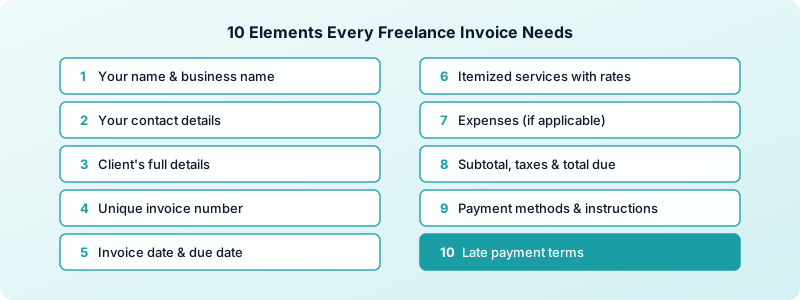
What Your Freelance Invoice Template Must Include
Miss any of these and you're inviting payment delays.
1. Your full name and business name Clients need to know who the invoice is from. Include your legal name and, if you operate under a business name, that too. Add your address and email — you'd be surprised how often a client needs to mail a check or file you for accounting.
2. Your contact details Phone number and email address so clients can reach you with questions. Less mystery means fewer payment holds.
3. The client's full details Include the client's name, company name, and address. If invoices go to a specific accounts payable contact, use their name — not just "Billing Department."
4. A unique invoice number Start at 1001 (or any number you like) and increment by one each time. A consistent numbering system makes it easy to track which invoices are paid and reference specific ones in follow-up conversations.
5. Invoice date and payment due date The invoice date is when you send it. The due date is when payment is expected. If you use Net 15, Net 30, or another payment terms structure, state the due date explicitly — don't make the client do the math.
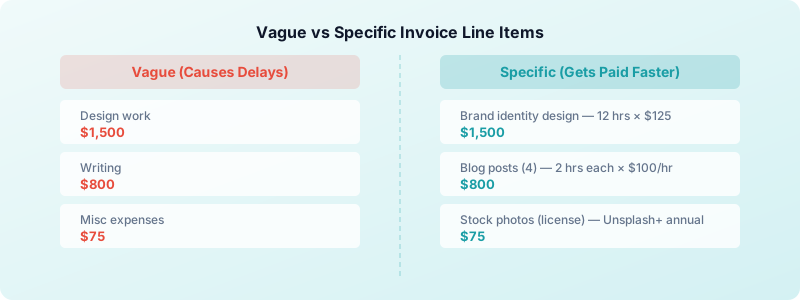
6. Itemized services with rates List each service, the quantity (hours or units), your rate, and the line total. Vague entries like "Design work — $1,500" invite questions. Specific entries like "Brand identity design — 12 hours × $125/hr = $1,500" communicate value and leave nothing open to interpretation.
7. Expenses (if applicable) If you incurred billable expenses — software licenses, stock photos, travel — list each one as a separate line item with a receipt reference. Clients appreciate transparency, and it protects you if they ever question a charge.
8. Subtotal, taxes, and total due Show the math clearly. Subtotal before tax, any applicable taxes as a separate line, and the final total in a prominent font. If you work internationally, note the currency.
9. Accepted payment methods and instructions Tell clients exactly how to pay. Bank transfer (include account details), PayPal, Stripe, check — whatever you accept. If you require a specific reference number in the payment, say so.
10. Late payment terms State your late fee policy plainly: "Invoices unpaid after 30 days accrue a 1.5% monthly fee." This alone can cut late payments dramatically, because most clients want to avoid fees.
How to Format a Freelance Invoice Professionally
Your invoice doesn't need to be a design project. It needs to be clean, readable, and unambiguous. Think of it as a business document, not a creative portfolio piece.
Use a simple layout with your logo or name at the top, client info and invoice details clearly separated, and the line items in a table format. The total due should be impossible to miss — bold it, increase the font size, or both. Clients should be able to find the amount owed in under five seconds.
PDF is the standard format for a freelance billing template. It preserves your layout across devices and can't be accidentally edited by the client. If you're building your template in Word or Google Docs, always export to PDF before sending — never send the editable source file.
Keep your brand colors subtle. A bit of color in the header looks professional. A rainbow invoice looks amateur.
When naming your PDF files, use a consistent pattern: Invoice-[Number]-[ClientName]-[Month].pdf. This makes it easy to track down any invoice later and looks organized when clients file it in their accounting system.
Common Freelance Invoice Mistakes That Delay Payment
Even good freelancers make these errors. Each one creates friction that slows down payment or triggers uncomfortable conversations.
Sending one invoice for multiple projects. Keep one invoice per project or engagement. Mixing projects confuses accounting teams and can put the entire payment on hold while they untangle it.
Forgetting to specify the due date. "Payment due upon receipt" is vague. Net 30 without a calendar date means the client gets to decide what counts as the start. Always write the actual date: "Payment due: April 20, 2026."
No late fee policy. Without consequences for late payment, there's no incentive to prioritize your invoice. A 1.5% monthly late fee is standard and rarely triggers pushback from serious clients.
Sending invoices to the wrong person. Always confirm who handles payments before you send. Forwarding chains and missed emails are one of the most common causes of payment delays. Ask during your project kickoff call: "Who should I send invoices to?"
Using vague service descriptions. If a client has to ask "What is this for?", your invoice has failed its job. Be specific. Reference the project name, deliverable, or contract if needed. Learn more about creating a freelance invoice from scratch if you're starting from zero.
Waiting too long to send. Every day you delay sending your invoice is a day later you'll receive payment. Build the habit of sending within 24 hours of completing deliverables — while the project is fresh in the client's mind.
Turning Tracked Hours Into Invoice Line Items
If you bill hourly, your invoice quality depends entirely on how well you track your time. Rough guesses become billing disputes. Precise logs become airtight invoices.
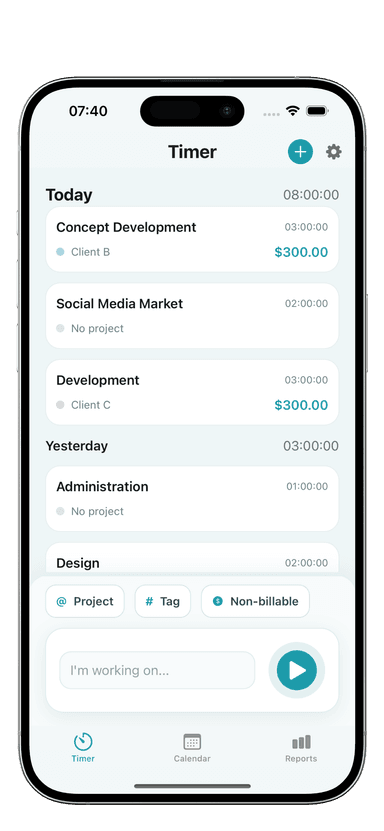
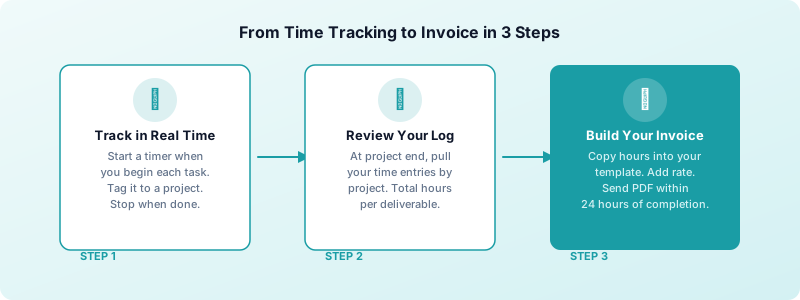
The best workflow: track every session in real time using a timer app, then pull your logged hours directly into the invoice at the end of the project. When a client questions a charge, you can show the exact timestamps — date, time, duration, and what you worked on.
Your freelance invoice format becomes much stronger when every line item is backed by real data. Instead of "Copywriting — $1,200," you can write "Copywriting — 10 hours × $120/hr — tracked April 1-8" and attach your time log if needed. That level of specificity builds client trust and eliminates disputes before they start.
Toggle Time Tracker makes this easy. Every time entry is tagged to a project, so when you're ready to invoice, you can see exactly how many hours went into each deliverable. No reconstruction, no guessing, no uncomfortable conversations.
This also protects you when scope creep happens. If a client says "I didn't think that was included," your time data shows exactly when the work was done and what it involved.
For a full walkthrough of the invoicing process — from first contact to final payment — see our complete guide to invoicing as a freelancer.
Build Your Template Once, Use It Forever
Your freelance invoice template is a one-time investment that pays off on every project you ever complete. Spend 30 minutes building a clean, complete template today — then focus on the work that actually makes you money.
Make sure your template includes all 10 elements, shows line items clearly, states your payment terms explicitly, and exports cleanly to PDF. Test it on a real invoice before you need it.
Download Toggle Time Tracker and start tracking every billable hour from your iPhone — so your next invoice writes itself.