Energy Mapping for Freelancers: Work Smarter, Not Longer
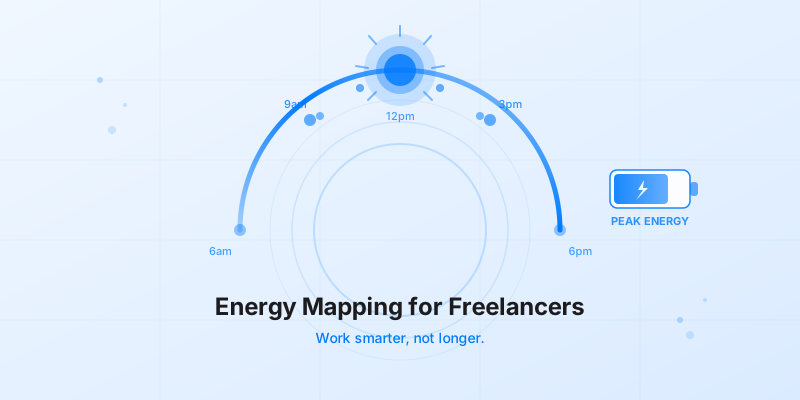
Most freelancers manage their time. Far fewer manage their energy. Energy mapping for freelancers is the practice of identifying when your focus, creativity, and drive are naturally highest — and then deliberately scheduling your hardest work into those windows. It sounds simple. But it changes everything.
If you've ever spent three hours on a task that should have taken one, the problem probably wasn't your time management. It was your energy.
What Is Energy Mapping (And Why Most Freelancers Skip It)
Energy mapping is the process of tracking your mental and physical energy across the day, finding your personal peaks and dips, and using that data to build a smarter schedule.
Most freelancers skip it because they're already busy. There's always client work to finish, emails to answer, or invoices to send. Stopping to observe how you work feels indulgent when you're trying to keep up with what needs to get done.
But here's the cost of ignoring it: you end up doing creative, high-stakes work when you're half-awake, and easy admin tasks during the hours when you could actually produce something great.
Your biology runs on two overlapping cycles. Your circadian rhythm sets the broad tone of alertness across the day. Nested inside that are ultradian rhythms — roughly 90-minute cycles of rising and falling cognitive performance, first identified by sleep researcher Nathaniel Kleitman. During the peak of each cycle, focus sharpens and problem-solving improves. At the trough, your brain is actively asking for a break.
Fighting these cycles doesn't make you more productive. It just burns you out faster.
How to Find Your Peak Energy Hours
You don't need a lab or a wearable device to find your peak hours. You need three days and a simple rating system.
For three working days, set a timer for every hour. When it goes off, write down a number from 1 to 10 for your energy and focus at that moment. Do this before you check anything — email, Slack, your task list. You want a raw reading, not a reaction to what's happening around you.
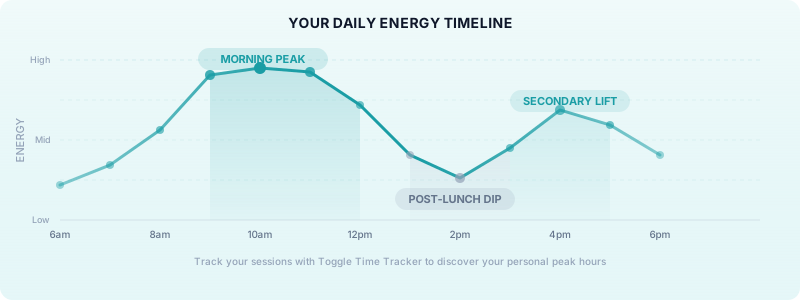
After three days, you'll have 24 to 30 data points. Look for the consistent highs and lows. Most people see a pattern almost immediately: a morning peak, a post-lunch dip around 1–2pm, and often a secondary lift in the late afternoon.
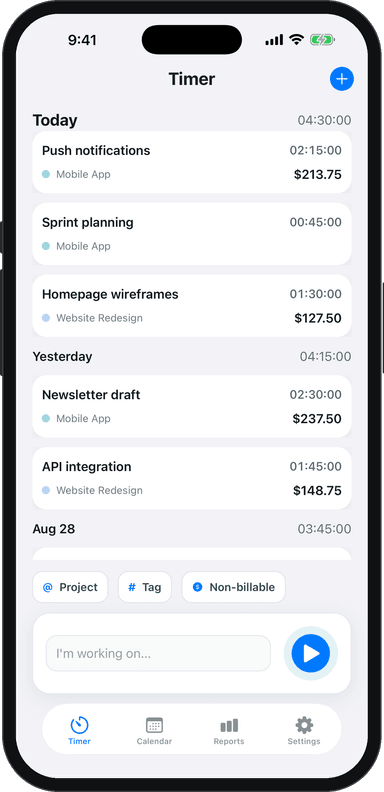
This is where Toggle Time Tracker becomes genuinely useful. If you run the app while you work, you can look back at your time logs and compare them to your energy notes. You'll start to notice which sessions produced fast, clean work and which ones felt like you were pushing through mud. The time data gives your energy observations real context.
Matching Tasks to Your Energy Levels
Once you know your peaks and dips, the next step is assigning tasks to the right zones.
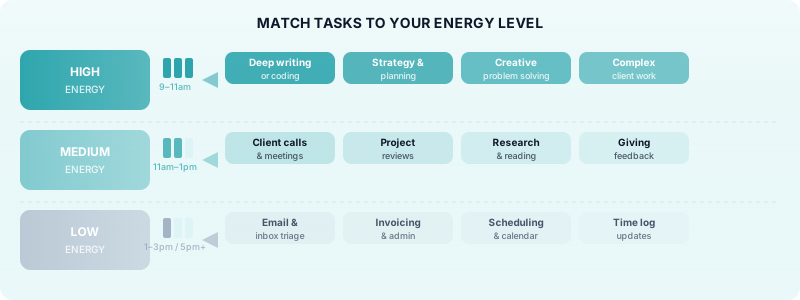
High energy (your peak hours): This is your prime creative and cognitive window. Use it for deep work — writing, designing, coding, strategic planning, anything that requires sustained focus or original thinking. Protect these hours aggressively. Keep them meeting-free. Don't start them by checking email.
Medium energy (the hours just before and after your peak): Good for work that requires attention but not peak creativity. Client calls, project reviews, giving feedback, research.
Low energy (your post-lunch dip or late-day drag): Perfect for administrative tasks that don't require much thinking. Invoicing, email replies, scheduling, expense tracking, updating your time logs. These tasks still need to get done — they just don't need your best brain.
This is the core principle of peak productivity hours for freelancers: not all hours are equal, and treating them as if they are is where most people leave performance on the table.
A concrete example: a freelance copywriter who typically hits peak focus between 9 and 11am could block those two hours for first drafts every morning. Client emails get batched into a 30-minute window at noon. Admin tasks go to 4pm. That single shift — matching task type to energy level — can cut a full day of mediocre work down to five hours of clean, high-quality output.
How to Build a Week Around Your Energy Map
A daily energy map is useful. A weekly energy map is powerful.
Your energy doesn't just vary by hour — it varies by day. Most people have lower cognitive energy on Mondays and Fridays. Tuesday through Thursday tends to be peak territory for most freelancers. Some people also notice that their ultradian rhythm timing shifts slightly across the week as sleep debt accumulates.
Start by picking your two or three highest-energy days and protecting the peak hours on those days for your most important client work. Use lower-energy days for admin-heavy tasks, prospecting, or internal business work.
A practical framework for building a sustainable work routine:
- Monday: Light admin, planning, reviewing the week ahead
- Tuesday–Thursday: Deep work blocks during peak hours; calls and meetings in medium-energy windows
- Friday: Wrapping up deliverables, invoicing, inbox zero
Pair this with time blocking and you've built a schedule that works with your biology instead of against it.
If you use Toggle Time Tracker throughout your week, your time logs double as a record of when you actually worked and for how long. Over a few weeks, you can spot which days and time slots are producing your best output — and which ones you should stop scheduling hard work into.
Common Energy Mapping Mistakes to Avoid
Tracking for one day and calling it done. One day gives you a snapshot. Three to five days reveals a pattern. Individual days have too much noise — a bad night's sleep, an early call, a stressful email first thing in the morning.
Ignoring your chronotype. Research consistently shows that "night owls" and "morning larks" have meaningfully different peak windows. If you're an owl, your best hours might be 10am to 1pm or even later. Don't copy someone else's schedule — find yours.
Treating your energy map as permanent. Energy patterns shift with seasons, life changes, sleep quality, and workload. Revisit your map every few months. A quick three-day check-in is enough.
Overscheduling your peak hours. This is the most common mistake. Freelancers discover their peak window and then jam it full of tasks. Protect those hours — but also protect time for breaks. The ultradian rhythm demands a 15–20 minute rest after each 90-minute focus cycle. Skipping breaks doesn't extend your peak. It just makes the crash worse.
Not using your time management strategy to reinforce the system. Energy mapping without a scheduling system to back it up fades quickly. Build your map and then put the structure in place to honour it.
Start Tracking, Start Learning
Energy mapping for freelancers is one of the fastest ways to get more done without working more hours. You stop guessing and start building a schedule around how you actually function.
The best place to start is simple: track your energy for three days, review your time logs in Toggle Time Tracker, and look for the overlap between your highest-energy hours and your most productive sessions. That overlap is your peak. Guard it.
Download Toggle Time Tracker and start building a clearer picture of when you do your best work.