The Freelance Shutdown Ritual: How to Actually Stop Working
As a freelancer, no one rings a bell to signal the end of the day. No commute forces the transition. Work just bleeds forward, an open laptop and another task away. A freelance shutdown ritual fixes that — it gives you a deliberate, repeatable way to close out the workday and actually stop working.
The concept was popularized by Cal Newport in Deep Work. His version involves reviewing tasks, updating tomorrow's plan, and saying a verbal cue — "Shutdown complete" — to mentally disengage. The underlying science is sound: your brain needs a clear signal that work is finished, or it keeps chewing on open loops all evening.
Here's how to build a shutdown ritual that fits freelance life.
Why Freelancers Struggle to Stop Working
The problem isn't laziness or poor discipline. It's structural.
When your home is your office, the psychological boundary between work and rest never fully forms. There's no physical departure, no commute to decompress, no coworker packing up next to you. The laptop is always there, always on.
Add in the financial anxiety that's common in freelance work — fear of missing a client message, guilt about an unfinished deliverable — and stopping feels irresponsible. So you don't stop. You just drift from working to half-working to scrolling, never fully present in either mode.
This is a fast road to burnout. And it's avoidable.
What a Shutdown Ritual Actually Does for Your Brain
The Zeigarnik Effect is the culprit behind most after-hours work rumination. Your brain naturally keeps unfinished tasks active in working memory — a built-in reminder system. Useful during the day. Exhausting at 9pm.
Here's the counterintuitive fix: you don't need to finish those tasks to get relief. You just need a trusted plan for them. Once your brain believes the tasks are captured and scheduled, it lets them go.
That's exactly what a shutdown ritual provides. You're not ignoring your work — you're telling your brain "this is handled, we can rest now."
The payoff is real: evenings that actually feel like evenings, better sleep, and sharper focus the next morning. Maintaining work-life balance as a freelancer isn't just about willpower — it's about systems like this one.
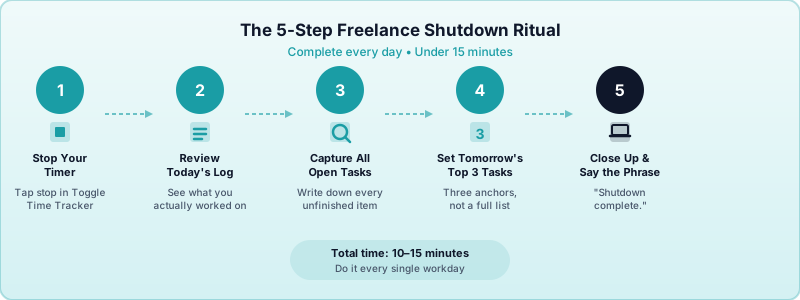
The 5-Step Freelance Shutdown Ritual
Keep this under 15 minutes. The goal is a complete, consistent close — not a second work session.
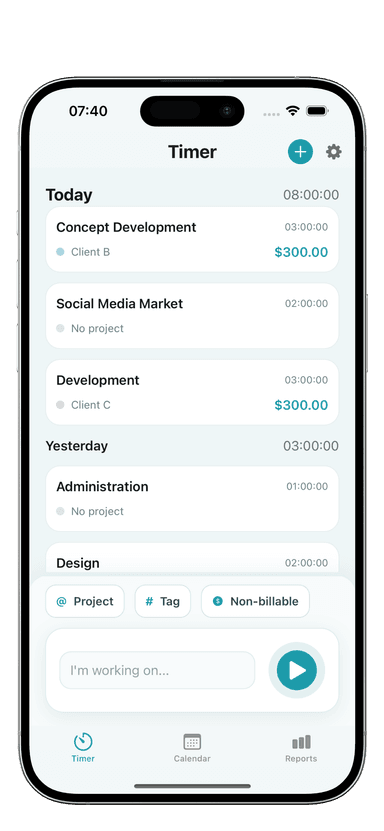
Step 1: Stop your timer. Open Toggle Time Tracker and stop the active timer. This is the physical act that initiates shutdown. It also gives you an instant read on what you billed that day — a satisfying anchor for the review that follows.
Step 2: Review today's log. Scan what you actually worked on. Did you finish what you planned? Were there interruptions that ate into billable time? This 60-second review builds awareness of where your day actually went, not just where you intended it to go.
Step 3: Capture everything open. Write down every unfinished task, pending reply, and stray thought in one trusted place — a task app, a notebook, your project management tool. Don't rely on memory. If it's not written down, your brain stays on high alert all night.
Step 4: Set tomorrow's top three. Pick three specific tasks for the next morning. Not a full to-do list — just three anchors. You'll start the next day with direction instead of decision fatigue.
Step 5: Close everything and say the phrase. Close your browser tabs, mute client notifications, and physically close your laptop if you can. Then say your shutdown phrase out loud. Newport uses "Shutdown complete." Pick whatever works for you. The verbal cue sounds silly until you realize it actually works — it's a pattern interrupt your brain learns to associate with "work is done."
How to Handle "One More Thing" Syndrome
"One more thing" is the shutdown ritual's biggest enemy. An email lands, a Slack message comes in, a thought surfaces about that client deliverable — and suddenly you've added 45 minutes to your day.
The fix is a firm cutoff rule, not willpower.
When a new task or message arrives after you've started your shutdown ritual, write it down in your capture system and keep going. It gets handled tomorrow. The only exception is a genuine emergency — and most "urgent" client messages are not emergencies.
If you find yourself routinely getting pulled back in, look at the pattern. Is a specific client creating after-hours pressure? Is your shutdown time too early or too late for your actual workload? Your time log in Toggle Time Tracker can show you where your day is running long and help you set a more realistic cutoff.
This connects to the bigger picture of building a daily routine that actually works for you — the shutdown time should be built into your schedule, not bolted on as an afterthought.
Making the Ritual Stick
A shutdown ritual only works if you do it every day. Here's how to build the habit.
Anchor it to a fixed time. Pick a shutdown time — say, 5:30pm — and treat it like a meeting you can't cancel. Set a recurring phone reminder 15 minutes before so you have time to wrap up before starting the ritual.
Start small. If 15 minutes feels like too much, start with five. Stop the timer, write down tomorrow's top three, close the laptop. That's enough to create a psychological endpoint. Add steps as the habit forms.
Track your streak. Even a simple tally on a sticky note ("Shutdown ritual: Day 4") gives you a small incentive to keep going. Streaks are surprisingly motivating once you've built a few days.
Be consistent on slow days too. The ritual matters most on days when you're not that busy — those are the days you're most likely to skip it. A consistent daily close reinforces the boundary regardless of workload.
Over time, the freelance shutdown ritual becomes the clearest signal you have that you're running a sustainable practice — one where work has defined edges, not open ends.
Start tonight. Stop your timer, write down what's open, set your three tasks for tomorrow, and close the laptop. That's all it takes to begin.
Download Toggle Time Tracker and make stopping your timer the first step of your shutdown ritual.