How to Track Time as a Freelancer: A Beginner's Guide
You just landed your first freelance client. The project is clear, the deadline is set, and you are ready to work. But then you sit down and realize: how do you actually track your time as a freelancer beginner? If you skip this step, you will end up guessing how long tasks take, undercharging for your work, and struggling to send accurate invoices.
The good news is that time tracking does not have to be complicated. A simple system, a few good habits, and 5 minutes of setup are all you need to start billing with confidence from your very first project.
Why Tracking Time Matters When You're Starting Out
New freelancers often skip time tracking because they think it only matters for hourly billing. That is a mistake. Even if you charge flat rates, tracking your hours shows you what you actually earn per hour on every project.
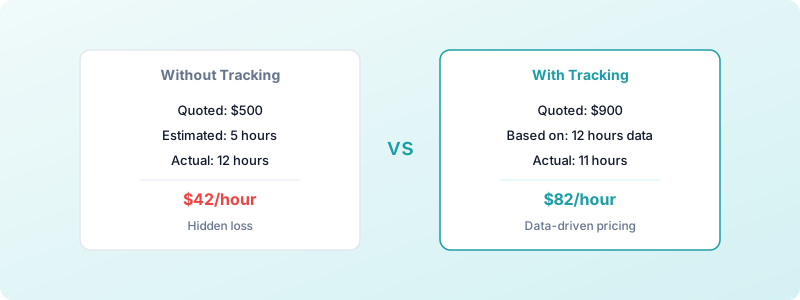
Here is a real scenario: you quote $500 for a logo design, thinking it will take 5 hours. Without tracking, you never notice that revisions, client calls, and file prep pushed the real total to 12 hours. That $100/hour project was actually a $42/hour project.
Freelancers who track their time from day one build a data set that makes future quoting accurate instead of hopeful. You will know exactly how long specific tasks take, which clients eat more time than expected, and whether your rates actually cover your costs. If you want to understand the full picture, read about why every freelancer needs time tracking.
What to Track (And What Not to Worry About Yet)
When you are starting out, keep it simple. Track these four things:
- Client work hours. Every minute spent on deliverables: designing, writing, coding, editing, or whatever your craft is.
- Client communication. Calls, emails, feedback rounds, and meetings. These are billable hours that beginners frequently forget.
- Project name or client name. Tag each entry so you can pull reports later and see totals by client.
- Whether the time is billable or not. This distinction matters more than most beginners realize. Our guide on tracking billable hours breaks this down in detail.
What you can skip for now: you do not need elaborate category systems, color-coded tags for every task type, or 15 different project codes. Start with client name + billable/non-billable. You can add complexity later when you have more clients.
How to Set Up a Simple Time Tracking System
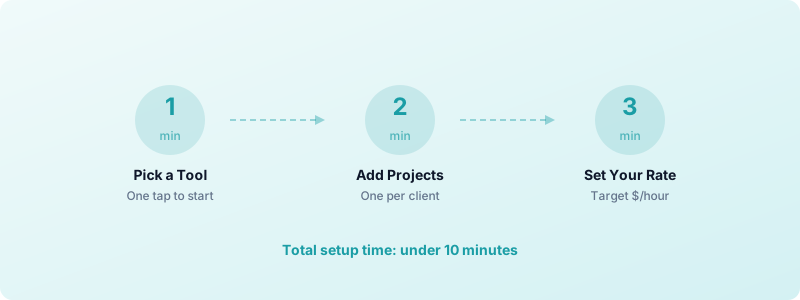
You need three things: a tracking tool, a basic project structure, and a daily routine. Here is how to set each one up in under 10 minutes.
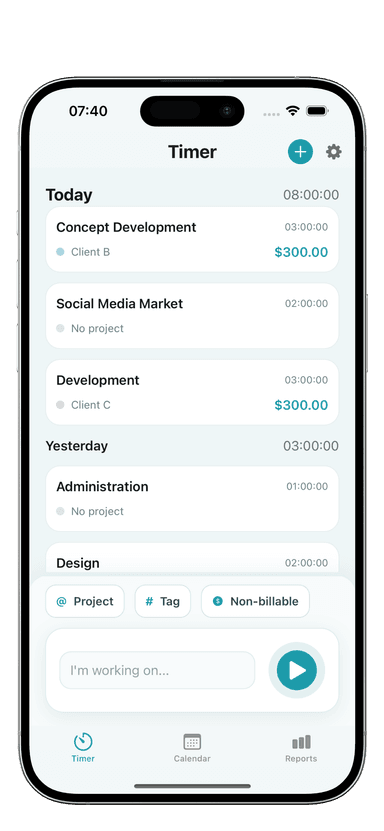
Step 1: Pick one tool and commit to it. Spreadsheets work but create friction. A dedicated time tracker removes the barrier between thinking "I should track this" and actually doing it. Toggle Time Tracker lets you start a timer with one tap, tag it to a project, and mark it as billable, all without creating an account or connecting to the internet.
Step 2: Create a project for each client. Before you start working, set up a project entry for every active client. This takes 30 seconds per client and saves hours of sorting later.
Step 3: Set your hourly rate in the tool. Even if you charge flat rates, enter your target hourly rate. This lets you see what you are effectively earning on each project as time accumulates.
Building the Time Tracking Habit
The biggest challenge is not choosing a tool. It is remembering to use it. Here are four techniques that work for beginners:
Start the timer before you open the project file. Make timer-first your rule. Open the tracker, hit start, then open your design tool or code editor. This sequence prevents the "I forgot to start the timer" problem that plagues most freelancers.
Use end-of-session notes. When you stop a timer, spend 10 seconds adding a brief note: "homepage wireframe v2" or "client feedback call." These notes make invoicing painless because you can show clients exactly what you worked on.
Review your time log every Friday. A 5-minute weekly review catches missed entries, reveals how much time went to non-billable tasks, and shows you patterns. After a month of weekly reviews, you will have a clear picture of where your hours actually go.
Do not aim for perfection. You will forget to start the timer sometimes. That is fine. Add the entry manually with your best estimate. A slightly imperfect log is infinitely more useful than no log at all. Consistency beats precision, especially when you are building the habit.
Common Beginner Mistakes to Avoid
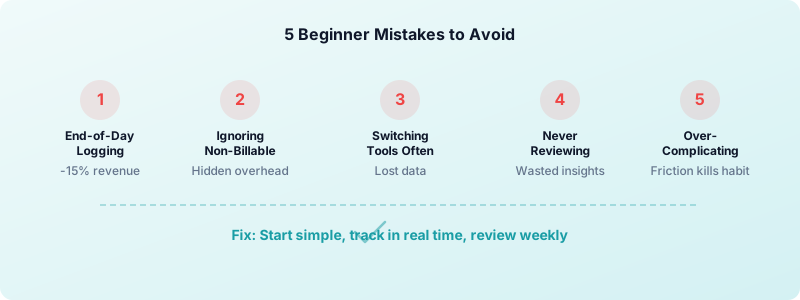
After reviewing what trips up new freelancers, these are the five most frequent errors:
-
Tracking only at the end of the day. Memory is unreliable. Freelancers who reconstruct their hours from memory lose an average of 10-15% of billable time. Real-time tracking captures everything.
-
Ignoring non-billable time. Admin tasks, invoicing, marketing, and learning new skills all take time. If you do not track them, you cannot account for them in your rate. You might be billing 30 hours per week but working 45.
-
Switching tools constantly. Every new tool means lost data and a reset on your habit. Pick one tracker and stick with it for at least 90 days before evaluating alternatives. If you haven't chosen one yet, our guide to the best time tracking app for freelancers covers exactly what to look for.
-
Tracking hours but never reviewing them. Data without analysis is just noise. The value of time tracking comes from the patterns it reveals, not from the act of pressing start and stop.
-
Making the system too complex. Ten project categories, five tag types, and color codes for urgency levels will slow you down. Start minimal and add structure only when you have a specific reason. For more on what to avoid, check out common time tracking mistakes freelancers make.
Start Tracking Today
You do not need to master freelance time tracking overnight. You need to start. Set up one tool, create projects for your current clients, and hit the start button before you begin your next work session.
Within 30 days, you will have enough data to quote projects accurately, identify where your time actually goes, and make informed decisions about your rates. That data set becomes more valuable with every entry.
Download Toggle Time Tracker and start building your time tracking habit with a simple, privacy-first tracker that works offline and requires no account.