How to Track Freelance Income and Expenses Simply
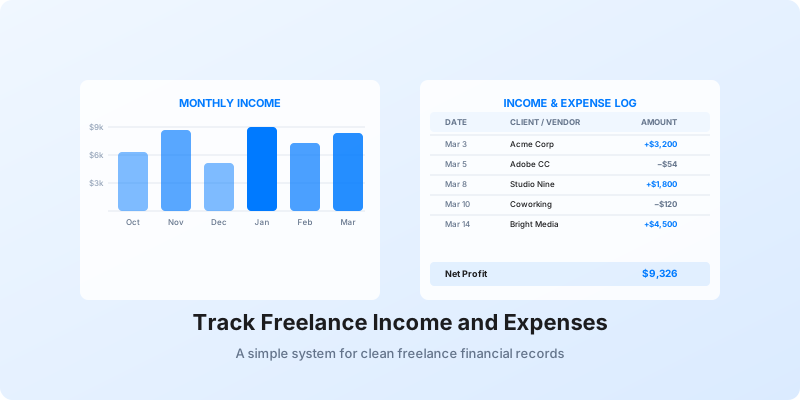
If you don't track freelance income and expenses consistently, you're flying blind. You can't tell which clients are actually profitable, you'll miss deductions at tax time, and cash flow surprises become a regular occurrence.
The good news: you don't need an accountant or expensive software to get organized. A simple system, built on a few solid habits, is enough.
Why Tracking Income and Expenses Is Non-Negotiable for Freelancers
Most freelancers underestimate how much their income varies month to month. One month you might invoice $9,000. The next, $3,500. Without records, you can't spot the pattern — or plan around it.
On the expense side, the average self-employed person misses $6,000 or more in legitimate deductions every year simply because they don't keep records. At a 22% federal tax rate, that's over $1,300 left on the table before you factor in self-employment tax.
There's also a legal dimension. The IRS expects you to keep business records for at least three years, and up to seven years if you report a loss. Scrambling to reconstruct a year of transactions from memory and old bank statements is not a position you want to be in.
How to Set Up a Simple Income Tracking System
You don't need dedicated accounting software to start. A spreadsheet with the right columns is enough to get going.
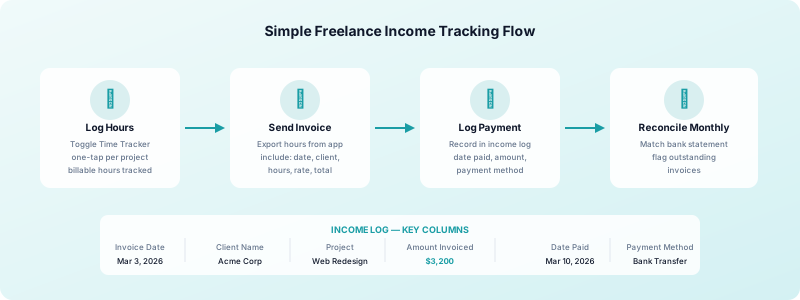
Set up a dedicated income log with these fields: invoice date, client name, project, amount invoiced, date paid, and payment method. Update it every time you send an invoice and again when payment lands.
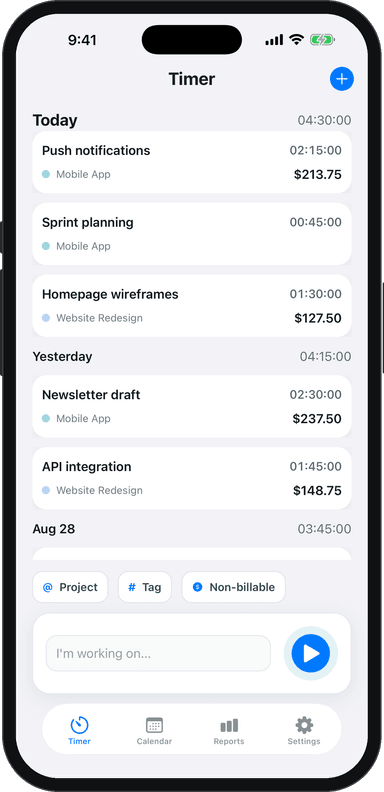
This is where Toggle Time Tracker feeds directly into your income system. When you log billable hours by project, you know exactly what to invoice and when — no guessing, no reconstructing time from memory. Your time log becomes the source of truth for every invoice you raise.
For income documentation, keep every invoice you send. The IRS considers invoices as supporting records even when you don't receive a 1099 from the client. See our full guide on how to invoice as a freelancer for a clean billing workflow that makes your records airtight.
How to Track Freelance Expenses Without a Full Accounting Tool
The same spreadsheet approach works for expenses. Add a second tab with these columns: date, vendor, category, amount, business purpose, and receipt saved (yes/no).
Use consistent categories from day one. Common ones for freelancers include:
- Software & Subscriptions — design tools, cloud storage, project management apps
- Home Office — a portion of rent, internet, and utilities if you have a dedicated workspace
- Hardware & Equipment — computers, monitors, external drives
- Phone & Internet — the business-use percentage of your monthly bill
- Travel & Transportation — client meetings, mileage at $0.70/mile in 2025
- Professional Development — courses, books, conferences
- Professional Services — accountant fees, contract review
Capture receipts the moment you spend. A photo in a dedicated folder on your phone is enough. Receipts over $75 are especially important to keep, but building the habit of saving everything is simpler than trying to remember thresholds.
For a full breakdown of what you can write off, check out our freelance tax deductions guide. And for more detail on building a robust expense tracking system for freelancers, that guide covers the full workflow.
Separating Business and Personal Finances
This is the single most impactful move you can make for your freelance bookkeeping.
Open a separate business checking account and run all client payments through it. Use a dedicated business credit card for all business purchases. When you do this, categorizing your transactions becomes a 10-minute weekly task instead of a two-hour monthly headache.
Mixing accounts creates ambiguity. Every transaction becomes a question mark. Clean separation means your business records are clean by default.
If a client pays you personally — say, via Venmo to your personal account — record it manually in your income log and note the payment method. The goal is that every dollar in and out of your freelance business has a corresponding entry somewhere.
Self-employed income tracking works best when income and expenses flow through dedicated accounts. Banks like Relay and Mercury offer free business checking accounts designed for freelancers and small businesses, with no monthly fees.
How Often Should You Reconcile Your Books?
Most freelancers wait until tax time. That's the hardest and most expensive way to do it.
A weekly 15-minute review is far easier than a monthly two-hour catch-up. Every Friday, log any new expenses, match payments received against outstanding invoices, and check that your time logs in Toggle Time Tracker reflect the billable hours you worked that week. This keeps everything current and catches errors while the details are fresh.
Do a fuller monthly reconciliation once per month — roughly 30 to 45 minutes. Match your bank and credit card statements against your income and expense logs. Flag anything that looks off. Update any outstanding invoices to paid or overdue.
Quarterly, review your overall numbers. Are expenses trending up? Is income from certain clients declining? This is also when you'll calculate and pay estimated quarterly taxes — a key part of freelance financial records management that prevents a large bill in April.
Freelance accounting basics don't require advanced skills. They require consistency. A simple income log, a simple expense log, clean bank accounts, and a short weekly review will put you ahead of most freelancers.
To keep your income side tight, make sure your billable hours are tracked accurately. Download Toggle Time Tracker and build the complete financial picture your freelance business needs to grow.