How to Build a Time Tracking Habit as a Freelancer (That Actually Sticks)
You already know time tracking is worth doing. You've read about why time tracking matters for freelancers and you have an app on your phone. But actually opening that app every time you start work? That's the part that keeps slipping.
This is normal. Building a time tracking routine as a freelancer is harder than it sounds — and it's not because you're disorganised. It's because of how freelance work is structured.
Why habit formation is harder for freelancers
Employees have built-in accountability. Timesheets get reviewed, punch clocks get checked, and project managers follow up. As a freelancer, none of that exists. Your time tracking habit has to run entirely on internal motivation.
Add the irregular nature of freelance work — shifting schedules, back-to-back context switches, client calls that materialise unexpectedly — and it's easy to see why the habit keeps breaking. The good news is that habit science gives us a reliable framework to work with.
The habit loop for time tracking
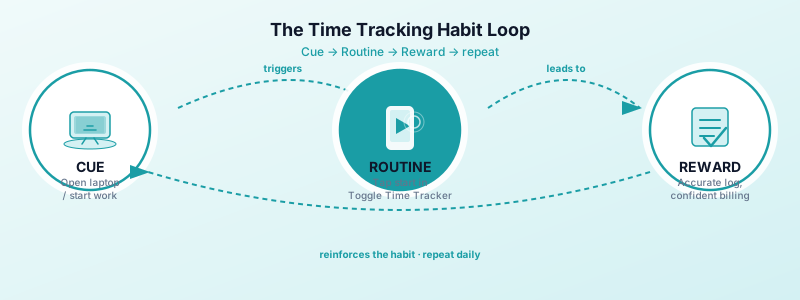
Every habit follows the same structure: cue, routine, reward. Building a strong time tracking routine means engineering all three deliberately.
Cue: The trigger that prompts the behaviour. For time tracking, the natural cue is starting work — opening your laptop, sitting at your desk, or launching a project file. The goal is to link that existing action to opening Toggle Time Tracker.
Routine: The behaviour itself. In this case, it's a single tap on the Toggle Time Tracker home screen widget to start the timer. The routine needs to be almost effortless — anything that adds friction is a habit killer.
Reward: The feeling that reinforces the loop. For time tracking, the immediate reward is seeing an accurate running total that removes billing uncertainty. Over time, the reward expands: you know exactly what you've worked, client invoices become straightforward, and you stop second-guessing your rates.
Start small: track just one project first
One of the most common time tracking mistakes freelancers make is trying to track everything at once. You download an app, commit to logging every minute, and by day three the system has collapsed under its own weight.
A better approach: pick one project and track only that for the first week.
Choose your most active project — ideally one you work on daily. Every time you start that work, open Toggle Time Tracker and tap start. Every time you stop, tap stop. Nothing else. Just one project.
This builds the muscle without overwhelming you. After a week, you'll have proved to yourself that you can do it. That evidence of success is what makes it possible to expand to more projects.
Design your environment for consistency
Your environment shapes your behaviour more than your willpower does. If Toggle Time Tracker isn't immediately visible, you'll forget it exists. Fix that before anything else.
Add the widget to your home screen. Toggle Time Tracker includes a home screen widget that lets you start and stop the timer without even opening the app. One tap from your lock screen is the goal. If the friction is low enough, the habit happens automatically.
Keep your phone on your desk. Not face-down in a drawer. When your phone is visible, the widget is visible. When the widget is visible, you remember to start the timer.
Pair it with an existing trigger. If you always make coffee before you start work, make starting the timer part of that ritual. Phone comes out, coffee goes on, timer starts. Habit stacking — attaching a new behaviour to an established one — is one of the most reliable habit-building techniques.
Make it frictionless
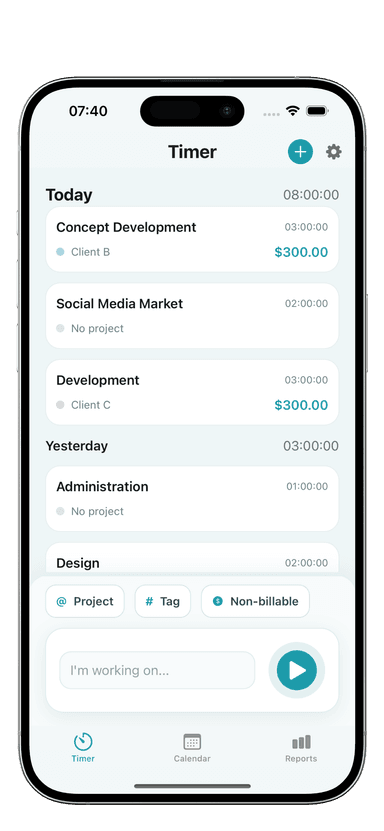
Toggle Time Tracker is built for exactly this. There's no account to log into, no desktop sync required, and the app works offline. You open it, tap start, and it's running. That's the entire process.
No account needed means no password barriers when you're trying to start a timer in a hurry. Offline support means it works whether you're at a client's office, in a coffee shop, or on a plane. The one-tap timer via the home screen widget means you don't even have to navigate the app.
Remove every possible reason to skip. The easier it is to track, the more often you will.
What to do when you forget to start the timer
You will forget sometimes. That's fine. What matters is how you recover.
When you realise mid-session that the timer isn't running, start it immediately. Don't try to recreate the exact start time from memory — just start it now and note in the entry that the session started earlier. Toggle Time Tracker lets you edit time entries, so you can adjust the start time after the fact when you do remember.
If you only notice at the end of the day, log the session manually with your best estimate. An approximate entry is better than no entry. Tracking your billable hours accurately doesn't require perfection — it requires consistency.
Don't turn a missed session into a reason to give up. The habit research is clear: missing once has no meaningful impact on long-term habit formation. Missing twice in a row starts to erode the pattern. Recover fast, and move on.
Build the review habit alongside the tracking habit
Tracking data is only useful if you look at it. Build a short weekly review into your routine — ten minutes on Friday afternoon works well for most freelancers.
Each week, open Toggle Time Tracker and look at your totals. Ask three questions: Did I track everything? Which projects took more time than expected? Am I on pace for my income targets?
This review does two things. It catches any missed entries before they're forgotten entirely. And it makes the reward side of the habit loop tangible — you see the full picture of your week and can bill with confidence.
The 30-day ramp
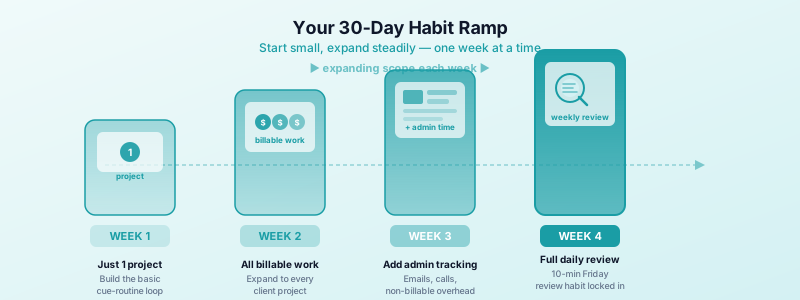
Here's a practical timeline for building the full habit:
Week 1 — Track just one project. Build the basic cue-routine-reward loop. Focus only on starting and stopping the timer for your primary project.
Week 2 — Expand to all billable work. Once the one-project habit is solid, extend it to everything you bill for. Same process, broader scope.
Week 3 — Add admin and overhead tracking. Start tracking non-billable time too — client communications, admin work, business development. This is where your data becomes genuinely useful for understanding where your time actually goes.
Week 4 — Add the weekly review. The final piece. Set a recurring calendar block for Friday afternoon and use it to review the week's entries in Toggle Time Tracker.
By the end of four weeks, you won't be thinking about time tracking as something you have to do. It will just be part of how you work.
The compounding value of a consistent habit
The real payoff from consistent time tracking isn't any single invoice — it's the data you accumulate over months. You'll know which types of projects are genuinely profitable. You'll know when your most productive hours are. You'll have the evidence you need to raise your rates or push back on scope creep with confidence.
Toggle Time Tracker is designed to stay out of your way while capturing all of that. No account, no friction, works offline, one tap from your home screen. The system only works if you actually use it — and now you have a plan to make that happen.
Download Toggle Time Tracker on the App Store and start with one project today.