How to Batch Tasks as a Freelancer (And Why It Changes Everything)
Every time you switch from writing a proposal to answering an email to logging an invoice to jumping on a client call, you pay a tax. It's not money — it's time and mental energy. Researchers call it the context switching cost, and for freelancers who juggle a dozen different task types in a single day, it silently drains hours every week.
Task batching is the fix. It's one of the simplest productivity shifts you can make, and its effects show up almost immediately.
What task batching actually is
Task batching means grouping similar tasks together and doing them all at once in a dedicated block of time, rather than spreading them randomly across your day.
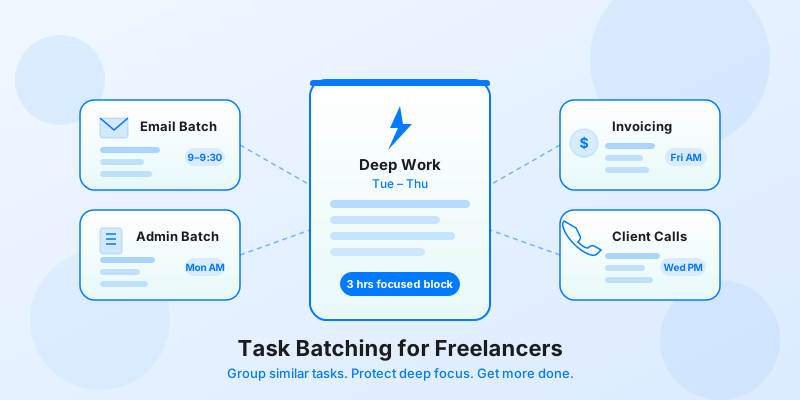
Instead of checking email at 9am, 11am, 2pm, and 4pm, you handle all your email in one 30-minute block after lunch. Instead of sending invoices whenever you remember, you do it every Friday morning. Instead of taking client calls whenever a slot appears, you cluster them on Tuesday and Thursday afternoons.
The science behind this is straightforward. Your brain requires roughly 20 minutes to reach full focus after switching to a new type of task. If you switch tasks six times a day, you could lose two hours just to re-entry costs — time you never see on a timesheet, but absolutely feel by Friday.
Batching keeps your brain in one mode longer, which means you get more done in each session and your output quality improves. It's the same principle behind deep work techniques for freelancers — protect sustained attention and you protect your results.
Which tasks should freelancers batch
Not everything batches well, but most of the recurring admin and communication work in a freelance business does.
Email and messages. This is the highest-impact batch for most freelancers. Set two fixed windows per day — one in the morning, one in the afternoon — and only process messages during those windows. Outside those windows, close your inbox.
Invoicing and financial admin. Sending invoices, reviewing expenses, logging billable hours, and reconciling payments all belong in the same mental mode. Batch these into one weekly session, ideally on a consistent day like Friday morning.
Client calls and check-ins. Context switching between deep work and conversation is particularly costly. Batch your calls to two or three days per week and protect the other days for focused output. Your clients will adapt faster than you expect.
Content creation and writing. Proposals, project updates, blog posts, case studies — anything that requires sustained writing attention should be batched. Block two or three hours and stay in writing mode the entire time.
Social media and marketing. If you maintain a professional presence on LinkedIn or elsewhere, batch your content scheduling into one weekly session rather than dipping in and out daily.

How to build a batching system week by week
Setting up a batching routine takes a few weeks to stabilize. Here's a practical approach.
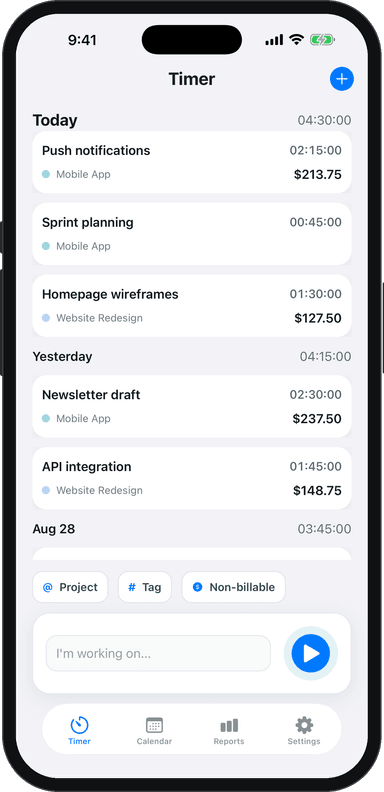
Week 1: Audit before you reorganize. Before you change anything, spend one week tracking exactly how you're spending your time. Use Toggle Time Tracker to log every task type as you switch between them. By the end of the week, you'll have a clear picture of how fragmented your days actually are — and which task types you're bouncing between most often.
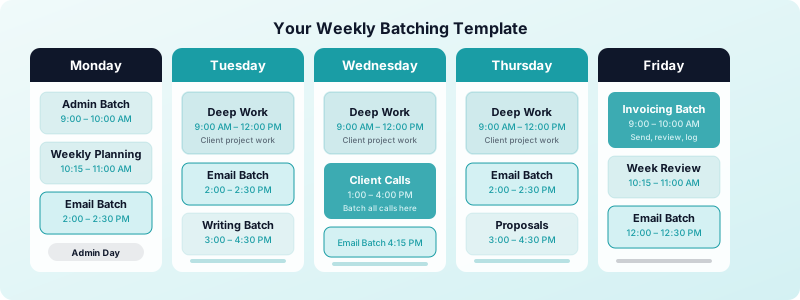
Week 2: Assign task types to time blocks. Take your task categories and assign each one a consistent time slot. A simple starting template: Monday morning for admin and planning, Tuesday through Thursday for focused client work, Wednesday afternoon for calls, Friday morning for invoicing and end-of-week review. Keep the blocks realistic — 60 to 90 minutes is usually enough for most batch categories.
Week 3: Protect the blocks and adjust. The first week of actual batching will feel uncomfortable. Resist the urge to check email outside your designated windows or squeeze in an invoice during deep work time. After a week, review what worked and what didn't. Adjust block length or timing as needed, but keep the structure.
Week 4 and beyond: Let time data guide you. This is where Toggle Time Tracker becomes genuinely useful. Log your batched sessions by task type and compare the time spent against your output. If your admin batch consistently runs over 90 minutes, that's useful data — either your admin load is too high, or you're letting scope creep in. The numbers tell you what to fix.
This approach pairs naturally with time blocking for freelancers, where you pre-schedule blocks on your calendar so that batching becomes a structural default rather than a daily decision.
Common batching mistakes
Batching tasks that shouldn't be batched. Creative tasks that require completely different thinking — a technical audit followed immediately by brand copywriting — don't always batch well just because they're both "client work." Group by cognitive mode, not just by category label.
Making batches too long. A four-hour email batch sounds productive but usually isn't. Attention degrades, and you end up spending the last hour at half-speed. Keep most batches under 90 minutes and take a proper break between them.
Forgetting to communicate the system. If clients expect same-day responses and you've switched to twice-daily email, they'll notice. A simple note in your email signature or a quick mention in your next check-in — "I batch my emails to mornings and afternoons for focus time" — sets expectations and usually earns respect.
Treating every urgent item as an exception. Once you start making exceptions, the batch system unravels. Most "urgent" emails can wait four hours. Identify true emergencies in advance (a live site is down, a contract needs signing today) and let everything else wait for the next batch window.
How time tracking reveals your batching gaps
The best argument for better batching is your own data. When you track time by task type in Toggle Time Tracker, patterns emerge that are impossible to see otherwise.
If you're logging short, fragmented sessions — eight minutes on invoicing, twelve minutes on email, six minutes on a proposal — that's a direct signal that you're context switching constantly. Each of those short sessions carries a re-entry cost that doesn't show up in the log but absolutely affects your output.
Look for task types where your sessions are consistently short and scattered. Those are your highest-leverage batching opportunities. Consolidate them, log the new batched sessions for two weeks, and compare the total time spent. In most cases, batching the same workload takes 20-30% less time than handling it reactively.
Good freelance time management isn't about working harder or longer — it's about reducing the invisible overhead that eats your hours before you've even started your real work. Task batching removes the biggest source of that overhead.
Start with one batch
You don't need to overhaul your entire schedule to get the benefit. Pick the task you context-switch on most — for most freelancers, that's email — and commit to batching it for two weeks. Set two fixed windows, close your inbox outside those windows, and track your time.
By the end of two weeks, you'll have real data showing the difference. That's usually enough to make batching a permanent part of how you work.