Freelance Home Office Setup: 7 Tips That Boost Focus
Your freelance home office setup has a bigger impact on your output than most people realize. A well-designed workspace reduces mental friction, cuts distractions, and makes it easier to switch into work mode — and out of it — at the right times.
Here are seven practical tips to build a home office that works as hard as you do.
1. Claim a Dedicated Space (Even a Small One)
The single biggest upgrade you can make is separating your work area from your living space. You don't need a spare room. A corner desk with a visual divider — a bookshelf, a curtain, a rug — is enough.
The goal is physical and psychological separation. When you sit at that specific spot, your brain learns that it's work time. When you leave it, you're off the clock.
This boundary also matters for the IRS home office deduction. If you claim one, the space must be used exclusively for work. A dedicated setup makes that easy to prove. For details on what qualifies, see the complete guide to freelance tax deductions.
2. Get Your Ergonomics Right
You spend 6-8 hours a day in this chair. A $40 Amazon chair will cost you in back pain and lost focus within months.
The essentials:
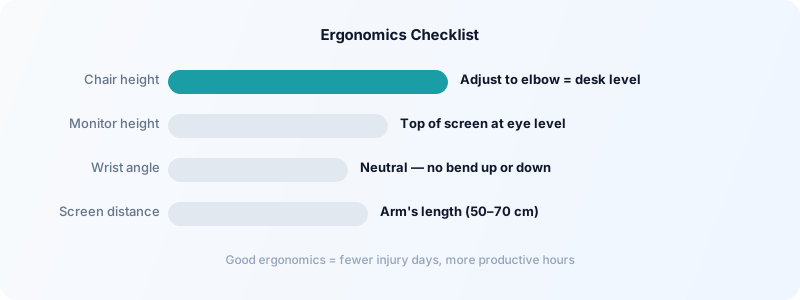
- Chair: Adjustable seat height, lumbar support, armrests at elbow height. You don't need a $1,000 Herman Miller — a mid-range option around $200-350 works well.
- Monitor height: Top of screen at or just below eye level. Stack books under your monitor if needed before buying a stand.
- Keyboard and mouse: Wrists neutral, elbows at 90°. A separate keyboard for laptop users makes a meaningful difference.
Neck strain and wrist issues are productivity killers. Getting ergonomics right once is far cheaper than treating repetitive strain injuries later.
3. Control Your Lighting
Poor lighting causes eye fatigue faster than almost anything else. Two things to get right:
Natural light: Position your desk so windows are to the side of your monitor, not behind or in front. Glare behind the screen forces your eyes to constantly adjust.
Artificial light: A warm desk lamp pointed at your workspace (not at your screen) reduces harsh contrast during evening work. Avoid working in a room lit only by your monitor — the bright screen against a dark room strains your eyes.
Color temperature matters too. Cooler light (5000-6500K) promotes alertness during the day. If you work evenings, switch to warmer tones (2700-3000K) to avoid disrupting sleep.
4. Build a Distraction-Free Sound Environment
Noise is one of the biggest productivity threats for freelancers working from home. Your solution depends on your environment:
- Background noise: Noise-canceling headphones are one of the highest-ROI purchases for remote workers. They signal to others that you're in focus mode and block ambient noise.
- Music: Instrumental music or ambient sound (rain, coffee shop noise) helps many people maintain focus. Lyrics compete with the language-processing parts of your brain.
- Silences: Some freelancers do their best deep work in complete silence. A white noise machine can smooth out unpredictable household sounds.
For a deeper look at managing interruptions, see how to manage digital distractions as a freelancer.
5. Keep Cables and Clutter Under Control
A cluttered desk is a cluttered mind — that's not just a cliché. Visual clutter competes for your attention and creates low-level mental noise.
A few high-impact fixes:
- Cable ties or clips: Run cables along desk edges and behind monitors. Ten minutes of organizing saves you the constant low-grade annoyance.
- Clear desk policy: At the end of each workday, clear the physical desk surface. This pairs well with a shutdown ritual that signals the end of the workday.
- One-in-one-out rule: For every new item added to your desk, remove one. Most desks accumulate clutter by default.
Keep only the tools you use daily in arm's reach. Everything else goes in a drawer or off the desk entirely.
6. Use a Time Tracker to Anchor Your Workday
A home office makes it easy to blur the lines between work hours and personal time. Tracking your time creates structure and accountability that an office environment provides by default.
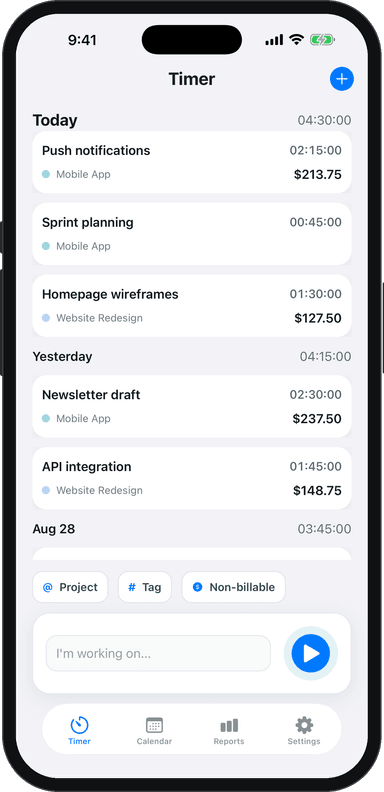
When you start a task, start a timer. When you stop, stop it. Toggle Time Tracker makes this frictionless — one tap starts a timer, and you can tag it to a project or client instantly.
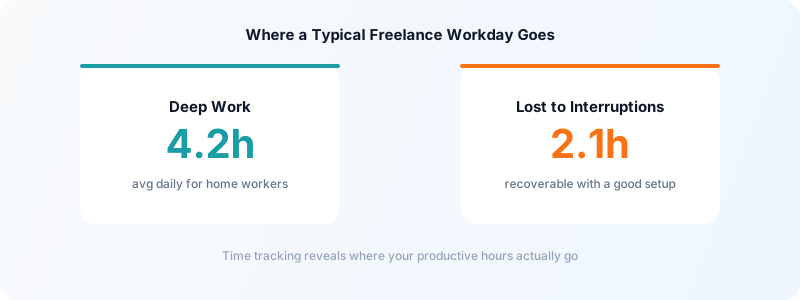
At the end of the week, review your time log. You'll quickly see which hours were deep-focused work versus shallow tasks, and where you're consistently losing time. This data makes it easier to build a productive daily routine and protect your most valuable hours.
7. Invest in Reliable Tech Infrastructure
Nothing kills a productive morning like a slow internet connection or a computer that lags during a client call.
Minimum tech standards for freelancers:
- Internet: At least 50 Mbps download, 10 Mbps upload. Test your actual speed at fast.com — ISP-advertised speeds often don't reflect real-world performance.
- Backup power: An uninterruptible power supply (UPS) protects you from sudden outages during client calls or deadline work. A basic model costs under $60.
- Cloud backup: Your client work lives on your machine. Automatic cloud backup (Backblaze, iCloud, Google Drive) takes 10 minutes to set up and costs less than $10/month.
Also: keep your home office on a separate Wi-Fi network from streaming devices if your household has multiple users. Bandwidth contention from a 4K streaming session can tank your video call quality mid-meeting.
The Setup That Pays Off
A good freelance home office setup doesn't require a big budget or a large space. It requires intentionality: a clear work zone, ergonomics that don't hurt you, light and sound you can control, and systems that keep you anchored to your actual work hours.
Start with the change that will have the biggest immediate impact for you — often that's the chair, the dedicated workspace, or starting to track your time. Each improvement compounds.
Download Toggle Time Tracker and start tracking exactly how your home office hours break down — so you can protect the ones that matter most.