Freelance Time Tracking: The Complete Guide
If you're a freelancer, freelance time tracking is the single habit that separates profitable businesses from ones that constantly feel like they're falling behind. You work hard — but if you're not tracking accurately, you're almost certainly leaving money on the table.
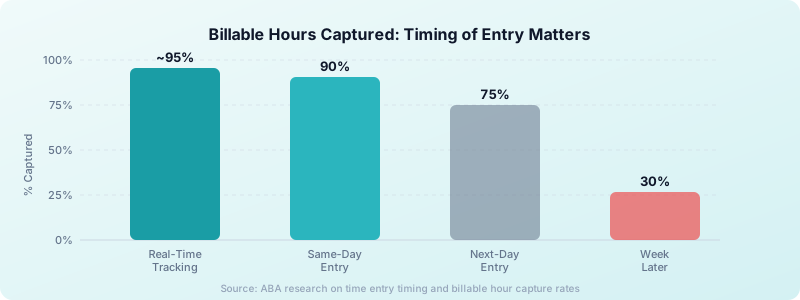
Research shows that 38% of freelancers struggle to accurately track billable time, and same-day time entries capture only 90% of hours worked — entries made after 24 hours drop to just 75%. That gap adds up fast.
This guide covers everything you need to build a reliable freelance time tracking system: what to track, how to track it, and how to use that data to earn more.
Why Freelance Time Tracking Is Non-Negotiable
Most freelancers underestimate how much time their work actually takes. A 20-minute client call here, 45 minutes of revision there — these fragments are nearly impossible to reconstruct at month-end.
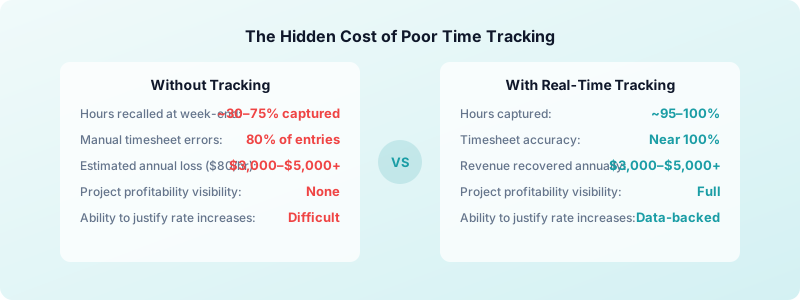
The financial cost is real. If you charge $80/hour and your poor tracking causes even a 3% underbilling rate on 25 billable hours per week, you lose over $3,100 per year — quietly, without noticing. Across a career, that's tens of thousands of dollars.
Time tracking also tells you which projects are genuinely profitable. Two clients at the same rate can look identical on paper, but one might take twice as long per dollar earned. Without data, you can't see it.
If you're newer to this habit, the why every freelancer needs time tracking post covers the foundational case in depth.
What to Track (And What Counts as Billable)
The first step in any freelance time tracking system is deciding what counts. Most freelancers track too little — or too much of the wrong things.
Billable time includes:
- Direct client work (writing, designing, coding, consulting)
- Client calls and meetings
- Revisions and feedback rounds
- Research that's specific to the client's project
- Project setup and file management for the client
Non-billable time includes:
- Prospecting and sales calls
- Invoicing and admin
- General skill-building and training
- Internal marketing and networking
The key is consistency. Pick your categories and stick with them. For a deeper breakdown of where the line sits, read the billable vs non-billable hours guide.
How to Track: Real-Time vs End-of-Day Logging
There are two main approaches to freelance time tracking: real-time (start/stop timers as you work) and retrospective (logging hours at the end of the day or week).
Real-time tracking wins on accuracy. The research is clear: same-day entries capture 90% of billable hours, but entries made after 24 hours drop to 75%. After a week, you recover as little as 30%. Real-time is the closest you get to 100%.
Retrospective logging works for freelancers who find constant timer-starting disruptive. If this is your approach, log within the same hour where possible — your memory fades faster than you think.
Practical real-time tracking tips:
- Start your timer before you open a single tab related to the project
- Keep your tracking app always visible — minimize the friction to log
- If you forget to start the timer, add a note with your best estimate and flag it
- Round to the nearest 6 minutes (0.1 hour) for clean invoice line items
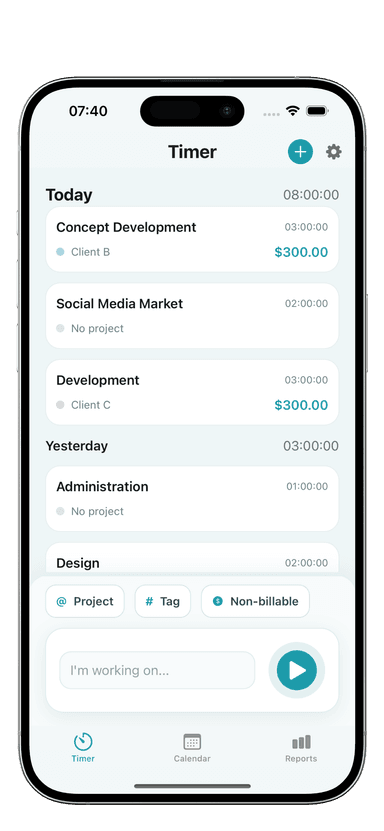
Toggle Time Tracker makes real-time tracking frictionless with a one-tap timer and project organization built for freelancers. No account required, no syncing overhead.
Organizing Time Entries by Project and Client
Raw hours are useful. Organized hours are powerful. Every time entry should have at minimum:
- Client name — Who gets billed
- Project or task — What was done
- Description — Enough detail to justify the line item on an invoice
When your entries are organized this way, generating an invoice is a matter of filtering by client and summing the hours — not reconstructing your week from memory.
Most freelancers make the mistake of using a single bucket for all work. You lose the ability to see which client is taking up the most time, which tasks are consistently underestimated, and whether a project is running over scope.
Separate entries also protect you in disputes. If a client questions an invoice, you can show exactly what was tracked, when, and for how long.
A practical way to structure your entries: use a consistent naming format across every project. Something like "ClientName / ProjectName / TaskType" makes filtering fast and reporting clean. When you're billing 5 clients simultaneously, this structure prevents the "which project was that?" confusion that leads to undercharging.
Think of your time log as the raw material for both invoicing and future pricing. The more structured and descriptive your entries, the more useful that data becomes over time.
Reviewing Your Time Data: The Weekly Check-In
Tracking time is only half the system. The other half is reviewing what you've tracked. A 10-minute weekly review reveals patterns that change how you price and plan.
Ask these questions each week:
- Which project took longer than expected — and why?
- What percentage of my time was billable vs non-billable?
- Did I hit my weekly billable hour target?
- Are there tasks I'm consistently underestimating?
Freelancers who do this regularly find that they naturally start estimating future projects more accurately. Your time data becomes a personal database. After 3 months of consistent tracking, you'll know almost exactly how long your typical project types take — which makes pricing far less guesswork. For more on this, see how to track billable hours as a freelancer.
The weekly review also catches scope creep before it becomes a crisis. If a project is already at 80% of its estimated hours and you're only halfway through the work, you need to know now — not at invoice time. Catching it early lets you have a conversation with the client while there's still time to adjust scope or rate.
Set a recurring 10-minute slot every Friday afternoon (or whenever your week wraps). Treat it as non-negotiable. The freelancers who skip this are the ones surprised by how little they earned each month despite working hard.
Using Time Data to Price More Confidently
The most valuable use of freelance time tracking is pricing. Most freelancers set rates based on what they think sounds reasonable — not on actual data. If you haven't built your rate formula yet, the freelance pricing guide walks through the full calculation.
Here's what your time logs tell you:
- Your real hourly rate — Divide your monthly income by total hours worked (including non-billable). Most freelancers are shocked by how low this is.
- Project profitability — Which clients and project types earn you the most per hour actually worked.
- Where scope creep is happening — Projects that run consistently longer than quoted reveal a pricing or boundary problem.
When you walk into a rate negotiation with 3 months of tracked data, you're negotiating from facts. "I tracked 47 hours on your last project, scoped at 30. Here's what I'll need to charge going forward" is a very different conversation than a vague feeling you're undercharging.
Download Toggle Time Tracker and start building the data foundation your freelance business needs to grow.
Building the Tracking Habit
The biggest barrier to freelance time tracking isn't the tool — it's the habit. Most freelancers start strong and fade within two weeks.
Three habits that stick:
- Anchor tracking to your existing routine. Open your timer when you open your laptop. Treat it as part of starting work, not an extra step.
- Do a 5-minute daily review. Before you close your laptop, confirm today's entries are complete and described. Don't leave it to memory.
- Track even on days you don't bill. Non-billable admin time is data too. Seeing how much time business overhead takes is often a catalyst for raising rates.
The freelancers who track consistently aren't more disciplined — they've just removed the friction. One app, one tap, one project. Keep it that way.
A common trap: using too many tools. Some freelancers use one app for some clients, a spreadsheet for others, and mental notes for the rest. The result is incomplete data across the board. Pick one tool — ideally one that works offline so you're not blocked when your connection drops — and use it for everything.
Toggle Time Tracker works entirely offline and stores data locally on your iPhone. There's no account to create, no subscription to manage, and no data leaving your device. That simplicity is exactly what makes the habit stick.
The Bottom Line on Freelance Time Tracking
Freelance time tracking isn't about being watched or proving your worth. It's about having accurate data to run a more profitable business.
Start simple: pick one tool, track real-time where you can, review weekly. Within a month, you'll have data that tells you exactly which clients, projects, and task types are worth your time — and which ones to price higher or walk away from.
Download Toggle Time Tracker — free to start, no account required, data stays on your device.