Best Time Tracking App for Freelancers in 2026
Finding the best time tracking app for freelancers isn't just about picking software — it's about choosing a tool you'll actually use every single day. The wrong app creates friction that slowly kills your tracking habit. The right one disappears into your workflow and quietly makes you more money by ensuring you capture every billable minute.
This guide breaks down exactly what to look for, what to avoid, and how to get the most from your time tracker once you've chosen one.
What Makes a Great Time Tracking App for Freelancers
Most time tracking apps are built for teams — managers tracking employees, not freelancers billing clients. That distinction matters more than most reviews acknowledge.
A team-focused tool is optimized for accountability and payroll. A freelancer tool is optimized for speed, accuracy, and client billing. Those are very different design priorities.
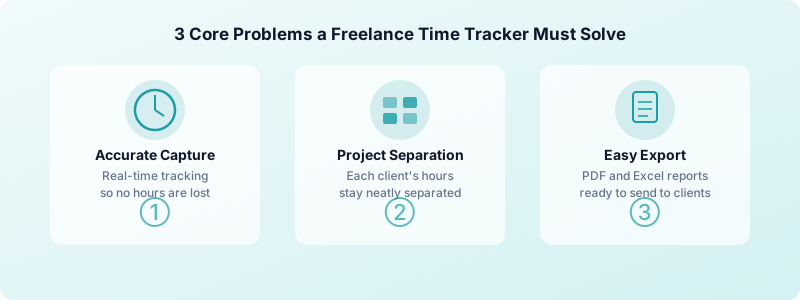
A great freelancer time tracking app needs to solve three specific problems:
- Accurate billable hour capture — if you forget to start or stop a timer, you lose money with no way to recover it
- Project and client separation — one client should never see time from another, and your admin hours shouldn't show up in billable reports
- Easy export for invoicing — your tracked hours should turn into client-ready reports without manual reformatting every billing cycle
Apps that nail all three make invoicing faster and disputes nearly impossible. Apps that miss even one create weekly headaches that compound over time.
Key Features to Look For in a Freelance Time Tracking App
Not all features matter equally. Here's what's worth paying attention to — and what's mostly marketing noise.
One-tap timer start. Every extra step between "start work" and "start timer" costs you tracked minutes. Look for an app where starting a timer takes a single tap from the home screen. No login, no project selection required, no loading screens. If it takes more than five seconds from opening the app to running a timer, it's too slow for daily use.
Project and tag organization. You need to cleanly separate client A from client B and billable work from admin tasks. Good apps let you label entries by project, client, and tags so your reports are clean and accurate when it's time to invoice. You should be able to switch between projects without rebuilding your context.
Billable vs non-billable marking. Not all your time is billable. Emails, admin work, invoicing itself, and professional development time shouldn't appear on client invoices. Learn more about separating billable from non-billable time — it's one of the most important habits you'll build as a freelancer, and it directly affects how you price your services.
PDF and Excel report export. When it's time to invoice, you need to share time logs with clients. Apps that export clean, professional reports save you from manually reformatting spreadsheets every billing cycle. Look for report formats that include project names, task descriptions, and duration breakdowns.
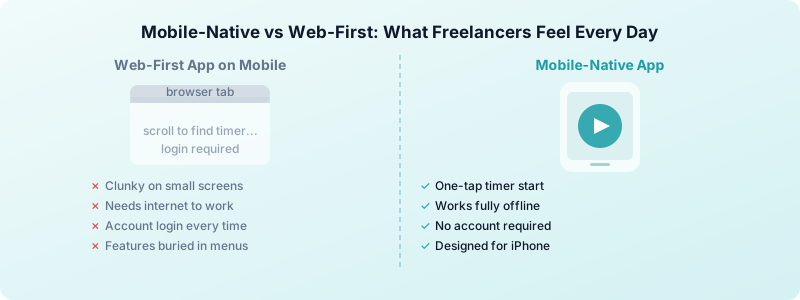
Offline functionality. If your app needs an internet connection to track time, you're vulnerable every time you work in a cafe, on a train, or in areas with spotty signal. Your tracker should work fully offline and sync when you reconnect — not queue up errors.
No account required to get started. The fewer barriers to starting, the better. Apps that require account creation before you can track your first minute introduce friction right when you're trying to build a habit. Some of the best apps store all data locally on your device, which also protects your client confidentiality.
Manual time entry. You will forget to start a timer sometimes. A good app lets you add past time entries quickly, with accurate start and end times. Without this, you'll end up guessing at the end of the day — which defeats the purpose.
Why iPhone-First Freelancers Need a Mobile-Native App
Many popular time trackers are web-first tools that added mobile apps as an afterthought. You can usually tell — the mobile experience feels cramped, important features are buried three taps deep, and the app wants you to work around its limitations rather than adapting to how you actually work.
If you work primarily from your iPhone, a mobile-native app changes everything. Start a timer the moment you open a file. Stop it when you close your laptop. Log a quick note about what you worked on right from your phone. No browser tab to keep open, no desktop app required.
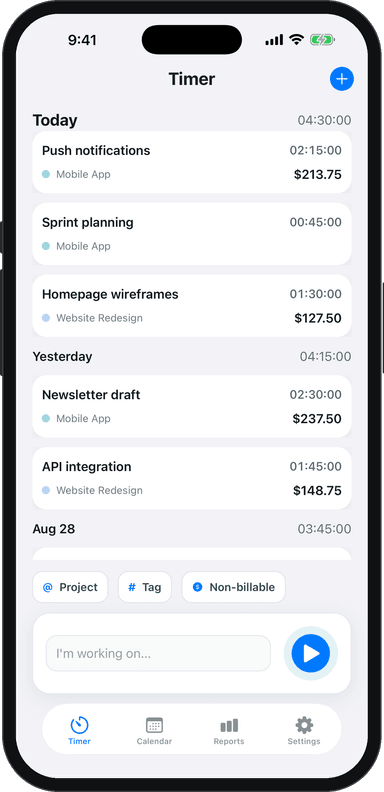
Toggle Time Tracker is built specifically for iPhone. The entire experience — from starting a timer to exporting a professional report — is designed for how freelancers actually work on mobile. No account setup, no data sent to servers, and it works completely offline. Your time data stays on your device.
If you're just getting started with time tracking, our guide to tracking billable hours as a freelancer walks through the full workflow from your first timer to your first client invoice.
How to Evaluate a Time Tracker Before You Commit
Before you spend a week importing all your projects into a new app, run it through this quick checklist. An app that passes all five steps in under 10 minutes is worth keeping.
- Start a timer in under 5 seconds. Open the app from scratch, start timing. If it asks for a project selection first, requires setup, or takes multiple taps, that's a friction point you'll hit every single day for years.
- Create two projects and switch between them. How long does it take? Is the interface intuitive or do you need to hunt through menus? You should be able to switch projects in under three seconds.
- Add a manual entry for an hour yesterday. You'll forget to start a timer sometimes. Can you add past time easily with a specific start and end time? Can you edit an entry you already saved without losing other data?
- Export a report for the past week. Generate a report. Does it look like something you could send directly to a client? Is it available in PDF or Excel format? Does it show project names and individual entries clearly?
- Test offline tracking. Turn on airplane mode and try to track time. Does it still work? Does it save your entry when you reconnect?
Apps that fail step one or two aren't worth spending more time on. The core experience should feel effortless.
Making Your Best Time Tracking App Work for Billing
Tracking time is only half the job. The other half is turning those hours into accurate, defensible invoices your clients trust.
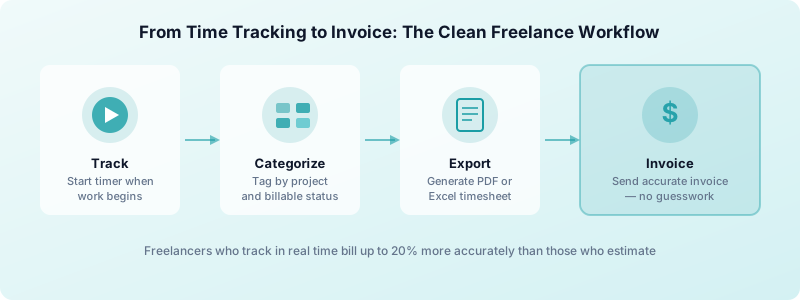
The cleanest freelance billing workflow looks like this: track every working session in real time, categorize each entry by project and billable/non-billable status as you go, then export a clean summary report at the end of each billing period. Your report becomes the direct basis for your invoice — no guesswork, no rounding, no client disputes.
Freelancers who track time this way bill an average of 15-20% more accurately than those who estimate hours at the end of the week. That gap adds up fast. On a $5,000/month workload, accurate tracking means potentially recovering $750-$1,000 in hours you were doing but not charging for — every single month.
The other benefit is trust. When a client questions an invoice line, you can pull up the exact time log, show when you started, what you worked on, and when you stopped. That level of transparency almost always ends the conversation in your favor.
To see where time tracking fits into the bigger picture of your freelance business, read our complete guide to freelance time tracking — it covers what to track, how to organize entries, and how to use time data to price your services confidently. For the foundational case, why every freelancer needs a time tracker covers the real cost of not tracking and how to build the habit from scratch.
The best time tracking app for freelancers is ultimately the one you actually use — not the one with the most features. Simple, fast, and reliable beats feature-heavy and complicated every time. Pick something that fits your real workflow, not your ideal workflow.
Download Toggle Time Tracker and start tracking your billable hours from your iPhone today — no account required, no data shared, just accurate time records that make billing easier.